

Professionals who rely on the best laptop for writers know that hardware decisions have real consequences for daily output. A keyboard that resists fatigue, a display that protects eyesight, and a battery that outlasts the workday are not optional comforts. They are professional requirements. Every recommendation here reflects a consistent editorial framework built on documented specifications, verified engineering characteristics, and well-established real-world behavior across this category.
Prose work demands a different evaluation lens than gaming or video production. Raw processing benchmarks matter far less than keyboard travel depth, thermal noise under sustained loads, and the ergonomic quality of the display. A machine that excels in speed but generates distracting fan noise during deep focus sessions is a poor writing companion, regardless of its specification sheet.
Editorial judgment at this level also accounts for workflow diversity. A journalist filing from airports needs different priorities than a novelist working in a quiet home office. Portability weight, port selection, form factor, and operating system ecosystem each influence daily comfort in ways that raw performance figures cannot capture. The first recommendation addresses writers who need a machine that disappears into the background and lets language take center stage.
Table of Contents
1. Apple MacBook Air 13-inch M3 – Best Fanless Laptop for Distraction-Free Writing

- BUILT FOR COLLEGE. AND BEYOND — MacBook Air with the M5 chip packs blazing speed and powerful AI capabilities into an in…
- TEAR THROUGH TOUGH ASSIGNMENTS — With its faster CPU and unified memory, the M5 chip delivers even more performance and …
- MAKE QUICK WORK OF YOUR TO-DO LIST — Apple Intelligence helps you write, express yourself, and get things done effortles…
Quiet confidence is perhaps the defining characteristic of the MacBook Air 13-inch M3 for anyone who earns a living through words. It runs completely fanless, meaning there is no audible noise interrupting a focused writing session. That silent operation, combined with genuinely all-day battery endurance, makes it a natural companion for novelists, journalists, and content creators who move between locations frequently.
The keyboard deserves particular attention here. Apple’s scissor-switch mechanism delivers a responsive, comfortable typing experience that sustains long manuscript sessions without fatigue. Key travel is satisfying without feeling mushy. The layout is clean and logically arranged. Writers who spend hours composing drafts will immediately appreciate how effortlessly keystrokes translate into rhythm on the page.
Display quality meaningfully elevates the daily writing environment. The Liquid Retina panel renders text with exceptional sharpness, reducing eye strain during extended sessions. Color rendering remains accurate enough to support light photo editing or social media work alongside writing tasks. The 13-inch form factor keeps the footprint compact without sacrificing enough screen real estate to comfortably work across split windows.
The M3 chip architecture delivers performance that genuinely exceeds what most writing workflows demand. Application launches feel instantaneous. Switching between a browser with research tabs, a writing application, and a notes tool happens without hesitation. Thermal management under these everyday loads is exemplary, with the chassis remaining cool throughout normal use.
Writers who occasionally require an external display will appreciate Thunderbolt 4 connectivity, though the two-port limitation requires a hub for users juggling peripherals. The webcam produces noticeably cleaner video than many competitors, which matters for remote interviews and virtual meetings. Those needing a larger canvas or more physical ports may find the 15-inch variant or a MacBook Pro a more complete solution. For the focused writer prioritizing portability and distraction-free endurance, however, this configuration rarely disappoints.
What We Loved
✅ Fanless design ensures completely silent operation during writing sessions
✅ Exceptional battery life supports full working days without charging
✅ Responsive scissor-switch keyboard reduces fatigue during extended drafting
✅ Sharp Liquid Retina display renders text with outstanding clarity
✅ M3 chip handles multitasking across writing and research tools effortlessly
✅ Compact, lightweight chassis ideal for writers who work on the move
What We Liked Less
❌ Only two USB-C ports requires a hub for users with multiple peripherals
❌ 13-inch screen may feel limiting for writers who prefer a larger workspace
2. Lenovo ThinkPad X1 Yoga Gen 9 – Best Convertible with OLED Display for Professional Writers

- With 16 GB of memory, runs as many programs as you want without losing the execution
- The 14″ 1920 x 1200 screen provides a great movie watching experience
- 512 GB SSD is enough to store your essential documents and files, favorite songs, movies and pictures
Few convertible ultrabooks earn the loyalty of professional writers as consistently as the ThinkPad X1 Yoga line. The ninth generation refines that reputation further. Its keyboard remains among the most rewarding typing experiences available in any thin-and-light chassis today. Key travel feels deliberate, feedback is precise, and the layout never forces awkward hand repositioning during extended drafting sessions.
The 14-inch OLED panel deserves genuine attention from anyone who spends hours reading and revising text. Contrast is exceptional, and the display handles both bright office environments and dim evening workspaces with equal composure. Writers who annotate drafts directly on-screen will appreciate the integrated stylus, which slots neatly into the chassis without requiring a separate carrying case.
Underneath its carbon fiber shell, Intel’s Core Ultra processor architecture delivers responsiveness that keeps pace with demanding multitasking workflows. Switching between a manuscript, a browser with dozens of research tabs, and a citation manager feels genuinely fluid. Thermals remain composed during sustained workloads, meaning fan intrusion rarely disrupts concentration during focused writing sessions at home or in quiet spaces.
Battery endurance is a practical strength for writers who move between locations throughout the day. The X1 Yoga Gen 9 handles full workday demands without requiring a midday charge. Its MIL-SPEC durability certification adds reassurance for frequent travelers who carry this machine through airports, coffee shops, and conference rooms without treating it gingerly.
The ideal buyer here is a professional writer, editor, or journalist who values typing comfort and display quality above raw processing power. Those needing discrete graphics for video or creative production work should look elsewhere. For prose-focused workflows where keyboard feel, build integrity, and all-day endurance define the experience, this convertible remains one of the most purposefully engineered choices available.
What We Loved
✅ Exceptional keyboard with deep travel and precise tactile feedback
✅ High-contrast OLED display ideal for extended reading and revision
✅ Integrated stylus for on-screen annotation without extra accessories
✅ All-day battery endurance suits mobile and location-flexible workflows
✅ Carbon fiber chassis with military-grade durability certification
✅ Composed thermal management keeps fan noise unobtrusive during focused work
What We Liked Less
❌ No discrete GPU limits appeal for writers who also handle video or heavy creative production
❌ Premium pricing places it above more budget-conscious alternatives in the same category
3. Dell XPS 13 9340 – Best Ultraportable for Focused Prose and Keystroke Quality

- [ Latest And Greatest ] Released in 2024 The XPS 9340 Laptop is DELL’s latest release in the 13″ XPS family. It includes…
- [ Display & Graphics ] This XPS 9340 Laptop comes with a 13.4″ Non-Touch Screen with (1920×1200) resolution for stunning…
- [ High Speed RAM And Enormous Space ] The 32GB DDR4 RAM Running @ 3200MHz will let you smoothly run multiple application…
Compact machines rarely earn the kind of loyalty the XPS 13 9340 commands among wordsmiths who spend hours at a keyboard daily. Dell’s latest iteration strips away excess bulk without compromising the core experience that matters most to prose-focused professionals. The result is a notebook that feels intentional rather than compromised, prioritizing comfort and clarity over specification theater.
At the center of that experience sits a keyboard that deserves genuine recognition. Key travel is measured and consistent, with enough tactile feedback to support extended drafting sessions without fatigue creeping into your fingertips. The layout avoids the cramped shortcuts that plague many ultraportable designs. Writers who regularly produce thousands of words per sitting will notice the difference immediately.
The 13.4-inch display reinforces the machine’s authorial credentials. IPS-level panel clarity renders text with sharp, comfortable contrast across long reading sessions. Whether you are editing a manuscript in a dimly lit cabin or reviewing copy under harsh office fluorescents, the screen adapts without demanding constant brightness adjustments. That kind of understated consistency genuinely reduces eye strain over a full workday.
Dell’s Meteor Lake architecture underpins the 9340’s responsiveness during everyday writing workflows. Research tabs, cloud document sync, and reference material open without hesitation. Thermal management remains unobtrusive under typical writing loads, keeping fan noise minimal during distraction-sensitive creative sessions. Battery endurance comfortably covers a full working day, reducing dependence on outlets during travel or café work.
The ideal buyer here is a writer who values a refined, carry-anywhere machine over raw processing muscle. Port selection is limited, which matters to anyone relying on peripherals or external displays without a hub. Buyers needing a larger canvas for multi-window research may find the 13-inch form factor genuinely constraining. For disciplined, focused writing work, however, few ultrabooks match the 9340’s balance of portability and keystroke quality.
What We Loved
✅ Comfortable, well-traveled keyboard suited to long writing sessions
✅ Sharp, low-fatigue display with strong text clarity
✅ Whisper-quiet thermals during typical prose and editing workflows
✅ Full-day battery endurance supports untethered work
✅ Premium, carry-anywhere build quality without excessive weight
✅ Responsive everyday performance for research-heavy writing tasks
What We Liked Less
❌ Limited port selection requires a hub for peripheral-dependent setups
❌ 13-inch screen constrains multi-window workflows for research-intensive writers
4. LG Gram 14 2024 – Best Lightweight Laptop for Travel-Focused Writers
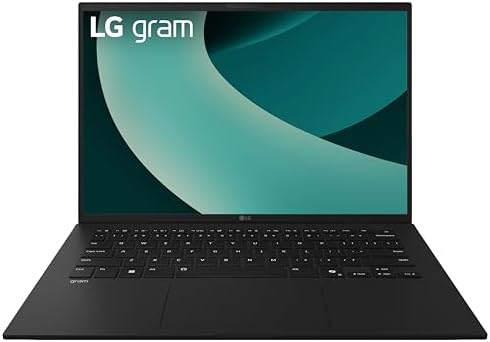
- AI Performance Anywhere – LG gram delivers powerhouse AI performance in an ultra-thin, ultra-light design. Weighing just…
- Welcome to Copilot on Windows 11 Home – Windows 11 Home brings you closer to what you love. Pursue your passions and max…
- Hybrid AI: On-Device and Cloud Synergy – LG gram now includes a hybrid AI solution that blends on-device intelligence wi…
Few ultraportables make the case for lightweight writing tools quite as compellingly as the Gram 14. Tipping the scales at under 2.2 pounds, it defies expectations with a chassis built to MIL-STD-810H durability standards. That combination of featherlight portability and rugged certification genuinely reassures writers who carry their machine between coffee shops, offices, and travel destinations daily.
The keyboard deserves particular attention from anyone who types for hours at a stretch. LG tuned the key travel and actuation to suit extended prose sessions rather than quick data entry. The layout remains uncluttered, spacing feels deliberate, and fatigue rarely sets in during prolonged drafting. Reviewers who prioritize tactile typing comfort consistently single out this keyboard as one of the Gram line’s most enduring strengths.
The 14-inch IPS display strikes a practical balance between screen real estate and compact footprint. Anti-glare treatment reduces reflections in variable lighting environments, which matters considerably for writers working across different locations. The Intel Core Ultra processor handles multitasking between word processors, research tabs, and reference documents without hesitation, keeping workflows fluid throughout a full working day.
Battery endurance is where the Gram 14 quietly outperforms much of its competition. LG engineers prioritized runtime in the overall design, and the 72Wh cell regularly supports full workdays without requiring a power adapter. Writers who frequently work away from their desks will recognize this as a genuine advantage rather than a marginal specification improvement. Portability and endurance rarely coexist this effectively at this form factor.
The Gram 14 suits deadline-driven scribes, remote professionals, and frequent travelers who need a dependable writing companion that disappears into a bag. The narrow port selection may prompt some buyers to carry a hub. Heavier-duty creative tasks fall outside its wheelhouse. For writers who define productivity through sustained focus, clean ergonomics, and all-day battery life, this remains one of the most purposeful ultraportables available today.
What We Loved
✅ Exceptionally lightweight chassis under 2.2 pounds
✅ MIL-STD-810H durability certification for everyday confidence
✅ Comfortable keyboard tuned for extended typing sessions
✅ Anti-glare display well-suited for variable environments
✅ Outstanding battery endurance supporting full workdays
✅ Responsive processor handles research-heavy multitasking smoothly
What We Liked Less
❌ Limited port selection may require a USB-C hub
❌ Not designed for demanding creative or GPU-intensive workloads
5. ASUS ZenBook 14 OLED – Best OLED Ultrabook for Writers Prioritizing Display Quality
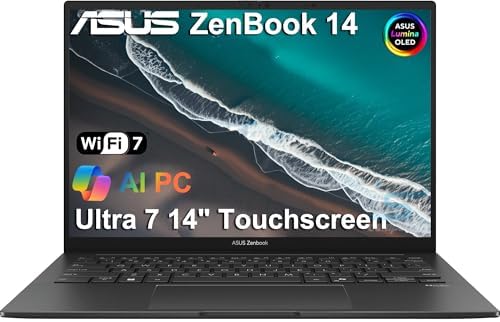
- DISCLOSURE — Brand New Computer has been resealed to upgrade Memory/SSD. 1 Year warranty by Issaquash Highlands Tech
- PREMIUM PORTABILITY – The ASUS Zenbook 14 OLED features a slim, lightweight build paired with a long-lasting battery to …
- POWERFUL PERFORMANCE – Equipped with the Intel Core Ultra 7 255H processor (16 cores), Configurable with storage options…
Word counts accumulate differently on a display like this. The ZenBook 14’s OLED panel renders text with a crispness and contrast that genuinely changes how long-form writing feels. Characters appear sharper against pure blacks, reducing the visual fatigue that plagues extended drafting sessions. For anyone who spends hours staring at a manuscript, that distinction matters more than raw processing speed.
The keyboard deserves serious attention from writers evaluating this category. Key travel feels deliberate and satisfying, with enough tactile feedback to support sustained typing without strain. The layout avoids the cramped compromises that undermine smaller ultrabooks. Coupled with a responsive touchpad, the input experience suits distraction-free drafting rather than constant mouse corrections or awkward hand repositioning.
Portability shapes how useful any writing tool actually becomes in daily routines. At roughly 1.39 kilograms, the ZenBook 14 slips into a bag without protest. The aluminum chassis feels composed rather than flimsy, projecting quiet confidence during travel. Battery endurance comfortably covers a full writing day on a single charge, which removes the anxiety of hunting for outlets in cafes or airports.
Under the hood, AMD Ryzen processors paired with ample memory handle the multitasking reality of modern writers. Research tabs, reference documents, cloud storage sync, and communication apps run simultaneously without sluggishness. The Ryzen architecture delivers responsive performance without generating disruptive fan noise, keeping the work environment calm during focused creative sessions where interruptions erode concentration.
Writers who prioritize display quality alongside portability will find a compelling case here. The trade-off worth acknowledging is the absence of a dedicated GPU, which limits multimedia production beyond writing-adjacent tasks. Buyers who strictly need a capable companion for drafting, editing, and research will appreciate the ZenBook 14’s thoughtful balance of screen quality, keyboard comfort, and travel-ready construction.
What We Loved
✅ Stunning OLED display reduces eye strain during long writing sessions
✅ Comfortable, well-traveled keyboard suited to extended drafting
✅ Lightweight aluminum build ideal for writing on the go
✅ All-day battery endurance eliminates outlet dependency
✅ Responsive AMD Ryzen performance handles multitasking without fan noise
✅ Slim, refined design that fits naturally into professional environments
What We Liked Less
❌ No dedicated GPU limits creative multimedia work beyond core writing tasks
6. HP EliteBook 840 G11 – Best Business Laptop for Writers Needing Privacy Features

- PREMIUM BUSINESS PERFORMANCE – The EliteBook 840, part of HP’s premium commercial lineup alongside the 845, 640, and 104…
- POWERFUL PERFORMANCE – Powered by an Intel Core Ultra 5 125U processor with 12-Cores for superior efficiency and speed, …
- CRISP DISPLAY & PRIVACY – Features a 5MP webcam with privacy shutter for clear video calls, and it boasts a 14″ WUXGA (1…
Quiet confidence defines the HP EliteBook 840 G11 in a way few business-class machines manage. It arrives positioned squarely at professionals who spend their days crafting documents, structuring arguments, and meeting deadlines. The chassis feels purposefully restrained rather than flashy, which suits the writing workflow precisely. Nothing about this machine competes for attention when focus matters most.
The keyboard is genuinely one of this machine’s most compelling arguments. Key travel feels deliberate and satisfying, reducing fatigue across extended writing sessions considerably. The layout avoids unnecessary compression, so writers accustomed to full-sized arrangements rarely feel cramped. Tactile feedback lands consistently, making long-form composition noticeably less tiring than on many thinner competitors sharing the same market shelf.
Display quality complements that keyboard experience effectively. The 14-inch IPS panel renders text with clean sharpness at comfortable viewing angles. Ambient light conditions rarely demand awkward posture adjustments, partly because brightness holds well under varied lighting. The Sure View Reflect privacy filter option also matters to writers working in open offices or public spaces where confidentiality carries genuine professional weight.
Battery endurance rounds out the daily workflow picture convincingly. The Intel Core Ultra processor architecture balances responsive multitasking against thermal efficiency, keeping fan noise low during typical writing-intensive sessions. Writers who carry this machine between meetings, cafes, and desks appreciate not hunting for outlets repeatedly. Portability at this weight class rarely compromises on build integrity, and the EliteBook 840 G11 maintains MIL-STD-810H durability certification accordingly.
The ideal buyer here is a professional writer or knowledge worker who values keyboard comfort, display clarity, and all-day stamina inside a chassis built to withstand real travel demands. Those chasing the brightest OLED panel or the most expansive screen real estate may find alternatives more suitable. For writers who prioritize sustained productivity over visual spectacle, this machine makes a measured and genuinely convincing case.
What We Loved
✅ Comfortable, well-spaced keyboard ideal for long-form writing
✅ Sharp 14-inch IPS display with strong readability across lighting conditions
✅ Quiet thermal management during typical writing workloads
✅ Impressive all-day battery endurance for mobile professionals
✅ MIL-STD-810H certified chassis built for demanding travel schedules
✅ Optional Sure View Reflect privacy filter for confidential work environments
What We Liked Less
❌ No OLED display option for writers who prioritize premium visual output
❌ Conservative design aesthetic may feel understated compared to lifestyle-oriented alternatives
7. Samsung Galaxy Book4 360 – Best Convertible AMOLED Laptop for Creative Writing Workflows

- 16GB DDR5 | 512GB SSD
- Equipped With The Powerful and Fast Intel 10-core Core 7 150U Processor
- 15.6″ FHD (1920 x 1080) AMOLED Touchscreen, Integrated Intel Graphics
Convertible laptops occupy a specific niche in the writing world, and the Samsung Galaxy Book4 360 makes a genuinely compelling case for that format. The 360-degree hinge allows seamless transitions between laptop and tent mode, which suits writers who annotate, sketch outlines, or simply prefer reading manuscripts from a tilted screen. Its slim aluminum chassis stays light enough for commuting without feeling fragile.
The keyboard is where most writing sessions live or die, and Samsung has delivered a comfortable typing surface here. Key travel is measured, feedback is consistent, and the layout avoids cramped shortcuts that frustrate during long drafting sessions. Writers moving between documents, research tabs, and notes will find the trackpad equally responsive, handling multi-finger gestures with precision throughout extended use.
Display quality carries genuine importance for anyone spending hours editing prose under artificial lighting. The AMOLED panel produces deep contrast and naturally vivid color reproduction, reducing the visual fatigue that glossy IPS alternatives can introduce over time. Text rendering appears sharp and well-defined at the native resolution, which matters when reviewing detailed formatting or proofreading extended manuscripts line by line.
Powering daily workflows is an Intel Core Ultra processor built on the Intel Meteor Lake architecture, which balances responsiveness with energy efficiency. Background tasks like cloud sync, grammar tools, and browser-heavy research sessions run without noticeable slowdown. Battery endurance supports a full working day across moderate writing workflows, though users pushing heavier multitasking may want a charger nearby toward evening.
The Galaxy Book4 360 suits writers who value display elegance, tactile typing comfort, and the flexibility a convertible form factor genuinely provides. Buyers who prioritize maximum battery longevity above all else may find some competitors more accommodating. For those within the Samsung ecosystem, seamless device continuity further strengthens the case. This remains a thoughtfully engineered choice for creative professionals who take their writing environment seriously.
What We Loved
✅ Vibrant AMOLED display with sharp text rendering for long editing sessions
✅ Comfortable, well-spaced keyboard suited to extended drafting
✅ Versatile 360-degree hinge enables tent and reading modes
✅ Slim, lightweight aluminum build ideal for commuting writers
✅ Responsive Intel Core Ultra processor handles multitasking smoothly
✅ Strong Samsung ecosystem integration for connected workflows
What We Liked Less
❌ Battery longevity under heavy multitasking may require carrying a charger
8. Acer Swift Go 14 – Best Budget-Friendly Laptop for Everyday Writing Tasks

- Ready, Set Go!: Say hi to the all-new Swift Go 14 AMD—your AI PC featuring AMD Ryzen 7 8845HS processor equipped with Ry…
- Premium Performance on the Go: With the unparalleled performance of the AMD Ryzen 7 8845HS processor and built-in AMD Ra…
- Indulge Your Eyes: The Swift Go 14 with a 14-inch 16:10 WUXGA (1920 x 1200) touchscreen display offers vivid color accur…
Acer has quietly built a reputation for delivering capable, no-nonsense productivity machines at approachable price points, and the Swift Go 14 continues that tradition convincingly. It targets wordsmiths, journalists, and content creators who spend hours in document editors, research tabs, and note-taking applications. The combination of a slim chassis with genuinely useful everyday performance makes it a compelling case study in prioritizing the right things for writing-focused buyers.
At the heart of the experience is AMD’s Ryzen 7000 series architecture, which delivers responsive multitasking without the thermal noise that disrupts concentration. Tab-heavy research sessions, simultaneous cloud syncing, and background application activity rarely cause perceptible slowdowns. Writers who rely on browser-based tools, manuscript platforms, or communication suites will appreciate how the processor handles varied workloads without demanding active cooling intervention during lighter tasks.
The display deserves particular attention from anyone who spends extended hours reading and revising text. The 14-inch IPS panel renders type with commendable clarity, and the relatively compact footprint keeps the machine easy to carry between coffee shops, libraries, and home offices. The keyboard delivers a comfortable travel depth that sustains typing momentum through long drafting sessions, reducing fatigue during intensive creative or professional writing workflows.
Battery endurance represents one of the Swift Go 14’s most practical advantages. The LPDDR5 memory configuration supports efficient power management, contributing to all-day runtime that reduces dependence on wall outlets during travel or remote work. Connectivity is sensibly equipped with USB-C and USB-A options alongside a microSD reader, covering typical peripheral needs without requiring a hub for everyday setups.
Buyers should weigh a few realistic trade-offs before committing. The display brightness may feel limiting in direct sunlight or very bright indoor environments, and the speaker output is functional rather than immersive. Writers seeking premium audio or a wider color gamut for occasional media work may find the experience modest in those areas. For focused writers prioritizing portability, keyboard comfort, and reliable daily performance, however, the Swift Go 14 makes a genuinely persuasive argument.
What We Loved
✅ Responsive AMD Ryzen processor handles multitasking without disruptive fan noise
✅ Comfortable keyboard depth sustains typing momentum through long drafting sessions
✅ Slim, lightweight chassis ideal for mobile and remote writing workflows
✅ All-day battery endurance reduces reliance on carrying a charger
✅ Clear IPS display renders text with commendable sharpness for extended reading
✅ Practical port selection covers everyday peripherals without requiring a hub
What We Liked Less
❌ Display brightness may struggle in very bright or outdoor environments
❌ Speaker quality is functional rather than impressive for media consumption
9. MSI Prestige 13 AI Evo – Best Lightweight OLED Laptop for Mobile Writers

- I-Powered Performance: Harness the capabilities of the latest Intel Core Ultra 7 processor to effortlessly manage demand…
- Power Your Passion: Intuitive navigation with faster performance, Windows 11 Pro is perfect for at home use or running a…
- 4K Display: The 13.3″ UHD OLED display produces stunning visuals with deep blacks and vivid whites, bringing videos and …
Ultraportable machines rarely balance refinement with genuine productivity endurance, yet the MSI Prestige 13 AI Evo makes a compelling argument for both. Weighing roughly 2.2 pounds, this 13-inch machine slips into a bag without complaint. Writers who move between coffee shops, libraries, and home offices will appreciate that lightweight chassis immediately. The slim aluminum body projects quiet professionalism rather than gamer aesthetics.
At the heart of the Prestige 13 AI Evo sits Intel’s Core Ultra processor architecture, which delivers responsive multitasking without generating disruptive heat. Document editing, browser-heavy research sessions, and light content creation all feel fluid and unhurried. Thermal management stays composed during sustained workloads, keeping fan noise low enough that focused writing sessions remain undisturbed. That restraint matters enormously in quiet environments.
The OLED display deserves genuine attention from anyone who spends hours crafting prose. Text renders with exceptional sharpness and contrast, reducing visual fatigue during long editing marathons. Color depth surpasses what typical IPS panels offer at this size. Writers who occasionally handle photography or layout work will find the panel’s accuracy equally rewarding. Viewing angles remain consistent whether working upright or reclined.
Keyboard quality is a non-negotiable priority for serious wordsmiths, and this machine delivers a well-travel deck with satisfying tactile feedback. Key spacing feels deliberate rather than cramped, supporting comfortable typing across extended sessions. Battery endurance on a single charge regularly supports full workdays, which reduces dependence on finding outlets during travel. That combination of typing comfort and genuine portability strengthens the overall value proposition considerably.
Writers seeking a refined, travel-ready companion rather than a powerhouse workstation will find the Prestige 13 AI Evo difficult to dismiss. Port selection is modest, which may frustrate buyers relying on wired peripherals or multiple external displays. Those who need dedicated graphics for video production should look elsewhere. For disciplined prose writers, journalists, and remote professionals prioritizing mobility and display quality, this machine earns a clear recommendation.
What We Loved
✅ Exceptionally lightweight chassis ideal for daily commuting
✅ OLED display with sharp text rendering and rich contrast
✅ Low fan noise during typical writing and research workloads
✅ Comfortable keyboard with satisfying travel for extended typing
✅ Full-day battery endurance reduces reliance on power outlets
✅ Premium aluminum build projecting professional aesthetics
What We Liked Less
❌ Limited port selection may require adapters for wired peripherals
❌ No dedicated GPU for video editing or heavier creative workflows
10. Microsoft Surface Laptop Go 3 – Best Compact Laptop with Tall Display for Writers

- 8 GB memory is ready to run powerful programs with efficient performance
- The 12.4″ 1536 x 1024 screen provides a great movie watching experience
- 128 GB total SSD capacity keeps your running programs active while your computer resumes from suspension in seconds
Compact machines rarely earn serious consideration from dedicated wordsmiths, yet the Surface Laptop Go 3 makes a compelling case for itself. Its 12.4-inch touchscreen punches above its size with a 3:2 aspect ratio that reveals more vertical text than conventional widescreen panels. For novelists, journalists, and bloggers who live inside documents, that extra reading room genuinely changes the daily experience.
The keyboard is arguably the most important hardware decision for anyone spending hours composing prose. Microsoft delivered a surprisingly refined typing surface here, with well-spaced keys and consistent actuation that reduces fatigue during extended writing sessions. The surface texture feels deliberate rather than utilitarian, and the precision touchpad responds accurately enough that reaching for a mouse rarely feels necessary.
Portability shapes how often a writer actually reaches for a laptop. Weighing just under 2.8 pounds with a slim profile, the Go 3 slips into a shoulder bag without protest. Battery endurance comfortably covers a full workday of document editing and research browsing. The fanless thermal design keeps things whisper-quiet, which matters enormously when working in libraries, cafes, or shared office environments.
The aluminum and polycarbonate chassis feels cohesive and premium for its price tier. The 720p webcam is adequate for occasional video calls without being a standout feature. Connectivity is limited to a single USB-A port, USB-C, and a headphone jack, which will frustrate writers who manage external drives or multi-monitor setups regularly.
Writers who prioritize an ultraportable, quiet machine for focused composition will find the Go 3 genuinely rewarding. It is not built for power users juggling heavy media or large local archives. However, for distraction-free drafting on the move, the combination of a tall display, comfortable keyboard, and all-day battery makes it a thoughtful, well-engineered choice within its category.
What We Loved
✅ Tall 3:2 display maximizes vertical document workspace
✅ Comfortable, well-spaced keyboard reduces long-session fatigue
✅ Fanless operation ensures complete silence during focused writing
✅ Lightweight under 2.8 lbs for effortless daily portability
✅ All-day battery endurance covers full workday writing sessions
✅ Premium aluminum build quality for its price segment
What We Liked Less
❌ Limited port selection restricts multi-peripheral setups
❌ 720p webcam falls behind competitors at this price tier
Also Read: Budget Laptop Guide
Buying Tips for the Best Laptop for Writers
Keyboard Quality Is Non-Negotiable
Writers spend more time at the keyboard than at any other part of the machine. Key travel depth, actuation consistency, and layout spacing directly affect fatigue levels during long sessions. A shallow, mushy keyboard erodes focus faster than almost any other hardware limitation.
Look for keyboards with deliberate key travel rather than the ultra-thin designs common in some ultraportables. Tactile feedback should feel satisfying without requiring excessive force per keystroke. Poor keyboard design has ended the usefulness of otherwise capable machines for serious writers.
Hand fatigue accumulates subtly over hours. Keyboards that feel acceptable during a brief test can become genuinely painful during a four-hour manuscript session. Always evaluate typing comfort as a primary criterion, not a secondary one. Budget accordingly, because this is where compromise costs the most.
Display Quality and Eye Strain Over Long Sessions
Writers read their own text thousands of times per project. Display sharpness, contrast quality, and anti-glare performance each contribute to how sustainable those hours feel. A poor display does not just reduce comfort. It accelerates fatigue and reduces overall daily output.
OLED panels offer exceptional contrast and text clarity that IPS alternatives cannot fully replicate. However, quality IPS displays with anti-glare coatings remain excellent choices for writers who work in variable lighting environments. Brightness range matters more for mobile writers than those working in controlled indoor settings.
Aspect ratio is a frequently overlooked display factor for writing workflows. Taller panels in 3:2 or 16:10 ratios reveal more vertical document content than standard widescreen formats. This reduces scrolling frequency during editing and proofreading. Writers who spend extended time in document editors will notice the difference within a single work session.
Battery Life and Untethered Work Freedom
Outlet dependence is a genuine productivity constraint for writers working across multiple locations. A machine that requires midday charging forces interruptions in creative momentum that are difficult to recover from. Battery endurance should be evaluated as a workflow enabler, not a secondary specification.
Real-world battery performance varies considerably from manufacturer claims. Processor efficiency architecture plays a larger role in runtime than raw battery capacity alone. Modern low-power processor platforms have significantly extended usable battery life on thin, lightweight machines in recent years.
Writers who frequently work in cafes, libraries, airports, or co-working spaces benefit most from machines rated above eight hours of realistic workday use. Writers who rarely leave a desk can prioritize other features instead. Honest self-assessment of your working habits leads to better purchasing decisions than chasing the highest-rated battery specification.
Portability and Weight for Mobile Writers
Not all writers are mobile, but most carry their machine at least occasionally. Weight accumulates quickly in a shoulder bag alongside notebooks, cables, and other daily essentials. A machine that feels light on a desk can feel punishing after an hour of commuting.
Machines under 2.5 pounds represent genuine portability without sacrificing structural integrity. Chassis durability matters equally here. A lightweight machine built from flimsy materials offers false economy. Durability certifications, such as MIL-STD-810H standards, indicate that a chassis has passed recognized stress tests for everyday real-world use.
Form factor also affects how often a writer actually uses their machine. A bulky notebook stays on a desk by default. A genuinely portable machine gets carried everywhere, meaning more writing opportunities throughout the day. Writers who work across multiple environments should weight portability more heavily in their evaluation criteria.
Operating System and Ecosystem Compatibility
Operating system choice affects more than aesthetics. It determines which writing applications, cloud platforms, and peripheral devices integrate seamlessly into daily workflows. Writers who rely on specific software should confirm compatibility before purchasing hardware built around an unfamiliar ecosystem.
macOS offers tight integration with mobile devices for writers already invested in Apple hardware. Windows provides the broadest application compatibility and the widest hardware choice across price tiers. Each platform has mature, professional-grade writing and research applications available today.
Ecosystem continuity matters for writers who switch between a laptop and a phone or tablet. File synchronization, clipboard sharing, and notification management each affect how smoothly a multi-device workflow operates. Writers using platform-specific tools should research how well their existing applications translate before committing to a new operating system environment.
Port Selection and Peripheral Needs
Writing workflows often involve more peripherals than the activity itself implies. External displays, mechanical keyboards, external drives for manuscript backups, and audio interfaces for interview recordings all require physical connections. Limited port selection forces hub dependency, which adds cost and reduces portability.
Many thin ultraportables now ship with only USB-C ports. Writers who rely on USB-A accessories, SD card readers, or wired Ethernet connections will need to factor hub costs into their total budget. Some machines include more practical port diversity without sacrificing portability significantly.
Consider your actual peripheral ecosystem honestly before purchasing. Writers who work entirely in cloud-based environments with wireless peripherals face fewer constraints. Those managing local archive drives, external microphones, or multi-monitor setups need machines with more physical connectivity. Port selection is a quiet dealbreaker that deserves early evaluation in the buying process.
Budget and Long-Term Value
Writing laptops span a wide price range without a consistent relationship between cost and typing comfort. Some genuinely excellent keyboards appear in mid-range machines. Some premium-priced ultrabooks prioritize thinness over key travel depth. Price alone does not predict the typing experience that matters most to writers.
Long-term value depends on build quality, repairability, and how well the machine sustains performance over years of daily use. A machine that degrades noticeably after two years costs more than a slightly pricier alternative that maintains its performance across five. Consider total cost of ownership rather than purchase price in isolation.
Writers on tighter budgets should prioritize keyboard quality, display sharpness, and battery endurance over processing power. Writing workflows are rarely processor-constrained. An older or mid-range processor paired with an excellent keyboard and display consistently outperforms a powerful chip inside a machine with a frustrating typing experience.
Frequently Asked Questions
Do I need a powerful processor for writing tasks?
No. Writing workflows are rarely limited by processor performance. Word processors, research browsers, and cloud-sync tools place minimal strain on modern processors. Even mid-range chips handle these tasks effortlessly. Prioritizing keyboard comfort, display quality, and battery endurance will improve your daily output far more than investing in a high-end processor.
Is an OLED display worth the extra cost for writers?
Yes. OLED panels offer deeper contrast and sharper text rendering than most IPS alternatives. This reduces eye strain during extended reading and editing sessions. The difference becomes more noticeable over hours, not minutes. Writers who spend long days revising manuscripts will find the visual comfort improvement meaningful enough to justify the added expense in many cases.
How much RAM does a writing laptop actually need?
For typical writing workflows, 8GB of RAM is sufficient for most users. Writers who keep dozens of browser tabs open alongside multiple document editors may benefit from 16GB. RAM beyond 16GB offers negligible improvement for prose-focused tasks. Prioritize storage speed and display quality over maximum memory capacity when allocating your budget.
Should I choose a 13-inch or 14-inch laptop for writing?
Both sizes suit writing workflows, but the right choice depends on your portability needs. A 13-inch machine offers a more compact footprint for travel-heavy routines. A 14-inch panel provides more screen real estate for split-window research and editing. Writers who work primarily at a single desk can comfortably prioritize the larger display option.
Does screen aspect ratio matter for writing?
Yes. Taller aspect ratios such as 3:2 or 16:10 display more vertical document content per screen. This reduces how frequently you scroll during editing and proofreading sessions. Standard 16:9 widescreen formats waste screen space with horizontal letterboxing in most writing applications. Writers who spend significant time inside document editors benefit noticeably from a taller panel.
Is a convertible or 2-in-1 laptop practical for writing?
Yes. Convertible laptops offer genuine value for writers who annotate drafts, sketch outlines, or prefer reading manuscripts in a tilted tent configuration. The integrated stylus in some models removes the need for separate accessories. Writers who use their machine exclusively for typing at a desk may find a standard clamshell design lighter and more straightforward.
How important is fan noise for writing laptops?
Fan noise is a significant but underappreciated factor in writing comfort. Audible cooling interrupts focus during deep creative sessions in ways that accumulate over time. Fanless designs eliminate this entirely. Many modern low-power machines manage sustained writing workloads with minimal or inaudible fan activity. Quiet thermal management should appear high on your evaluation criteria list.
Can a budget laptop handle professional writing workflows?
Yes. Professional writing demands very little from hardware beyond keyboard comfort, display clarity, and reliable battery endurance. Budget and mid-range machines equipped with capable keyboards and quality displays perform writing tasks identically to premium alternatives. The meaningful differences appear in build quality, display panel type, and typing experience rather than raw processing capability.
Conclusion
Matching a laptop to a writing workflow requires honest evaluation of how and where you work. Keyboard comfort, display endurance, battery life, and portability each carry more practical weight than processing benchmarks for prose-focused professionals. The right machine for a travel journalist differs from the right machine for a novelist who rarely leaves a desk. Budget, ecosystem preference, and peripheral needs further shape the decision. For writers who need all of these priorities addressed in a single, refined package, the Apple MacBook Air 13-inch M3 remains the strongest overall choice. Its fanless silence, exceptional keyboard, sharp Liquid Retina display, and genuine all-day battery endurance set a standard that competing machines consistently measure themselves against.