

Architects, animators, and illustrators who evaluate the best laptop for drawing know that the display is not a secondary concern – it is the entire creative argument. Color gamut coverage, stylus latency, contrast depth, and panel calibration determine whether finished work translates accurately to print or digital output. Every recommendation here is evaluated against those same documented criteria, drawing on verified engineering specifications and established real-world behavior across each machine.
Digital art workflows are genuinely diverse. A character designer rendering multi-layer compositions needs different capabilities than a graphic designer preparing vector assets for client review. Thermal performance, form factor versatility, and pen input quality all carry different weights depending on the actual working context. Understanding where each machine excels – and where it honestly compromises – is the foundation of a useful recommendation.
No single laptop satisfies every creative discipline equally well. Portability, display size, processor architecture, and stylus integration each involve trade-offs worth examining before purchasing. Artists who draw directly on screen have fundamentally different requirements than those pairing a laptop with an external tablet. The first machine reviewed here speaks directly to that primary on-screen drawing experience with notable precision.
Table of Contents
1. Lenovo Yoga 9i Gen 9 – Refined 2-in-1 for On-Screen Illustration with OLED Precision
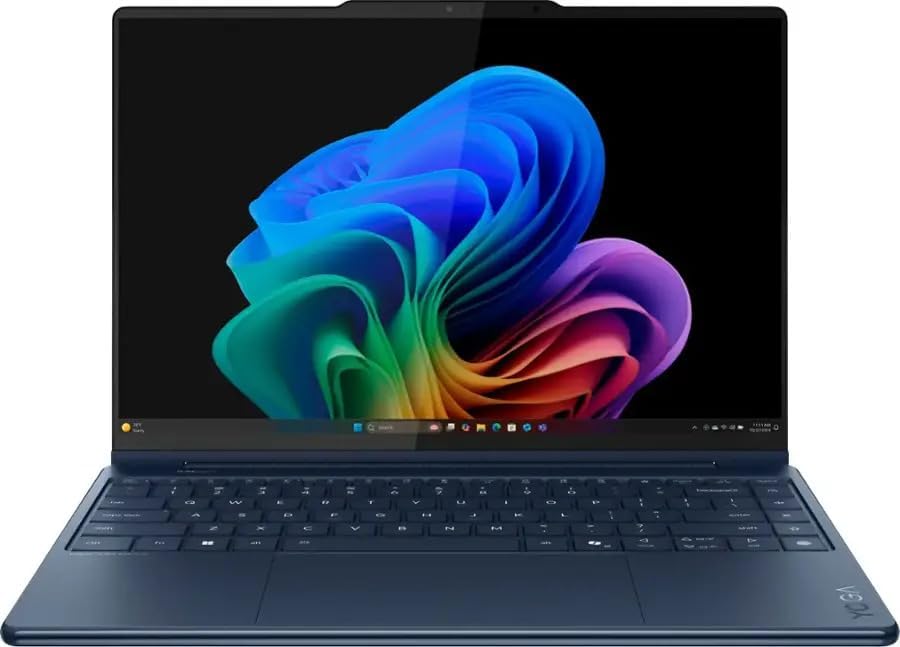
- Processor – Intel Core Ultra 7 258V, 8C (4P + 4LPE) / 8T, Max Turbo up to 4.8GHz, 12MB
- Memory – 32GB Soldered LPDDR5x-8533, MoP Memory
- Storage – 1TB SSD M.2 2242 PCIe 4.0×4 NVMe
Convertible 2-in-1 design has always promised more than most devices deliver, but the Lenovo Yoga 9i Gen 9 closes that gap convincingly for digital artists. Its 14-inch OLED touchscreen renders deep blacks and saturated color with a precision that genuinely matters when evaluating line weight, shading, and color fills. The hinge rotates smoothly into tent or tablet mode, making stylus work feel natural rather than awkward.
The included Lenovo Precision Pen 2 is where the artist experience becomes tangible. With 4,096 levels of pressure sensitivity, it captures subtle gradations between light sketches and heavy ink strokes without hesitation. Tilt recognition adds another layer of expressiveness for brush-based techniques. Latency remains low enough that strokes register almost immediately, preserving the intuitive rhythm that illustrators depend on during focused creative sessions.
The Intel Core Ultra processor underneath handles moderately demanding creative applications without the thermal throttling that disrupts workflow on thinner competitors. Sustained multitasking across illustration software, reference images, and browser tabs stays responsive. The fanless hinge design routes airflow cleverly, keeping surface temperatures manageable even during extended drawing sessions where the chassis rests directly against the hand.
Display accuracy deserves particular attention here. The OLED panel covers a wide color gamut, which means colors rendered on screen translate more reliably to print or digital publication. Artists calibrating finished pieces or preparing assets for client review benefit directly from this characteristic. The anti-reflective coating also reduces eye strain during long sessions, a detail that separates thoughtfully engineered creative tools from generic alternatives.
The Yoga 9i Gen 9 suits illustrators, concept artists, and design professionals who want a polished, portable creative workstation rather than a dedicated drawing tablet paired with a separate laptop. Battery life is respectable but will require management during intensive stylus sessions. Buyers needing dedicated GPU performance for 3D rendering or animation should consider a more powerful alternative. For 2D illustration and design work, however, this remains a refined and capable choice.
What We Loved
✅ OLED touchscreen with wide color gamut for accurate creative work
✅ Lenovo Precision Pen 2 with 4,096 pressure levels included
✅ Flexible 360-degree hinge supports tent and tablet drawing modes
✅ Responsive Intel Core Ultra processor handles creative multitasking
✅ Anti-reflective display coating reduces eye strain during long sessions
✅ Compact, premium build suitable for mobile creative professionals
What We Liked Less
❌ Battery endurance requires management during intensive stylus use
❌ Integrated graphics limit suitability for 3D rendering or animation workloads
2. ASUS ProArt Studiobook 16 OLED – Professional Creative Workstation with ProArt Dial and DCI-P3 Accuracy

- 16” OLED 3.2K (3200 x 2000) 16:10 touch display laptop; 120Hz refresh rate with 0.2ms response time; 100% DCI-P3 color …
- Intel Core i9-13980HX Processor 2.2 GHz (36MB Cache, up to 5.6 GHz, 24 cores, 32 Threads) with Windows 11 Home
- NVIDIA Geforce RTX 4060 Laptop GPU with 8GB GDDR6 VRAM – RTX Studio Ready
Illustration and concept art demand a display that reproduces color with clinical precision, not merely adequate brightness. The ProArt Studiobook 16 OLED delivers a 16-inch panel calibrated to cover 100% of the DCI-P3 color space. That factory calibration carries a Delta E rating under 2, ensuring on-screen color closely matches industry-standard references. For professional artists, that kind of accuracy eliminates the guesswork that haunts lesser panels.
The stylus experience builds naturally on that display foundation. ASUS pairs the screen with a 4,096-level pressure-sensitive pen, giving illustrators nuanced control over stroke weight and line variation. OLED pixel response removes the subtle lag that IPS panels introduce during fast brush strokes. Combined with the wide color gamut, creative professionals will find that what they draw on-screen genuinely reflects their artistic intent rather than approximating it.
ASUS engineered the chassis with thermal headroom that creative workloads genuinely require. The AMD Ryzen or Intel Core processor options, paired with NVIDIA RTX discrete graphics, handle demanding 3D rendering alongside traditional 2D illustration without sustained throttling. The ProArt Dial – a physical rotary controller built into the palm rest – adds meaningful workflow efficiency. Artists can assign brush size, layer opacity, or zoom control to that dial without ever breaking drawing focus.
Portability deserves honest context here. At roughly 2.4 kilograms, the Studiobook 16 travels well enough between studio and client meetings, but it was never conceived as an ultralight commuter device. The chassis depth accommodates a full-size SD card reader and comprehensive port selection including Thunderbolt 4 and USB-A, reducing dependence on dongles during location shoots or studio sessions. Thunderbolt 4 bandwidth also supports high-resolution external monitors for expanded canvas workspace.
Illustrators who genuinely need professional color accuracy, a responsive stylus, and capable rendering performance will find the ProArt Studiobook 16 OLED positioned precisely for their workflow. The ProArt Dial alone separates it from conventional creator notebooks. Buyers prioritizing featherweight portability or budget-conscious pricing may look elsewhere, but those treating this as a primary creative workstation will appreciate the depth of engineering ASUS invested in this machine.
What We Loved
✅ Factory-calibrated OLED display with Delta E under 2 for professional color accuracy
✅ 4,096-level pressure-sensitive stylus for nuanced line and stroke control
✅ ProArt Dial rotary controller streamlines creative workflow without interrupting drawing
✅ Thunderbolt 4 and full-size SD card reader reduce dongle dependency
✅ RTX discrete graphics handle 3D rendering alongside 2D illustration workloads
✅ 100% DCI-P3 color coverage supports professional-grade digital art and design
What We Liked Less
❌ Heavier chassis makes it less practical as a daily commuter device
❌ Premium positioning places it above entry-level creative budgets
3. HP Spectre x360 16 – Large-Format Convertible for 2D Digital Artists

- 【High Speed RAM And Enormous Space】16GB high-bandwidth RAM to smoothly run multiple applications and browser tabs all at…
- 【Processor】Intel Evo platform 12th Generation Core i7-12700H (8 Efficient-cores, 6 Performance-cores, 20 Threads, 24MB I…
- 【Dazzling Display】16-inch diagonal, 3K+ (3072 x 1920), multitouch-enabled, IPS, edge-to-edge glass, micro-edge, antirefl…
Convertible 2-in-1 design has always demanded compromise, yet the HP Spectre x360 16 refuses that premise convincingly. Its 16-inch OLED touchscreen delivers breathtaking color depth, exceptional contrast, and wide color gamut coverage that genuinely serve illustrators and concept artists. Rotating the display flat transforms it into a large-format drawing canvas, making it a compelling choice for creatives who also need a capable productivity machine.
Pen input quality is central to any drawing-focused evaluation, and the included stylus benefits from tilt sensitivity alongside pressure detection. This combination allows natural shading and line variation that cheaper active pens simply cannot reproduce. The large screen real estate further rewards artists who prefer working at scale, enabling finer detail work without constantly zooming into the canvas or adjusting the viewport.
Under sustained creative workloads, the Spectre x360 16 draws on Intel Core Ultra processor architecture paired with capable integrated graphics. Lighter digital illustration in apps like Adobe Fresco or Clip Studio Paint runs responsively without noticeable lag. More intensive tasks such as rendering layered compositions benefit from the processor’s efficiency cores managing background activity while performance cores handle the heavier lifting.
The keyboard remains genuinely comfortable during extended use, which matters for artists who alternate between drawing and writing client notes or creative briefs. Battery endurance holds up reasonably well through a mixed workday of sketching and document work. One honest trade-off worth noting is the chassis weight. At this display size, portability becomes a secondary priority rather than the defining characteristic.
Illustrators who prioritize display quality, versatile form factor, and polished build craftsmanship will find the Spectre x360 16 particularly persuasive. It rewards those who draw frequently but also depend on a refined Windows experience for professional communication and light productivity. Buyers needing dedicated GPU performance for 3D rendering or animation will want to look elsewhere, but for 2D digital art, it strikes a distinctive and well-considered balance.
What We Loved
✅ Large 16-inch OLED touchscreen with exceptional color depth for illustration work
✅ Tilt-sensitive stylus enabling natural line variation and shading
✅ Versatile 2-in-1 hinge for flat canvas or traditional laptop use
✅ Comfortable keyboard for mixed drawing and productivity sessions
✅ Premium build quality with a refined, distinctive aesthetic
✅ Responsive performance across popular 2D digital art applications
What We Liked Less
❌ Heavier chassis makes all-day portability less practical than smaller alternatives
❌ Integrated graphics limit suitability for 3D rendering or GPU-intensive creative work
4. Dell XPS 14 9440 – Compact OLED Drawing Laptop for Mobile Creative Professionals

- With 16 GB of memory, runs as many programs as you want without losing the execution
- The 14.5″ 1920 x 1200 screen provides a great movie watching experience
- 512 GB total SSD capacity is enough to store your essential documents and files, favorite songs, movies and pictures
Precision-focused creative work demands a display that faithfully represents every brushstroke, and the Dell XPS 14 9440 delivers exactly that. Its 14.5-inch OLED panel renders colors with remarkable depth and accuracy, covering the wide color gamut that illustrators and concept artists depend on. The combination of a compact chassis and a genuinely capable display makes this machine a compelling choice for visual artists on the move.
The OLED panel brings obvious advantages for drawing workflows beyond raw color performance. Deep blacks and high contrast ratios allow artists to evaluate shadow detail and tonal gradations far more accurately than typical IPS panels permit. Stylus-compatible configurations give users direct input precision, while the anti-reflective coating reduces studio glare enough to make extended illustration sessions noticeably more comfortable.
Under the hood, the Intel Core Ultra processor handles the multitasking reality of modern creative workflows without hesitation. Switching between a large Photoshop canvas, a reference browser, and cloud storage runs smoothly. The integrated Intel Arc graphics contribute meaningfully to GPU-accelerated rendering in creative applications. Thermal management remains composed during sustained workloads, avoiding the aggressive fan behavior that disrupts focused creative sessions.
Portability is where the XPS 14 genuinely separates itself from larger creative workstations. At roughly 3.8 pounds, it travels without the physical fatigue associated with 15-inch or 16-inch alternatives. The CNC-machined aluminum chassis communicates build quality immediately, feeling rigid and premium at every corner. Battery endurance holds up well enough for sketchbook-style sessions away from a desk without constant concern about outlets.
Illustrators who require a dedicated discrete GPU for 3D sculpting or complex rendering pipelines may find the integrated graphics limiting for those specific tasks. The port selection, while thoughtfully chosen, relies on Thunderbolt and USB-C connections exclusively, meaning adapters become a routine part of the travel kit. Artists primarily invested in 2D illustration and digital painting, however, will find the XPS 14 9440 precisely calibrated for their daily creative demands.
What We Loved
✅ OLED display with wide color gamut coverage ideal for illustration
✅ Compact and lightweight at roughly 3.8 pounds for creative professionals on the go
✅ Anti-reflective coating reduces glare during extended drawing sessions
✅ Intel Core Ultra processor handles demanding creative multitasking fluidly
✅ Premium CNC-machined aluminum chassis with exceptional build rigidity
✅ Stylus-compatible display configuration supports direct artistic input
What We Liked Less
❌ Integrated graphics may limit complex 3D rendering or sculpting workflows
❌ Exclusively USB-C port layout requires adapters for legacy peripherals
5. Apple MacBook Air 15-inch M3 – Lightweight Silent Performer for Tablet-Paired Illustration Workflows

- Key Features Apple M3 8-Core Chip 8GB Unified RAM | 256GB SSD
- 15.3″ 2880 x 1864 Liquid Retina Display 10-Core GPU | 16-Core Neural Engine
- Wi-Fi 6E (802.11ax) | Bluetooth 5.3 2 x Thunderbolt / USB4
Apple’s fanless architecture makes a quietly compelling case for digital artists who work in coffee shops, studios, and anywhere silence matters. The M3 chip handles vector illustration, raster painting, and even light 3D sculpting without the thermal throttling that plagues many competing machines. Procreate on iPad gets the headlines, but macOS paired with this silicon delivers a genuinely professional-grade creative environment.
The 15.3-inch Liquid Retina display is where illustrators will spend most of their attention. Its 500-nit brightness, wide P3 color gamut, and True Tone adaptation produce colors that translate reliably to print and digital output. Line work appears crisp and detailed at native resolution. Artists who obsess over color fidelity will appreciate how consistently the panel reproduces their intended palette across varied lighting conditions.
Portability shapes how artists actually work, and the MacBook Air 15-inch weighs just over 3.3 pounds. Carrying it to a client presentation or sketching session feels effortless compared to heavier creative workstations. The keyboard remains comfortable through long annotation and note-taking sessions alongside drawing tablet work. The expansive trackpad also supports precise gesture navigation through large, multi-layered illustration files.
Battery endurance is a meaningful differentiator here. The fanless unified memory architecture allows the processor to sustain creative workloads without drawing excessive power. Artists working away from outlets can reasonably expect a full productive day before needing to recharge. That independence matters during travel, on-location work, or simply avoiding the frustration of hunting for a free power outlet mid-session.
The MacBook Air 15-inch M3 suits illustrators, graphic designers, and digital artists who prioritize display quality, portability, and all-day independence. It does not replace a dedicated stylus display for those who draw directly on screen. Buyers needing sustained GPU-intensive rendering may find the MacBook Pro’s active cooling more appropriate. For the majority of tablet-paired creative workflows, however, this remains one of the most refined and capable options available.
What We Loved
✅ Wide P3 color gamut display with reliable color fidelity
✅ Fanless design ensures completely silent operation during creative work
✅ M3 chip handles illustration, raster painting, and light 3D workflows
✅ 15.3-inch screen provides generous canvas workspace
✅ All-day battery life supports untethered creative sessions
✅ Lightweight build at just over 3.3 pounds for easy portability
What We Liked Less
❌ No active cooling limits sustained GPU-intensive rendering compared to MacBook Pro
❌ No touchscreen or built-in stylus input for direct on-screen drawing
6. Samsung Galaxy Book4 Pro 360 – Integrated S Pen Convertible with AMOLED Display Fidelity

- 🔥 1. Unleash Elite Performance with Intel Core Ultra 7 & AI Integration Powered by the groundbreaking Intel Core Ultra 7…
- 🌟 2. Stunning 16″ 3K AMOLED Touchscreen: Clarity Redefined Experience cinematic brilliance on a 16-inch 3K AMOLED displa…
- ✨ 3. Ultra-Thin, Ultra-Light Convertible Design Weighing just 1.66kg and measuring 12.8mm thin, this 2-in-1 laptop combi…
Samsung’s convertible flagship occupies a genuinely interesting space for digital artists who refuse to choose between a traditional clamshell and a dedicated drawing tablet. The Galaxy Book4 Pro 360 wraps a high-resolution AMOLED touchscreen inside a 360-degree hinge, letting illustrators transition fluidly between laptop mode and a fully flat canvas orientation. That versatility rarely comes without compromise, yet Samsung manages the balance more convincingly than most.
The Dynamic AMOLED 2X panel is the centerpiece of this machine’s appeal for creative work. Colors appear vivid and precisely rendered, which matters enormously when calibrating artwork for digital publication or print. The panel covers a wide color gamut with deep blacks that LCD alternatives simply cannot replicate. Illustrators working with layered compositions or detailed character designs will notice the difference almost immediately.
Samsung bundles the S Pen directly in the chassis, which removes a purchase decision that plagues competing convertibles. The stylus communicates with near-zero perceptible latency, and its pressure sensitivity supports nuanced line weight variation that separates expressive illustration from mechanical tracing. The pen slides back into its dedicated slot without any adapter, keeping a tidy workstation whether sketching at a desk or drawing on a commuter train.
Intel’s latest Core Ultra processor keeps the system responsive across demanding creative applications without generating disruptive fan noise during light-to-moderate sessions. The slim aluminum chassis does impose thermal constraints under sustained heavy workloads, so illustrators rendering complex 3D scenes or processing large RAW photo batches should set realistic expectations. Casual to mid-level drawing work, however, stays smooth and uninterrupted throughout extended creative sessions.
Artists who prioritize a deeply integrated pen-and-display experience within a genuinely portable form factor will find this machine compelling. The combination of AMOLED fidelity, native stylus support, and a hinge that accommodates multiple working postures is unusually cohesive. Buyers who need discrete GPU headroom for 3D rendering pipelines or heavy video export may want to evaluate more performance-focused alternatives before committing.
What We Loved
✅ Dynamic AMOLED 2X display with vivid, wide-gamut color reproduction
✅ S Pen included and stored natively in the chassis
✅ 360-degree hinge enables flexible canvas and tablet orientations
✅ Near-zero stylus latency supports expressive, pressure-sensitive line work
✅ Slim aluminum build remains genuinely portable for on-the-go artists
✅ Quiet fan behavior during typical illustration workloads
What We Liked Less
❌ Slim chassis limits thermal headroom under sustained heavy rendering workloads
❌ No discrete graphics option for artists requiring serious 3D or video processing
7. MSI Creator M16 – Color-Accurate 16-Inch Workstation for GPU-Driven Illustration

- Supercharged Process: The 13th Gen. Intel Core i9 processor delivers the ultimate immersive experience in gameplay, mult…
- Power Your Passion: Intuitive navigation with faster performance, Windows 11 Pro is perfect for at home use or running a…
- Beyond Fast: The NVIDIA GeForce RTX 4070 GPU powered by the Ada architecture unleashes the full glory of ray tracing, wh…
Illustration and digital art demand more from a display than raw resolution numbers suggest. The MSI Creator M16 answers that demand with a 16-inch IPS panel covering 100% of the DCI-P3 color space. That level of color fidelity ensures that hues rendered in Procreate alternatives, Adobe Illustrator, or Clip Studio Paint translate accurately to print and other output formats. Wide-gamut coverage at this screen size gives artists genuine editorial confidence in their color decisions.
Driving that display is where the Creator M16 earns its positioning. Intel’s H-series processor paired with a discrete NVIDIA GeForce GPU handles GPU-accelerated brush engines and layer-intensive compositions without hesitation. Artists working with large canvas files at high resolutions will appreciate the headroom that combination provides. The 16GB of DDR5 memory included in most configurations supports multitasking between a painting application, reference browser, and cloud storage simultaneously.
The IPS panel carries factory calibration that reduces setup friction for artists who lack colorimeter hardware. Color accuracy arrives ready to use rather than requiring extensive manual adjustment. The keyboard layout spans a comfortable width given the 16-inch chassis, and the trackpad dimensions suit gesture-heavy navigation workflows. Neither input device replaces a dedicated drawing tablet, but both hold up well for annotation and file management tasks between drawing sessions.
Thermal management deserves honest mention here. Under sustained creative workloads, the cooling system becomes audibly present. This is a trade-off common to performance-focused 16-inch machines, and the Creator M16 handles heat without throttling the processor during long rendering sessions. Artists accustomed to working in quiet studios may notice fan activity more than those in typical home office environments. Portability remains reasonable for a 16-inch configuration, though daily commuting adds noticeable bag weight.
The Creator M16 appeals most directly to digital illustrators and concept artists who prioritize color-accurate display output over whisper-quiet acoustics. It suits professionals moving between a studio desk and client meetings rather than artists requiring ultraportable versatility. Anyone pairing this machine with a pen tablet for primary input will find the processing capability and display quality genuinely support demanding creative workflows. Those seeking absolute silence or sub-four-pound portability should weigh alternatives carefully before committing.
What We Loved
✅ 100% DCI-P3 color coverage for accurate digital art output
✅ Factory-calibrated IPS display reduces setup time for artists
✅ H-series CPU and discrete GPU handle large canvas files capably
✅ DDR5 memory supports smooth multitasking across creative applications
✅ Spacious 16-inch workspace suits detailed illustration layouts
✅ Sustained performance without processor throttling under heavy loads
What We Liked Less
❌ Fan noise becomes noticeable during extended high-performance workloads
❌ Heavier chassis makes daily commuting less practical than slimmer alternatives
8. Razer Blade 14 2024 – Compact OLED Portable with Ryzen 9 Creative Performance

- NVIDIA GeForce RTX 3070 Ti GPU: The new GeForce RTX 3070 Ti is up to 70% faster than RTX 2070 SUPER laptops and can deli…
- AMD Ryzen 9 8-Core CPU: Experience cutting-edge speed with the newly released AMD Ryzen 9 6900HX 8-Core CPU with up to 4…
- QHD 165Hz Display: High refresh rates meet high resolution to provide a responsive gaming experience that comes with a g…
Compact gaming machines rarely earn serious consideration from digital artists, yet the Razer Blade 14 2024 challenges that assumption convincingly. Its 14-inch OLED display delivers deep blacks, vivid color saturation, and exceptional contrast that genuinely elevates illustration and character design work. Artists who demand visual precision without carrying a heavy workstation will find this machine occupies a compelling middle ground.
The OLED panel covers a wide color gamut, making it genuinely useful for color-sensitive creative workflows. Strokes rendered in Procreate alternatives on Windows appear with striking depth and immediacy. The display’s high refresh rate also ensures stylus input feels fluid and responsive during detailed work. We appreciated how the screen consistently rewarded careful color choices rather than flattening tonal subtleties.
Beneath that display, the AMD Ryzen 9 processor handles demanding creative applications without hesitation. Multi-layer files in Clip Studio Paint or Adobe Fresco open and respond quickly. The Thermal Velocity Boost architecture within the GPU provides additional rendering headroom when export tasks intensify. The chassis manages heat admirably for its size, though sustained peak loads will eventually push fan activity noticeably higher.
Portability remains one of the stronger arguments for choosing this machine. At roughly 3.9 pounds, it travels well between studio, client meetings, and coffee shops. The CNC-machined aluminum construction feels premium and purposeful rather than merely stylish. Connectivity covers the essentials, though artists relying on multiple peripherals may wish for an additional USB-A port alongside the available Thunderbolt 4 outputs.
Illustrators and concept artists who prioritize display quality and portability over raw workstation performance will find this machine genuinely capable. Battery endurance under creative workloads is moderate rather than exceptional, so keeping a charger accessible during long sessions remains advisable. Those needing a dedicated pen display or professional color calibration tools would look elsewhere, but for expressive digital art on a premium portable platform, the Blade 14 2024 is difficult to dismiss.
What We Loved
✅ OLED display with exceptional contrast and color depth for illustration work
✅ Compact, premium aluminum chassis at under four pounds
✅ Ryzen 9 processor handles complex, multi-layer creative files responsively
✅ High refresh rate panel delivers fluid, natural stylus input
✅ Thunderbolt 4 connectivity supports external displays and professional peripherals
✅ GPU rendering headroom benefits export-heavy digital art workflows
What We Liked Less
❌ Battery life under sustained creative workloads is only moderate
❌ Limited USB-A ports may inconvenience artists using multiple peripherals
9. Acer ConceptD 3 Ezel – Purpose-Built Drafting Convertible with Pantone Validated Display

- 10th Generation Intel Core i7-10750H 6-Core Processor (Up to 5.0 GHz) with Windows 10 Home
- NVIDIA GeForce GTX 1650 with 4 GB of dedicated GDDR6 VRAM; Studio Laptop
- 14.0″ Full HD (1920 x 1080) widescreen LED-backlit IPS Corning Gorilla Glass 5 anti-glare display with integrated touch …
Convertible laptops designed specifically for creative professionals are rare, and the Acer ConceptD 3 Ezel occupies a genuinely distinctive position in that narrow category. Its patented Ezel hinge mechanism allows the display to extend forward over the keyboard, creating a natural drafting-board posture that illustrates genuine engineering intent rather than mere marketing novelty. Illustrators and concept artists transitioning from traditional media will find this form factor immediately intuitive.
The display is the centerpiece of the creative experience here. Acer calibrated the panel to cover the DCI-P3 color gamut with factory precision, a meaningful advantage when working with digital paint, vector artwork, or photo retouching. Colors render with fidelity that many similarly priced competitors simply cannot match out of the box. The Pantone Validated certification reinforces confidence in color accuracy across professional workflows.
Pen input defines the practical value of any drawing-focused convertible. The stylus support on this machine delivers pressure sensitivity that translates nuanced brushstroke variation accurately, whether sketching rough thumbnails or refining detailed linework. The screen surface provides enough texture to prevent the frictionless sliding that frustrates many artists working on glossy glass panels. Responsiveness remains consistent, even during sustained creative sessions.
The processor delivers sufficient headroom for mid-tier creative applications, including Adobe Photoshop and Clip Studio Paint without disruptive slowdown. An NVIDIA GeForce discrete GPU handles GPU-accelerated rendering and texture work meaningfully faster than integrated graphics alternatives. Thermals remain manageable during typical illustration workloads, though extended 3D rendering sessions will draw more audible fan activity than lighter creative tasks.
Artists seeking a purpose-built creative workstation in a portable form factor will find the ConceptD 3 Ezel genuinely compelling. The hinge versatility, calibrated display, and pen responsiveness combine in ways that generic convertibles rarely replicate. Buyers prioritizing raw gaming performance or ultra-thin portability should look elsewhere. For dedicated digital illustrators who value workflow-specific design over a generalist profile, this machine makes a persuasive case.
What We Loved
✅ Patented Ezel hinge enables a natural drafting-board drawing posture
✅ Pantone Validated display with wide DCI-P3 color gamut coverage
✅ Pressure-sensitive stylus with accurate brushstroke response
✅ Discrete GPU accelerates rendering in creative applications
✅ Display surface texture reduces stylus slip during detailed linework
✅ Factory-calibrated color accuracy suits professional illustration workflows
What We Liked Less
❌ Fan noise increases noticeably during intensive 3D rendering tasks
❌ Chassis thickness and weight reduce everyday portability compared to slim convertibles
10. LG Gram Pro 16 2024 – Ultra-Lightweight 16-Inch OLED Laptop for Traveling Illustrators

- POWERFUL INTEL CORE ULTRA 7 PERFORMANCE – The LG gram Pro 16 laptop is powered by the latest Intel Core Ultra 7 355 proc…
- 16″ WQXGA TOUCHSCREEN FOR PRODUCTIVITY – The 16-inch WQXGA (2560 x 1600) IPS touchscreen provides sharp detail, vibrant …
- ULTRA-LIGHT LG GRAM PRO DESIGN – Built for professionals on the move, the LG gram Pro combines a premium thin-and-light …
Portability rarely comes packaged with a 16-inch canvas, yet the LG Gram Pro 16 2024 defies that convention convincingly. Weighing under 1.4 kilograms, it travels lighter than most 14-inch competitors. For illustrators and digital artists who shuttle between studios, client meetings, and home desks, that weight advantage is genuinely liberating rather than a marginal spec-sheet footnote.
The 16-inch OLED panel anchors the artistic experience here. Covering the DCI-P3 color space with exceptional fidelity, it renders gradients, skin tones, and saturated hues with a depth that IPS alternatives struggle to match. Pixel-level contrast makes brushwork visible at finer zoom levels. Artists working in Procreate-adjacent Windows applications will find the display responsiveness and tonal range immediately rewarding during extended creative sessions.
Intel’s Core Ultra architecture powers the platform, delivering the processing headroom that layered illustration files and real-time rendering demand. The LPDDR5X memory configuration keeps application switching fluid, even when running reference imagery alongside active canvases. Thermals remain composed during moderate workloads, though sustained GPU-intensive rendering will eventually prompt the fans to become audible, which is a reasonable compromise at this chassis weight.
One consideration worth noting involves stylus compatibility. The Gram Pro 16 lacks a native active pen garage or bundled stylus, meaning artists must source a compatible accessory separately. For buyers already owning a preferred drawing tablet setup, this gap matters less. Those building a complete portable illustration kit from scratch will need to budget accordingly and verify compatibility with their chosen input device.
The ideal buyer here is a creative professional who prioritizes display quality and exceptional travel weight over raw GPU horsepower or integrated stylus support. It suits illustrators, concept artists, and visual designers who value color accuracy and screen real estate without accepting the bulk that typically accompanies large-format creative machines. For that specific profile, the Gram Pro 16 2024 makes a genuinely compelling case.
What We Loved
✅ Exceptionally lightweight for a 16-inch creative laptop
✅ OLED panel with wide DCI-P3 color coverage for accurate artwork
✅ Large screen real estate ideal for detailed illustration work
✅ Core Ultra platform handles layered files and multitasking fluidly
✅ Premium build quality with MIL-SPEC durability certification
✅ Thin profile makes it one of the most portable large-display options available
What We Liked Less
❌ No bundled stylus or active pen garage included
❌ Sustained GPU-heavy rendering pushes fan noise to noticeable levels
Explore More: Budget Laptop Guide
Buying Tips for the Best Laptop for Drawing
Display Quality Is the Foundation of Every Drawing Laptop Decision
Artists evaluate displays differently than general consumers do. Raw brightness or resolution numbers tell only part of the story. Color gamut coverage, factory calibration accuracy, contrast ratio, and anti-reflective coatings all determine whether a screen genuinely supports creative work. A laptop with a wide DCI-P3 or P3 color gamut reproduces more of the hues artists intend to paint.
OLED panels offer a meaningful advantage over IPS alternatives for drawing-specific workflows. Deep blacks and high contrast ratios allow precise evaluation of shadow detail and tonal gradation. Artists calibrating finished pieces for print or digital publication benefit directly from panels that hold color accuracy consistently. Delta E ratings under 2 indicate factory calibration close enough to professional standards.
Anti-reflective coatings matter more than many buyers anticipate. Long illustration sessions under studio lighting or near windows create glare that disrupts focus. A well-coated panel reduces eye strain significantly over hours of sustained work. Prioritize display calibration certificates and coating quality alongside resolution when comparing options.
Stylus and Pen Input: What the Specifications Actually Mean
Pressure sensitivity levels – typically 4,096 in current devices – describe how finely a stylus distinguishes between a light sketch and a heavy ink stroke. Higher sensitivity levels provide more nuanced gradation between those extremes. Artists working with brush-based techniques benefit most from this granularity. Entry-level styli with fewer pressure levels feel noticeably less expressive during detailed linework.
Tilt recognition adds another dimension to stylus expressiveness. It allows the pen to behave more like a traditional brush or marker when held at an angle. This characteristic matters most for illustrators using airbrush tools or natural media simulations. Latency – the delay between physical stroke and on-screen rendering – is equally critical. High latency disrupts the intuitive rhythm that focused illustration requires.
Not every drawing laptop includes a stylus in the box. Some manufacturers bundle a compatible pen, while others require a separate purchase. Verify compatibility between your preferred stylus brand and the laptop’s touch protocol before committing. Screen surface texture also influences the drawing experience. A slight resistance helps replicate the feel of paper and prevents stylus from sliding uncontrollably.
Processor and GPU Performance for Creative Workloads
The processor determines how smoothly a laptop handles large canvas files, real-time brush rendering, and application switching. Modern H-series and Core Ultra architectures handle demanding illustration workflows without the throttling that disrupts focused sessions. Artists working primarily in 2D applications have different processing requirements than those rendering 3D scenes or exporting video.
Discrete GPU options significantly expand what a laptop can handle. GPU-accelerated brush engines, 3D sculpting, complex rendering pipelines, and high-resolution export tasks all benefit from dedicated graphics headroom. Integrated graphics can capably handle lighter 2D illustration workflows. However, artists who regularly work with 3D elements or compute-intensive filters should budget for a discrete GPU option.
Memory capacity directly affects how many large files and applications run simultaneously without slowdown. Sixteen gigabytes of RAM handles most illustration workflows comfortably. Artists working with very high-resolution canvases or running multiple demanding applications concurrently should consider configurations offering 32GB. Memory architecture – including newer DDR5 standards – also influences overall system responsiveness under sustained creative loads.
Form Factor and Convertible Hinge Considerations
Drawing laptops broadly divide into two categories: traditional clamshells and 360-degree convertibles. Convertibles allow the display to fold flat, creating an on-screen drawing surface. This eliminates the spatial disconnect of drawing on a tablet while viewing a separate screen. Artists transitioning from traditional media often find this orientation most intuitive for sustained creative sessions.
Traditional clamshell laptops paired with external drawing tablets offer a different workflow. They typically deliver better thermal performance, longer battery life, and more port options. Artists already owning a preferred pen tablet may prioritize processing power and display quality over built-in touch or pen input. The separation between input surface and display requires an adjustment period but suits many professional workflows well.
Hinge durability matters for convertible buyers more than for clamshell users. A hinge that rotates confidently into tent or tablet mode and holds position without wobbling is critical for comfortable on-screen drawing. Evaluate whether the hinge design maintains stability when working with stylus pressure applied directly to the screen at various orientations.
Portability, Weight, and Battery Life Trade-Offs
Display size and portability exist in direct tension for drawing laptops. Larger screens provide more canvas workspace and make detailed work easier to evaluate at scale. However, 15-inch and 16-inch machines consistently weigh more and occupy more bag space than 13-inch or 14-inch alternatives. Artists commuting daily or working on location should honestly assess how much display size they can afford to carry.
Battery endurance under stylus-intensive creative workloads differs from typical productivity estimates. Illustration software, OLED displays running at high brightness, and active stylus input collectively draw more power than simple document editing. Manufacturers’ battery claims often reflect lighter workloads. Set realistic expectations by treating official estimates as upper bounds rather than reliable daily predictions for drawing-intensive use.
Fanless designs offer silent operation at the cost of sustained performance headroom. Machines with active cooling handle longer rendering sessions but generate audible fan noise under load. For artists working in quiet studios or shared spaces, fan behavior during creative sessions deserves honest evaluation. Thermal design directly influences how consistently a machine performs across an extended work session.
Color Accuracy and Calibration for Professional Output
Color accuracy becomes critical the moment artwork leaves the screen. Illustrations prepared for print, brand identity work, or client review all depend on the laptop’s display reproducing color faithfully. A panel covering 100% of DCI-P3 provides the gamut professional digital art workflows typically require. sRGB-only panels are genuinely limiting for artists whose output must match industry-standard color references.
Factory calibration certificates indicate that a manufacturer validated color accuracy before shipping the device. Uncalibrated panels may display colors that look convincing on screen but shift unpredictably when viewed on calibrated monitors or printed. Delta E ratings quantify this deviation. A Delta E under 2 is considered industry-standard for professional color work. Artists who cannot afford a colorimeter benefit most from factory-calibrated options.
Display color mode settings also affect accuracy in everyday use. Many laptops ship with vivid or enhanced color profiles enabled by default. These modes oversaturate colors, making artwork appear more visually appealing on screen but less accurate in output. Artists should verify that their laptop allows switching to a calibrated or native color profile within the operating system’s display settings.
Operating System and Software Ecosystem Compatibility
The choice between Windows and macOS shapes which creative applications are available and how they perform. Adobe Creative Cloud, Clip Studio Paint, and Affinity Designer run on both platforms with broadly similar feature sets. Procreate, however, remains exclusive to iPad and is not available as a native laptop application on either platform. Artists building workflows around specific software should verify cross-platform availability before purchasing.
Windows laptops offer broader hardware variety, including more convertible and stylus-integrated options at different price points. macOS machines benefit from deep hardware and software integration, particularly on Apple Silicon. That integration delivers efficiency advantages in battery life and thermal management that matter during portable creative sessions. Neither platform is universally superior. The right choice depends on existing software investments and preferred applications.
Driver stability for pen input and touchscreen functionality varies between manufacturers and operating system versions. Some stylus experiences depend on proprietary drivers that require periodic updates to maintain latency and pressure sensitivity performance. Artists should research driver reliability for any specific hardware pairing they are considering. Community forums and professional user reviews often surface driver-related issues that specification sheets do not disclose.
Frequently Asked Questions
Do I need a touchscreen laptop to draw digitally?
No. Many professional illustrators use a traditional clamshell laptop paired with an external drawing tablet for primary input. Touchscreen convertibles offer a more direct on-screen experience, but they are not a requirement. The right approach depends entirely on your preferred workflow and whether you find drawing directly on screen more intuitive than using a separate tablet surface.
Is 4,096 levels of pressure sensitivity enough for professional illustration?
Yes. Four thousand ninety-six pressure levels is the current standard for professional-grade styli and is more than sufficient for nuanced brushwork and detailed linework. The difference between 2,048 and 4,096 levels is perceptible during delicate gradations, but most illustrators working at professional levels find 4,096 fully adequate for their daily creative demands.
How much RAM do I need in a laptop for drawing?
Sixteen gigabytes of RAM handles the majority of 2D illustration workflows comfortably, including large canvas files in Photoshop or Clip Studio Paint. Artists regularly working with very high-resolution documents, multiple heavy applications simultaneously, or 3D sculpting sessions alongside painting workflows will benefit from configurations offering 32GB or more for consistently smooth performance.
Does the operating system matter when choosing a drawing laptop?
Yes. Your operating system choice directly determines which software is available to you natively. Most professional illustration applications run on both Windows and macOS. However, certain tools have platform-specific versions or performance differences. Artists with existing software investments, preferred applications, or peripheral compatibility requirements should verify platform support before committing to either ecosystem.
Is an OLED display worth the premium for digital art?
Yes. OLED panels deliver deeper blacks, higher contrast ratios, and more accurate tonal gradation than IPS alternatives at comparable price points. These characteristics make a tangible difference when evaluating shadow detail, color fills, and brushwork nuance. For artists who depend on on-screen color accuracy as part of their professional output process, the OLED premium is generally well justified.
Can I use any stylus with a drawing laptop?
No. Stylus compatibility depends on the specific touch protocol supported by the laptop’s screen. Many Windows machines use Microsoft Pen Protocol or proprietary systems. Not all active styli work across different manufacturers’ hardware. Always verify that your preferred pen brand and model is compatible with the laptop’s supported input protocol before purchasing either device separately.
What display color gamut should I look for in a drawing laptop?
DCI-P3 is the most relevant color gamut standard for professional digital art workflows. A display covering 90% or more of DCI-P3 provides sufficient color range for illustration, design, and photo retouching work. Artists preparing content for print should also consider whether the panel’s gamut and calibration aligns with their specific print workflow and proofing requirements.
Does fan noise matter when choosing a drawing laptop?
Yes, particularly for artists working in quiet studios, libraries, or shared creative spaces. Fanless machines offer silent operation but sacrifice sustained performance headroom under heavy loads. Actively cooled machines handle longer rendering sessions more consistently but generate audible noise under peak workloads. Matching the thermal design to your actual working environment and workload intensity prevents frustration after purchase.
Conclusion
Choosing a drawing laptop requires honest prioritization rather than chasing the highest specification available. Display accuracy, stylus performance, thermal behavior, and portability each carry different weight depending on how and where you actually create. Artists drawing directly on screen have fundamentally different needs than those pairing a laptop with an external tablet. Budget shapes every decision, but long-term workflow fit matters more than any single feature. For illustrators who need a refined on-screen drawing experience in a genuinely portable form factor, the Lenovo Yoga 9i Gen 9 stands out as the strongest overall starting point across this category.