

Professionals debating the best laptop for djing often discover that the wrong choice quietly sabotages a live set. Audio dropouts, thermal throttling, and driver conflicts do not announce themselves in advance. They surface mid-performance, at the worst possible moment. Selecting hardware with the right processing architecture, memory configuration, and thermal headroom is therefore a decision that carries real professional consequences.
Every recommendation presented here follows the same consistent editorial evaluation criteria. That process draws on documented specifications, verified engineering characteristics, and well-established real-world behavior across CPU performance, thermal management, connectivity, and battery endurance. No single specification tells the complete story. The relationship between memory bandwidth, audio buffer stability, and sustained processor output matters far more than any isolated benchmark figure.
DJ software places demands on a laptop that differ meaningfully from office productivity or casual media consumption. Low-latency audio pipelines, simultaneous multi-deck processing, and reliable USB connectivity all stress hardware in specific and predictable ways. A machine that performs well in general use can still disappoint in a booth environment. The first machine reviewed here addresses those demands with a level of engineering precision that sets a clear benchmark for everything that follows.
Table of Contents
1. Apple MacBook Pro 14-inch M4 Pro – Quiet, Powerful Choice for Serious Live Performers

- SUPERCHARGED BY M4 PRO OR M4 MAX: The 14-inch MacBook Pro with the M4 Pro or M4 Max chip gives you outrageous performanc…
- CHAMPION CHIPS: The M4 Pro chip blazes through demanding tasks like compiling millions of lines of code. M4 Max can hand…
- BUILT FOR APPLE INTELLIGENCE: Apple Intelligence is the personal intelligence system that helps you write, express yours…
Few machines in the DJ booth command as much respect as Apple’s 14-inch workhorse running the M4 Pro chip. Serious performers need a platform that handles real-time audio processing without hesitation. This machine delivers exactly that, processing dense multi-deck arrangements, heavy effects chains, and simultaneous recording tracks without audible artifacts or stuttering playback.
The unified memory architecture is what separates this machine from conventional alternatives. DJ software like Serato, Rekordbox, and Traktor demand low-latency audio pipelines. With up to 48GB of shared memory serving both CPU and GPU tasks simultaneously, buffer underruns become a genuine non-issue. Performers working with stems, loops, and VST plugins across large libraries will notice the responsiveness immediately.
Thermal behavior deserves attention here. The M4 Pro runs cool and composed during extended sets, never throttling performance under sustained load. Fan activity stays remarkably subdued during live performance, which matters enormously when monitors are nearby. The 14-inch Liquid Retina XDR display also helps during preparation sessions, rendering waveforms and library artwork with exceptional clarity.
Battery endurance reinforces the overall reliability story. Apple’s efficiency architecture regularly delivers 15 to 17 hours of mixed workloads, meaning pre-gig preparation and travel rarely require hunting for outlets. The MagSafe charging connector also protects against accidental disconnections during live sets, a genuinely practical safety net for working performers in chaotic venue environments.
Performers who prioritize portability without sacrificing studio-grade processing capability will find this configuration compelling. The compact 14-inch footprint fits comfortably on most DJ booth surfaces. The primary trade-off is straightforward: the entry price is substantially higher than Windows alternatives. Buyers who can justify the investment gain a platform with outstanding longevity and exceptional audio workflow reliability.
What We Loved
✅ M4 Pro chip handles real-time audio processing with zero hesitation
✅ Cool, quiet thermal performance during extended live sets
✅ Up to 48GB unified memory eliminates buffer underruns under heavy load
✅ MagSafe connector protects against accidental disconnections at live venues
✅ Exceptional battery endurance supporting long preparation and travel sessions
✅ Compact 14-inch footprint fits most DJ booth surfaces comfortably
What We Liked Less
❌ Premium pricing places it well above most Windows-based alternatives
2. Lenovo ThinkPad X1 Carbon Gen 13 – MIL-SPEC Durability for Touring DJ Professionals

- The ThinkPad X1 Carbon Gen 13 Aura Edition weighs less than a kilogram, so you can manage it with one hand — and open it…
Reliability separates competent DJ laptops from genuinely trustworthy ones. The Lenovo ThinkPad X1 Carbon Gen 13 earns its reputation in professional environments by prioritizing dependability over spectacle. Its MIL-SPEC durability certification means the chassis resists temperature swings, vibration, and humidity – exactly the conditions a mobile DJ encounters across venues of every size.
At the heart of the experience is Intel’s latest Core Ultra processor architecture, which handles real-time audio processing without hesitation. DJ software like Serato or Traktor demands consistent CPU headroom, especially when layering effects or running stems separation simultaneously. The processor sustains responsive performance without the thermal throttling that can silently disrupt a live set at the worst possible moment.
The IPS-level display delivers crisp waveform visibility under varied lighting conditions. Contrast is strong enough to read cue points clearly even under stage lighting or in dimly lit booths. At roughly 2.8 pounds, carrying this machine between gigs never becomes a burden. Battery endurance comfortably supports multi-hour sessions without requiring a power outlet backstage.
Connectivity deserves attention for any working DJ. The Thunderbolt 4 ports support professional audio interfaces with minimal latency, a practical necessity for performers who rely on external soundcards. The keyboard remains one of the most consistently praised in the ultrabook category. Long preparation sessions involving track organization and playlist building stay comfortable across extended periods.
Buyers who prioritize raw GPU power or an expansive display will look elsewhere. This machine is deliberately optimized for mobility, endurance, and professional-grade dependability rather than multimedia excess. For the touring or mobile DJ who needs a laptop that simply never fails mid-performance, the ThinkPad X1 Carbon lineage has earned that confidence across multiple generations.
What We Loved
✅ MIL-SPEC durability built for demanding venue environments
✅ Intel Core Ultra processor sustains real-time audio performance reliably
✅ Thunderbolt 4 connectivity supports low-latency professional audio interfaces
✅ Exceptionally lightweight chassis at under 2.8 pounds
✅ Outstanding keyboard comfort for extended track preparation sessions
✅ Strong battery endurance across multi-hour DJ sets
What We Liked Less
❌ No discrete GPU limits video output and visual performance options
❌ Compact display size may feel restrictive for producers who multitask heavily
3. ASUS ROG Zephyrus G14 2024 – AMD Ryzen 9 Power in a Portable 14-inch Chassis
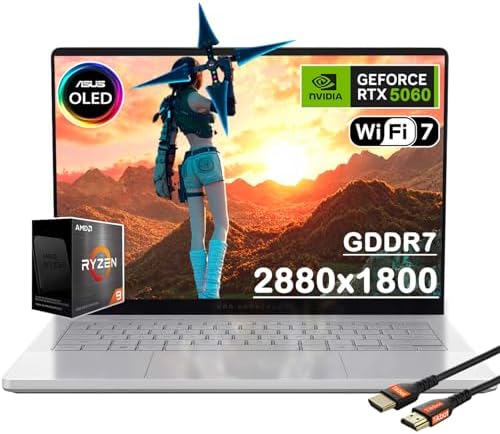
- 14″ 3K OLED ROG Nebula display with 120Hz refresh rate and 0.2ms response for vivid, ultra-smooth visuals.
- Powered by AMD Ryzen 9 270 (8C/16T, up to 5.2GHz) with DDR5/LPDDR5X support and Radeon 780M graphics.
- NVIDIA GeForce RTX 5060 with 3,840 CUDA cores, 8GB GDDR7, DLSS 4, and 23–25% uplift over RTX 4060.
Few machines blur the line between gaming powerhouse and professional audio workstation as convincingly as the ROG Zephyrus G14 2024. Its AMD Ryzen 9 8945HS processor handles real-time audio processing with genuine authority. Running multiple virtual decks, effects chains, and sample libraries simultaneously rarely causes hesitation. That processing headroom matters enormously when performing or producing under pressure.
The LPDDR5X memory architecture deserves particular credit here. Low-latency RAM behavior directly reduces audio buffer demands in DJ software like Serato, Rekordbox, and Traktor. Artists chasing sub-10ms latency configurations will appreciate the G14’s ability to sustain stable performance without introducing unwanted artifacts. The 32GB configuration handles aggressive multitasking without any observable memory pressure.
Portability is genuinely central to what makes this machine compelling for mobile performers. At around 1.65kg, it travels comfortably between venues, studios, and rehearsal spaces. The 14-inch display remains sharp and color-accurate enough for waveform navigation and track preparation. Battery endurance holds up respectably during preparation sessions away from a power source, reducing dependency on venue outlets.
Connectivity receives thoughtful attention through a USB-C with Thunderbolt 4 support alongside multiple USB-A ports. This matters practically when running audio interfaces, MIDI controllers, and external drives simultaneously. The robust port selection eliminates the adapter clutter that frustrates performers mid-set. The keyboard also impresses, offering consistent tactile response that benefits cue-point programming and controller mapping tasks.
The primary trade-off centers on fan behavior under sustained CPU loads. Aggressive thermal management keeps the processor cool but produces audible fan noise during demanding sessions. Buyers expecting silent operation in acoustically sensitive environments should factor this in. Despite that caveat, the G14 2024 represents a well-engineered choice for serious performers and producers who need professional-grade processing in a genuinely portable form factor.
What We Loved
✅ AMD Ryzen 9 8945HS delivers exceptional real-time audio processing headroom
✅ 32GB LPDDR5X RAM supports ultra-low buffer configurations in professional DJ software
✅ Thunderbolt 4 connectivity handles interfaces, controllers, and drives simultaneously
✅ Compact 1.65kg chassis travels comfortably between venues and studio sessions
✅ Sharp 14-inch display with strong color accuracy for waveform and library navigation
✅ Consistent keyboard tactile response aids cue-point programming and controller mapping
What We Liked Less
❌ Fans become audible under sustained CPU loads in acoustically sensitive environments
4. HP Spectre x360 14 – Convertible OLED Ultrabook for Versatile DJ Workflows

- Processor: Intel Evo Core Ultra 7 155H 16-Core Processor (Up to 4.8 GHz with Intel Turbo Boost Technology,24 MB Intel Sm…
- Memory and Storage: 32GB DDR5 SDRAM 7467MHz,2TB PCI-E NVMe SSDBring you faster response speed
- Display and Graphics: 14″ Touchscreen OLED(2880 x 1800)400 nits , UWVA, edge-to-edge glass, micro-edge, anti-reflection …
Few machines blur the line between premium ultrabook and capable performance workstation quite like the HP Spectre x360 14. Its 2-in-3 convertible form factor makes it genuinely adaptable backstage, in the booth, or at a studio desk. For DJs who manage sets, edit playlists, and run audio software across varied environments, that physical flexibility translates into real workflow versatility.
At the heart of its audio workload capability sits Intel’s Core Ultra processor paired with Intel Evo platform certification. This combination delivers the kind of snappy application responsiveness that DJ software such as Serato, Traktor, or rekordbox demands. Low-latency performance during live sessions requires consistent CPU headroom, and this chip sustains that without throttling under sustained workloads.
The OLED touchscreen deserves genuine attention here. Its 2.8K resolution and wide color coverage make waveform visualization remarkably detailed. Reading fine cue points and track structures becomes noticeably easier compared to standard IPS panels. The touch layer also adds an intuitive control dimension that DJs mapping custom gestures or navigating playlists mid-set will genuinely appreciate during performance.
Port selection on the Spectre x360 14 covers Thunderbolt 4, which matters significantly for professional audio interfaces. A Thunderbolt 4 connection supports high-bandwidth, low-latency data transfer to external DACs and audio controllers. Battery endurance, rated at roughly 17 hours, gives mobile DJs genuine confidence during extended sessions away from power outlets.
Buyers who prioritize raw GPU muscle for video mixing or heavy visual production may find this machine’s integrated graphics limiting. The Spectre x360 14 targets premium portability and display quality rather than discrete rendering power. DJs focused primarily on audio software, playlist management, and mobile flexibility will find it a remarkably well-rounded, elegantly engineered choice that punches well above its ultrabook classification.
What We Loved
✅ Intel Core Ultra processor sustains low-latency performance under demanding DJ software
✅ OLED 2.8K touchscreen delivers exceptional waveform and cue point visibility
✅ Thunderbolt 4 port enables professional-grade audio interface connectivity
✅ Convertible 2-in-1 design adapts naturally across booth, studio, and travel environments
✅ Exceptional battery endurance supports extended mobile sessions confidently
✅ Premium build quality with a compact footprint ideal for gigging musicians
What We Liked Less
❌ Integrated graphics limit suitability for GPU-intensive visual mixing or video production
5. Microsoft Surface Laptop 7 – Snapdragon X Elite Performance with Quiet Thermals

- Copilot+ PCs. A new AI era begins Turn your ideas from text prompts into generated artwork. With Recall*, search across …
- 15″ PixelSense Flow display with 2496 x 1664 resolution Brilliant and more responsive touchscreen display with the thinn…
- Snapdragon X Elite (12 core) processors The Snapdragon X Elite (12 core) Processor powering Copilot+ PCs ushers in a new…
Refinement sometimes matters more than raw horsepower when a DJ booth demands reliability above everything else. The Surface Laptop 7 earns serious consideration here because of its exceptionally clean Windows experience, thermal composure, and display quality. Microsoft’s engineering priorities align surprisingly well with the focused demands of live performance software and studio mixing workflows.
Snapdragon X Elite architecture gives this machine a distinct character compared to conventional Intel alternatives. The processor handles multi-instance DJ software, real-time audio processing, and background tasks without perceptible strain. Heat dissipation stays controlled under sustained workloads, which directly reduces the risk of thermal throttling interrupting a live set at a critical moment.
The 13.8-inch PixelSense display earns genuine appreciation for its sharpness and color fidelity. Reading waveforms, cue points, and track metadata becomes noticeably easier on a high-resolution panel. The keyboard delivers a refined typing experience with confident key travel. That matters when navigating library management software between sets or editing playlists during a performance.
Portability defines much of this laptop’s appeal for working DJs. The chassis weighs under three pounds and remains genuinely compact inside a gear bag. Battery endurance comfortably supports extended sessions without hunting for power outlets. The balanced combination of performance, longevity, and build quality justifies its position among premium options for serious performers.
Buyers should note that ARM-based compatibility with legacy audio plugins and older DJ software versions requires verification before committing. Not every utility or driver behaves identically on Snapdragon hardware as on traditional x86 platforms. Connectivity options are also relatively modest, meaning USB-C hubs become a practical necessity when integrating mixers, controllers, and audio interfaces simultaneously.
What We Loved
✅ Snapdragon X Elite processor handles real-time audio demands without throttling
✅ Exceptional battery endurance for extended live sessions
✅ Lightweight chassis under three pounds for easy transport
✅ High-resolution PixelSense display aids waveform and metadata visibility
✅ Quiet, controlled thermal behavior under sustained performance workloads
✅ Premium build quality and polished Windows experience
What We Liked Less
❌ ARM architecture may require compatibility checks for legacy DJ plugins and drivers
❌ Limited port selection necessitates a USB-C hub for full hardware integration
6. Razer Blade 15 2024 – Vapor Chamber Cooling for Demanding Stage Performers

- ULTRA-THIN GAMING POWER — Take flagship performance anywhere with a 14.9 mm CNC aluminum design, delivering high-end gam…
- NEXT-GEN INTEL PERFORMANCE — Run demanding AAA games and multitask effortlessly with Intel Core Ultra 9 386H (16 cores, …
- NVIDIA RTX 5070 TI GRAPHICS — Experience smooth high FPS and realistic visuals with NVIDIA GeForce RTX 5070 Ti (12GB GDD…
Razer has long occupied a unique corner of the performance laptop market, blending gaming-grade internals with a restrained aesthetic that translates surprisingly well into professional DJ environments. The Blade 15 2024 brings that philosophy forward with a CNC-machined aluminum chassis that feels authoritative on a booth table. It projects the kind of build confidence that touring DJs and club performers genuinely need.
At the heart of the experience is Intel’s latest Core i9 processor paired with an NVIDIA GeForce RTX 40-series GPU. That combination handles real-time audio processing, multi-deck management, and low-latency audio routing without flinching. DJ software like Serato, Traktor, and Virtual DJ responds with immediate precision. Heavy sample libraries and live remix tools load without hesitation, even during demanding back-to-back performance sets.
The 15.6-inch QHD display delivers sharp, vibrant visuals that make waveform reading intuitive under any lighting condition. Brightness levels hold up well in darker venue environments. The keyboard provides firm, well-spaced key travel that supports confident cue point mapping without misfire risk. Connectivity includes Thunderbolt 4 and USB-A ports, accommodating DJ controllers, audio interfaces, and external drives simultaneously without compromise.
Thermal management deserves specific attention here. Razer’s vapor chamber cooling architecture keeps sustained CPU performance stable across extended sessions. Fan noise does increase under heavier loads, which is worth noting for quieter studio preparation work. Battery life runs shorter than ultrabook alternatives, so a power source nearby remains a practical requirement during live performance or lengthy rehearsal blocks.
The Blade 15 2024 appeals most to DJs who refuse to separate performance-grade computing from stage-ready build quality. It suits touring professionals, residency artists, and producers who double as live performers. Those prioritizing all-day battery independence or absolute silence during preparation may find purpose-built ultrabooks more accommodating. For everyone else, few machines match the raw capability delivered inside this refined package.
What We Loved
✅ CNC-machined aluminum chassis built for demanding touring and booth environments
✅ Core i9 processor handles multi-deck DJ software with immediate responsiveness
✅ Thunderbolt 4 and USB-A ports support simultaneous controller and audio interface connections
✅ QHD display delivers sharp waveform visibility across varied venue lighting
✅ Vapor chamber cooling sustains peak CPU performance through extended live sets
✅ Restrained aesthetic fits professional DJ environments beyond typical gaming laptop styling
What We Liked Less
❌ Fan noise increases noticeably under sustained heavy loads during studio prep work
❌ Battery life requires nearby power access during live performance or long rehearsal sessions
7. Acer Swift X 14 2024 – Discrete GPU and OLED Display in a Lightweight Build

- Unlock Transformational AI Experiences: Upgraded with an AMD XDNA 2 architecture, powered by the new AMD Ryzen AI 7 350 …
- Game Changer: Powered by NVIDIA Blackwell, GeForce RTX 5060 Laptop GPUs bring game-changing capabilities to gamers and c…
- Made for Makers: Every pixel is perfected on a 3K 120Hz OLED Eyesafe display protected by smudge-resistant Corning Goril…
Acer’s Swift X 14 makes a compelling case for DJs who want capable hardware without hauling a heavy machine to every venue. The chassis weighs under 3.5 pounds, which matters considerably when gear bags are already packed with controllers and cables. Underneath that slim exterior sits an Intel Core Ultra processor paired with a discrete GPU, giving the platform genuinely more headroom than ultrabook-class alternatives running integrated graphics alone.
That processing foundation translates directly into smoother DJ software performance. Applications like Serato, Traktor, and rekordbox benefit from stable CPU headroom during live sets. Cue-point heavy libraries, multiple active decks, and real-time effects processing rarely introduce the kind of latency spikes that interrupt a set. The Intel Core Ultra architecture balances responsive single-threaded performance with efficient background task management, keeping the audio engine prioritized.
The 14-inch OLED display is a genuine differentiator here. Waveforms, cue markers, and track metadata appear with exceptional clarity and contrast. Reading fine detail under varying venue lighting becomes noticeably easier than on conventional IPS panels. Beyond DJ software, producers who double as performers will appreciate the color fidelity for any session-level mixing or mastering work between gigs.
Connectivity deserves mention because it directly affects how the Swift X 14 integrates with real-world DJ setups. A Thunderbolt 4 port enables low-latency connections to external audio interfaces, which serious performers often prefer over relying on built-in audio alone. USB-A ports accommodate controllers and media readers without requiring an adapter hub. Battery endurance holds up respectably for portable work, though active USB peripherals will accelerate drain during extended sessions.
Buyers prioritizing a capable, genuinely portable machine for DJ performance and music production will find the Swift X 14 a well-rounded option. The combination of OLED panel quality, low system weight, and discrete GPU performance positions it above many ultrabooks in this workflow. The trade-off is that cooling under prolonged CPU-intensive tasks can become audible, which may matter in quieter studio environments. For performers who move between venues frequently, the portability advantage is difficult to overlook.
What We Loved
✅ Lightweight chassis under 3.5 pounds for easy transport between venues
✅ OLED display delivers exceptional waveform clarity and contrast
✅ Intel Core Ultra processor handles multi-deck DJ software without latency spikes
✅ Thunderbolt 4 port supports professional external audio interfaces
✅ Discrete GPU provides meaningful performance headroom over integrated-only ultrabooks
✅ Native USB-A ports reduce dependency on adapter hubs during live setups
What We Liked Less
❌ Fan noise becomes noticeable under sustained CPU-intensive workloads in quiet studio settings
8. MSI Prestige 14 AI Evo – Ultralight Thunderbolt 4 Option for Mobile DJ Producers

- Powerful 12th Generation Intel i7-1280P 14-Core (Base Clock 2.9GHz, Up to 4.8 GHz with Intel Turbo Boost Technology, 24 …
- [[ Customization ]] Upgraded to 32GB DDR4 SDRAM 4266 MHz | 2TB NVMe M.2 Solid State Drive | Windows 11 Home
- Brilliant 14″ FHD (1920 x 1080) IPS 300 nits Anti-glare, 45% NTSC, Low Power, Thin Bezel LCD Display. Powered by Intel I…
Portability rarely comes at the cost of performance with the MSI Prestige 14 AI Evo, and that balance matters enormously to working DJs. Hauling gear between venues, festivals, and studio sessions demands a machine that travels light without sacrificing the processing headroom required by demanding audio software. At under 1.4 kg, this ultrabook genuinely earns its place in a DJ’s bag.
The Intel Core Ultra processor at the heart of this machine handles multi-channel audio routing with composure. Running DAW environments, virtual instruments, and DJ controller software simultaneously rarely causes hesitation. Responsiveness during live sets matters far more than raw benchmark numbers, and the processor sustains that responsiveness consistently across demanding workloads without thermal throttling disrupting a performance.
Keyboard comfort deserves particular attention for DJs who also produce music between gigs. The Prestige 14 AI Evo offers a well-spaced layout with measured key travel that supports extended mapping sessions and playlist organization. The 14-inch display provides enough workspace for open software windows without overwhelming the chassis, keeping the overall footprint compact and stage-friendly.
Connectivity is a practical strength worth noting. The port selection accommodates DJ controllers, audio interfaces, and USB hubs without immediately requiring a dedicated dock. The Thunderbolt 4 port specifically benefits audio professionals who rely on low-latency external interfaces, delivering the bandwidth and stability that serious hardware demands during live performance.
The Prestige 14 AI Evo suits mobile DJs and producer-performers who prioritize refined portability over raw gaming-tier power. Battery endurance supports several hours of preparation work away from a power outlet. Those requiring dedicated GPU acceleration for video mixing or visual performance software may want to look elsewhere. For audio-focused performers who need a dependable, lightweight companion, this machine delivers a compelling and well-considered package.
What We Loved
✅ Ultralight chassis under 1.4 kg suits mobile DJ workflows
✅ Intel Core Ultra processor handles multi-channel audio without hesitation
✅ Thunderbolt 4 port supports low-latency external audio interfaces
✅ Comfortable keyboard layout for extended mapping and production sessions
✅ Solid port selection reduces dependence on external docks at venues
✅ Reliable battery endurance for preparation work away from power outlets
What We Liked Less
❌ No dedicated GPU limits suitability for video mixing or visual performance software
9. Samsung Galaxy Book4 Pro 14 – AMOLED Clarity and Wi-Fi 6E for Mobile Performers

- POWER FOR YOUR MOST PRODUCTIVE DAYS: Breeze through every task with a powerful Intel processor; Intel Core Ultra 7 proce…
- POWERFUL. LIGHT. AMAZINGLY SLIM: Take premium power on the go with an ultralight and amazingly slim laptop; 16” Thicknes…
- BRACE YOURSELF FOR THE ULTIMATE SCREEN EXPERIENCE: Tackle what you need to do then kick back with what you love to do on…
Samsung’s Galaxy Book4 Pro 14 approaches the DJ booth from an unexpected angle. Its ultra-slim magnesium alloy chassis weighs under 2.7 pounds, making it genuinely practical for mobile performers hauling gear between venues. The Intel Core Ultra processor handles demanding DJ software like Serato, Traktor, and rekordbox without hesitation. Low-latency audio performance remains stable even when running multiple virtual decks simultaneously.
The AMOLED display deserves particular attention from performers who rely on waveform visibility under challenging lighting. Colors remain vivid and contrast stays sharp even at reduced brightness settings. Scrolling through extensive music libraries feels fluid and responsive. The 120Hz refresh rate ensures waveform animations in DJ applications render smoothly, reducing visual lag during fast-paced mixing sessions.
Connectivity is a natural concern for DJs running external mixers, audio interfaces, and USB controllers. The Galaxy Book4 Pro 14 includes Thunderbolt 4 ports, which deliver the bandwidth necessary for professional audio interfaces without dropouts. Wi-Fi 6E ensures stable streaming when pulling tracks from cloud services mid-performance. The USB-A port accommodates legacy DJ hardware without requiring an adapter hub.
Battery endurance holds up through extended practice sessions away from power outlets. The 63Wh cell typically sustains several hours of software-driven playback, which covers rehearsals and short club sets comfortably. The keyboard offers a well-spaced layout with satisfying key travel, allowing precise navigation through cue points and effects menus. Thermal management stays quiet during moderate workloads, avoiding fan noise that could disrupt a live environment.
Buyers should recognize that the single USB-A port may feel limiting when connecting multiple controllers and drives simultaneously. A compact USB hub becomes a practical companion. That consideration aside, the Galaxy Book4 Pro 14 suits mobile DJs who prioritize portability, display quality, and platform reliability over raw GPU muscle. Performers who value a lightweight, capable machine for booth and bedroom use will find it a compelling choice.
What We Loved
✅ Ultralight magnesium chassis ideal for mobile performers
✅ Vivid AMOLED display with excellent waveform visibility
✅ Thunderbolt 4 connectivity for professional audio interfaces
✅ Intel Core Ultra processor handles demanding DJ software smoothly
✅ Wi-Fi 6E supports stable cloud library streaming mid-performance
✅ Quiet thermal management during live and rehearsal use
What We Liked Less
❌ Limited to a single USB-A port, requiring a hub for multi-controller setups
10. LG Gram 16 2024 – Ultralight 16-inch Screen for Extended DJ Sessions

- AI Performance Anywhere – LG gram delivers powerhouse AI performance in an ultra-thin, ultra-light design. Weighing just…
- Reimagine Productivity with AI-Powered Copilot+ PC on Windows 11 – AI Copilot+ PC redefines what your laptop can do. Bui…
- Hybrid AI: On-Device and Cloud Synergy – LG gram now includes a hybrid AI solution that blends on-device intelligence wi…
Portability rarely comes packaged with a 16-inch display, yet the LG Gram 16 2024 manages exactly that. Weighing under 2.8 pounds, it travels to venues and studio sessions without the physical toll of conventional large-screen machines. For DJs who split time between home production and live performance, that weight advantage genuinely reshapes the daily carry equation in meaningful ways.
Behind the lightweight chassis sits Intel’s Core Ultra processor architecture, which handles demanding DJ software such as Serato, Traktor, and rekordbox without the thermal throttling that undercuts performance mid-set. The fanless-adjacent thermal design stays impressively quiet during moderate workloads. Silent cooling behavior matters considerably when monitoring cue outputs through headphones in noise-sensitive environments.
The 16-inch IPS panel delivers a wide viewing area that makes waveform navigation and multi-deck layouts noticeably more comfortable than cramped 14-inch alternatives. Color rendering is accurate enough to support basic visual feedback from software interfaces. The 2560×1600 resolution also keeps interface elements sharp, reducing eye strain across long mixing or production sessions.
Battery endurance is one of the Gram 16’s most compelling differentiators. The 77Wh cell routinely supports extended unplugged sessions, a genuine advantage at events where power access is inconsistent. Connectivity includes Thunderbolt 4 ports, which accommodate professional audio interfaces without compatibility concerns. That combination of endurance and interface flexibility suits working DJs rather than casual hobbyists.
Buyers should note that the integrated GPU handles software visualizations comfortably but is not suited for GPU-accelerated video mixing or VJ workflows. The all-plastic MIL-STD-810H certified construction feels durable without adding weight, though it lacks the premium tactile impression of aluminum rivals. DJs prioritizing ultralight portability and reliable battery life over raw graphical muscle will find the Gram 16 a genuinely capable road companion.
What We Loved
✅ Exceptionally lightweight at under 2.8 pounds for a 16-inch machine
✅ Quiet thermal behavior suits headphone-critical monitoring environments
✅ Large 2560×1600 display improves waveform navigation and deck layouts
✅ Strong battery endurance ideal for venues with limited power access
✅ Thunderbolt 4 connectivity supports professional audio interface pairing
✅ MIL-STD-810H certification adds durability confidence for frequent travel
What We Liked Less
❌ Integrated GPU limits suitability for GPU-accelerated video mixing or VJ use
❌ Plastic build lacks the premium feel of aluminum competitors at this price
Learn More: Budget Laptop Guide
Best Laptop for DJing Buying Guide
Processor Performance and Audio Latency
The processor is the single most important component in any DJ laptop. Real-time audio processing demands consistent, sustained CPU output. A chip that throttles under load will introduce buffer underruns, clicks, and dropouts that ruin a live set. Prioritize processors with strong single-threaded performance and efficient thermal management above raw multi-core benchmark scores.
DJ software such as Serato, Traktor, and rekordbox relies heavily on single-core responsiveness. Running stems, live effects chains, and multiple decks simultaneously amplifies that demand significantly. A processor that sustains its rated clock speed across a full set is far more valuable than one with impressive peak numbers that cannot be maintained.
Consider how the chip handles background tasks alongside your primary audio engine. System processes, cloud sync, and driver activity all compete for CPU headroom. A processor with strong efficiency cores manages background workloads without touching the performance cores reserved for audio output. That architectural separation translates directly into cleaner, more stable live performance.
RAM Capacity and Memory Architecture
Buffer underruns are among the most disruptive failures a DJ laptop can experience mid-set. Insufficient RAM forces the system to swap data to storage, introducing latency that no DJ software setting can fully compensate for. A minimum of 16GB is workable for basic setups, but 32GB provides genuine headroom for demanding configurations.
Memory architecture matters as much as total capacity. Unified memory designs, where CPU and GPU share a single high-bandwidth pool, eliminate the transfer bottleneck that conventional architectures impose. Low-latency RAM standards reduce the time the processor waits for data. Both factors contribute directly to stable audio buffer performance during demanding live sessions.
Producers who double as live performers carry additional memory demands. Running a DAW environment alongside DJ software, virtual instruments, and a browser simultaneously can push 16GB systems toward their limits. If your workflow involves stems separation, real-time remixing, or sample-heavy library management, budgeting for 32GB is a practical investment rather than an optional upgrade.
Thermal Management and Fan Behavior
Thermal throttling is a silent performance killer. A laptop that cannot sustain its operating temperatures under load will reduce processor speed automatically to protect hardware. That reduction in clock speed translates directly into higher audio latency, dropped frames, and unstable buffer performance during live sets. Understanding a machine’s thermal ceiling before buying matters enormously.
Fan noise is a separate but equally important consideration. In acoustically sensitive environments, audible fan activity bleeds into monitor speakers and headphone outputs. Some machines handle sustained loads quietly through efficient chip design. Others deploy aggressive fan curves that generate noticeable noise during demanding sessions. Knowing which category a machine falls into helps buyers match hardware to their specific environment.
Ultrabooks typically prioritize quiet operation over peak sustained performance. Gaming-tier machines offer stronger cooling infrastructure but often at the cost of fan noise. Neither approach is universally better. Buyers should assess whether their primary use case is a silent studio environment, a loud club booth, or a mix of both. That distinction should guide the thermal trade-off they accept.
Connectivity for DJ Hardware Integration
A laptop that cannot reliably connect to your gear is not a DJ laptop, regardless of its processing specifications. Thunderbolt 4 ports are the gold standard for professional audio interface connectivity. They deliver high bandwidth and low-latency data transfer that USB 2.0 and even USB 3.0 connections cannot match. Verify that any candidate machine includes at least one Thunderbolt 4 port.
USB-A availability matters practically for working performers. Controllers, media readers, and legacy hardware often require full-size USB connections. A laptop with only USB-C ports forces adapter dependency during a live set, which introduces a potential point of failure. Machines that combine Thunderbolt 4 with native USB-A ports reduce that risk meaningfully.
Wireless connectivity deserves consideration for performers who stream tracks from cloud libraries. Wi-Fi 6E provides the bandwidth and stability that mid-set library access requires. A stable wireless connection removes the dependency on complete offline preparation before every gig. For DJs relying on streaming services or cloud-synced libraries, wireless specification is a genuine operational concern.
Display Quality and Waveform Visibility
A DJ booth is rarely a controlled lighting environment. Overhead stage lighting, colored wash effects, and near-darkness all challenge display legibility. A high-brightness display with strong contrast helps performers read waveforms, cue points, and track metadata accurately under variable conditions. Panel quality directly affects how comfortably a DJ can work during a live set.
OLED and AMOLED panels offer superior contrast and color accuracy compared to conventional IPS alternatives. Fine waveform detail, cue marker positions, and track structure become noticeably easier to read on high-contrast screens. That visual advantage compounds across long sessions where eye strain accumulates. Resolution also matters – panels at 2560×1600 or higher render DJ interface elements with noticeably sharper clarity.
Screen size involves a genuine trade-off between portability and usability. A 14-inch display fits comfortably on most booth surfaces but limits how much software content is visible simultaneously. A 15 or 16-inch panel provides more workspace but adds weight to the carry bag. Buyers who split time between production and live performance may weight screen size differently than those who perform exclusively.
Portability and Battery Endurance
Mobile DJs carry more gear than most other musicians. A heavy laptop compounds the physical load of controllers, cables, audio interfaces, and a bag. Machines under 3 pounds represent a meaningfully different carry experience than machines approaching 5 pounds. Weight matters more across cumulative travel days than any single trip might suggest.
Battery endurance defines how confidently a performer can operate away from a power outlet. Backstage power access is inconsistent across venues. Airports, trains, and green rooms rarely offer convenient charging. A machine that genuinely sustains 10 to 15 hours of mixed workloads removes a logistical concern that drains focus before a performance begins.
Not all battery ratings reflect real-world DJ software performance. Manufacturer figures typically reflect browser-based or video playback workloads, which are less demanding than DJ applications. Actual endurance during active mixing sessions will be lower than rated figures. Prioritize machines with reputations for strong real-world endurance, and plan for roughly 60 to 70 percent of the rated figure under active software use.
Operating System and Software Compatibility
Platform choice has direct implications for DJ software availability. macOS and Windows both support the major DJ applications natively, including Serato, Traktor, and rekordbox. The more significant compatibility concern arises with processor architecture. ARM-based processors require software developers to provide native or translated versions of their applications.
Legacy plugin support is a practical concern for experienced DJs with established software libraries. Not every VST, driver, or utility application has been updated for newer processor architectures. Before committing to a machine built around a non-x86 chip, verify that every tool in your workflow has confirmed compatibility with that platform. A single incompatible driver can disable an audio interface at a critical moment.
Operating system stability and driver maturity also vary by platform. A clean, well-maintained system with minimal background processes reduces the risk of unexpected interruptions during live performance. Regardless of platform, maintaining a dedicated performance install with non-essential software removed is a professional practice that pays dividends mid-set.
Frequently Asked Questions
How much RAM do I need in a laptop for DJing?
For most DJ setups, 16GB of RAM handles standard multi-deck configurations comfortably. Performers running stems separation, heavy sample libraries, or simultaneous DAW sessions benefit significantly from 32GB. More RAM directly reduces the risk of buffer underruns and latency spikes during demanding live performances.
Is a dedicated GPU necessary for a DJ laptop?
No. Most DJ software relies primarily on CPU and RAM rather than GPU processing. Integrated graphics handle standard waveform visualization and interface rendering without difficulty. A discrete GPU only becomes relevant if your workflow includes video mixing, VJ performance software, or GPU-accelerated visual production alongside your audio setup.
Does the choice of operating system matter for DJing?
Yes. Both macOS and Windows support major DJ applications, but your specific plugin library, hardware drivers, and audio interface compatibility may favor one platform. ARM-based systems require additional compatibility verification for legacy software. Choosing a platform where all your existing tools are confirmed to work avoids preventable issues during live performance.
What audio buffer size should I target for live DJ performance?
Most experienced DJs target buffer sizes between 64 and 256 samples during live performance. Lower buffer sizes reduce latency but increase CPU demand. The correct setting depends on your processor’s sustained performance capability. A thermally stable laptop with strong single-core output can sustain lower buffer sizes reliably without introducing artifacts.
How important is Thunderbolt 4 connectivity for DJing?
Yes. Thunderbolt 4 is genuinely important if you use an external audio interface. It provides the bandwidth and low-latency data transfer that professional audio hardware requires. USB 2.0 connections introduce higher latency that compromises performance at low buffer settings. At least one Thunderbolt 4 port is a practical requirement for serious performers.
Can I use a gaming laptop for professional DJ work?
Yes. Gaming laptops often provide strong processor performance and robust cooling infrastructure that sustains stable audio output during extended sets. The primary trade-off is fan noise under heavy loads, which may be disruptive in quieter studio or booth environments. Battery life on gaming-class machines also runs shorter than purpose-built ultrabooks.
What display size works best on a DJ laptop?
A 14-inch display offers a practical balance between portability and on-screen workspace for most DJ setups. It fits comfortably on booth surfaces without crowding hardware. Performers who also produce music may prefer 15 or 16-inch panels for greater software visibility. The right choice depends on how you balance booth footprint against daily carry weight.
Should I buy a laptop with an OLED display for DJing?
Yes. OLED panels provide superior contrast and clarity compared to standard IPS screens. Waveforms, cue markers, and track metadata appear sharper and more legible under varied venue lighting conditions. The visual advantage is most noticeable when reading fine detail in dark booth environments. The trade-off is typically a modest impact on battery endurance.
Conclusion
Matching a laptop to a DJ workflow is ultimately a question of priorities. Battery-dependent mobile performers need different hardware than club residents with reliable power access. Producers who double as live performers value display quality and RAM headroom differently than pure touring DJs. No single machine satisfies every scenario equally, and recognizing where your workflow sits within that spectrum shapes every buying decision that follows. Consider thermal behavior, connectivity, and software compatibility alongside raw processing numbers before committing. For buyers who want one machine that addresses the broadest range of live performance demands without compromise, the Apple MacBook Pro 14-inch M4 Pro remains the strongest overall choice in this category.