

The best laptop for rendering and 3D modeling is not a single machine – it is the right machine for your specific pipeline. Choosing poorly means thermal throttling mid-render, inaccurate color on final composites, or memory bottlenecks that stall complex scene builds. These outcomes cost time, money, and client confidence in equal measure.
Every recommendation here follows consistent editorial evaluation criteria. Specifications are drawn from documented hardware configurations and verified engineering characteristics. Display performance, thermal behavior, memory architecture, and professional driver support are all assessed against real creative workflow demands. No laptop earns a place here through marketing claims alone.
Understanding your own workflow is the first step toward a confident decision. CPU-intensive simulation artists have different priorities than GPU-render-dependent VFX professionals. Display accuracy matters differently for texture artists than for motion designers. Each recommendation below reflects those distinctions clearly, beginning with a workstation purpose-built for serious creative production.
Table of Contents
1. ASUS ProArt Studiobook 17 OLED H7604 – 17-Inch OLED Workstation with Vapor Chamber Cooling

- 16” OLED 3.2K (3200 x 2000) 16:10 touch display laptop; 120Hz refresh rate with 0.2ms response time; 100% DCI-P3 color …
- Intel Core i9-13980HX Processor 2.2 GHz (36MB Cache, up to 5.6 GHz, 24 cores, 32 Threads) with Windows 11 Home
- NVIDIA Geforce RTX 4060 Laptop GPU with 8GB GDDR6 VRAM – RTX Studio Ready
Serious 3D artists and visualization professionals rarely find a workstation laptop that genuinely addresses their entire pipeline. The ASUS ProArt Studiobook 17 OLED H7604 is one of the few machines engineered specifically around creative production demands. Its combination of raw compute power, display fidelity, and sustained thermal performance makes it a compelling choice for anyone pushing complex geometry, high-resolution textures, and multi-layered rendering queues.
At the center of this machine is a high-core-count Intel Core HX processor paired with a professional-grade NVIDIA RTX GPU. This pairing directly accelerates viewport performance across industry-standard tools like Blender, Maya, and Cinema 4D. CUDA core acceleration meaningfully shortens GPU render times, while the CPU handles simulation tasks, physics calculations, and scene compilation without becoming a bottleneck during demanding sessions.
The 17-inch OLED panel deserves focused attention from any creative professional evaluating this workstation. ASUS calibrated it to cover 100% of the DCI-P3 color space, which translates directly into accurate material previews and reliable texture work. Touchscreen input adds flexibility for precision adjustments. At this screen size, the display workspace genuinely reduces the friction of managing complex scene hierarchies alongside viewport navigation.
Thermal management is where many creator-focused laptops quietly disappoint, particularly under sustained rendering loads. The ProArt Studiobook addresses this through a reinforced cooling architecture that maintains consistent clock speeds during extended workloads. Vapor chamber cooling distributes heat efficiently across the chassis, reducing thermal throttling that would otherwise compromise render queue consistency during overnight or multi-hour jobs.
Portability is an honest trade-off here. At 17 inches with a workstation-class GPU, this machine prioritizes capability over everyday carry convenience. Battery runtime under professional workloads reflects that reality. Creatives who primarily work at a desk will find the compromise entirely reasonable. Those needing a lighter machine for frequent travel may want to weigh this carefully before committing. For studio-anchored professionals who demand uncompromised output quality, the ProArt Studiobook 17 OLED H7604 represents one of the most coherent workstation designs currently available in its category.
What We Loved
✅ OLED panel with 100% DCI-P3 coverage for accurate creative work
✅ Professional NVIDIA RTX GPU accelerates viewport and render performance
✅ High-core-count Intel HX processor handles simulation and scene complexity
✅ Vapor chamber cooling sustains performance through extended render jobs
✅ Large 17-inch display workspace reduces viewport and UI friction
✅ Factory color calibration supports reliable texture and material workflows
What We Liked Less
❌ Workstation weight and bulk make frequent travel less practical
❌ Battery life under sustained GPU workloads is expectedly limited
2. Dell Precision 7680 – ISV-Certified Mobile Workstation with DDR5 and Thunderbolt 4

- POWERFUL FOR CREATIVITY – The Dell Precision 7000 series, positioned at the apex of the Precision lineup, surpasses the …
- HIGH PERFORMANCE – Powered by Intel Core i7-13850HX vPro Processor for superior efficiency and speed, 32GB DDR5 CAMM RAM…
- CRISP DISPLAY – 16″ FHD+ (1920 x 1200) Anti-Glare 45% NTSC display delivers crisp visuals, supported by the ability to c…
Workstation-class mobile computing rarely arrives this thoroughly engineered. The Precision 7680 targets professionals who genuinely push hardware through sustained, compute-intensive sessions. Its foundation is built around Intel’s 13th-generation HX processors, delivering core counts that few consumer laptops can match. That processing headroom translates directly into faster mesh calculations, simulation workflows, and CPU-based ray tracing passes across demanding scenes.
The GPU configuration is where the Precision 7680 earns particular attention from visualization professionals. NVIDIA RTX Ada Lovelace workstation graphics bring certified driver support that consumer GeForce cards simply cannot offer. Applications like Autodesk Maya, SolidWorks, and Cinema 4D respond noticeably differently on certified hardware. Stability during GPU-accelerated viewport work remains consistently reliable throughout extended sessions without the occasional hitching that plagues uncertified configurations.
Thermal management on large-format workstations often determines sustained throughput more than peak clock speeds. Dell’s dual-fan cooling architecture keeps processor and GPU temperatures disciplined during prolonged rendering queues. Clock speeds hold more steadily compared to thinner competitors that throttle aggressively under load. Memory support extending to DDR5 further strengthens the machine’s ability to handle large scene files without paging to slower storage.
The 16-inch IPS display offers professional color space coverage that supports accurate material previewing without an external monitor. Connectivity reflects a genuine workstation philosophy, including Thunderbolt 4, SD card, and dedicated USB-A ports. The keyboard provides the measured, deliberate travel that extended scripting and annotation sessions demand. Build quality throughout the chassis inspires genuine confidence during daily transport between studio and desk environments.
Buyers should acknowledge the inherent trade-offs this platform carries. The chassis weight exceeds most ultrabooks considerably, and battery endurance under rendering loads is modest. This is fundamentally a desk-anchored workstation that happens to be portable rather than a lightweight travel companion. Professionals requiring ISV-certified graphics drivers, maximum core throughput, and expandable memory for complex 3D production pipelines will find the Precision 7680 among the most capable mobile options available today.
What We Loved
✅ ISV-certified workstation GPU with stable driver support for professional 3D applications
✅ High core-count Intel 13th-gen HX processor handles demanding scene calculations effectively
✅ Sustained thermal performance maintains clock speeds through prolonged rendering queues
✅ DDR5 memory support accommodates large scene files and complex geometry
✅ Professional-grade display coverage supports accurate material and color previewing
✅ Comprehensive connectivity with Thunderbolt 4, USB-A, and SD card built in
What We Liked Less
❌ Considerable chassis weight makes it less practical for frequent travel
❌ Battery life under heavy rendering workloads is limited, requiring regular access to power
3. Apple MacBook Pro 16-inch M4 – Apple Silicon Portable Workstation with Liquid Retina XDR Display

- SUPERCHARGED BY M4 PRO OR M4 MAX — The 16-inch MacBook Pro with the M4 Pro or M4 Max chip gives you outrageous performan…
- CHAMPION CHIPS — The M4 Pro chip blazes through demanding tasks like compiling millions of lines of code. M4 Max can han…
- BUILT FOR APPLE INTELLIGENCE—Apple Intelligence is the personal intelligence system that helps you write, express yourse…
Apple’s unified memory architecture has always set the MacBook Pro apart from conventional laptops, and the M4 generation pushes that advantage further into creative territory. Sculpting dense geometry in ZBrush or building complex material networks in Blender feels remarkably fluid. The processor handles sustained computational workloads without the thermal throttling that plagues many Windows-based competitors at this price range.
The 16-inch Liquid Retina XDR display remains one of the most compelling reasons to choose this machine for visual work. Its wide color gamut coverage and exceptional peak brightness give 3D artists an accurate canvas for texture work and final compositing. Reviewing high-fidelity renders directly on the panel reveals detail and color nuance that cheaper displays simply cannot reproduce faithfully.
Thermal behavior deserves attention because rendering sessions are inherently punishing. The Apple Silicon architecture integrates CPU, GPU, and memory onto a single die, dramatically reducing heat transfer across components. Sustained rendering tasks produce noticeable fan activity, but temperatures stay controlled and performance rarely degrades over long sessions, which matters enormously during deadline-driven production work.
Battery endurance is genuinely exceptional for a machine with this level of capability. Viewport navigation, scene management, and light rendering tasks can comfortably run for eight to ten hours away from an outlet. That autonomy distinguishes it from desktop-replacement alternatives that demand constant access to power, giving artists and designers real flexibility across studio and mobile environments.
The ideal buyer here is a professional 3D artist, motion designer, or architectural visualization specialist who demands workstation-class output in a portable chassis. The primary trade-off involves GPU compute capability, since discrete graphics cards in competing Windows laptops can outperform integrated solutions on certain CUDA-dependent rendering engines. Studios locked into CUDA-based pipelines should evaluate software compatibility carefully before committing.
What We Loved
✅ Unified memory architecture enables fluid handling of complex 3D scenes
✅ Liquid Retina XDR display delivers accurate color for texture and compositing work
✅ Sustained performance under rendering load without significant thermal throttling
✅ Exceptional battery life for a machine with workstation-level capability
✅ Premium build quality and compact chassis for a 16-inch portable workstation
✅ Extremely fast storage speeds accelerate large asset loading and scene caching
What We Liked Less
❌ Incompatible with CUDA-dependent rendering pipelines, limiting some studio workflows
❌ Premium pricing places it beyond reach for budget-conscious creators
4. Lenovo ThinkPad P16 Gen 2 – 128GB DDR5 Workstation with RTX Ada Lovelace Graphics

- Processor:14th Generation Intel Core i7-14700HX Processor (E-cores up to 3.90 GHz P-cores up to 5.50 GHz)
- Memory: 32 GB DDR5-4000MHz (SODIMM) – (2 x 16 GB); Storage: 1 TB SSD M.2 2280 PCIe Gen4 Performance TLC Opal
- Display16″ WQUXGA (3840 x 2400), IPS, Anti-Glare, Non-Touch, HDR 400, 100%DCI-P3, 800 nits, 60Hz, Low Blue Light, LED Ba…
Workstation laptops occupy a narrow but demanding space, and the ThinkPad P16 Gen 2 occupies it with uncommon authority. Lenovo engineered this machine around professional 3D workflows, pairing Intel’s 13th-generation HX-series processors with NVIDIA RTX Ada Lovelace graphics. That combination gives geometry-heavy scenes and complex shader networks the headroom they rarely find in consumer hardware.
The NVIDIA RTX Ada Lovelace GPU tier deserves particular attention for anyone relying on viewport acceleration and GPU-assisted rendering. Ada’s architectural improvements over Ampere translate into faster ray tracing and meaningfully better performance in applications like Blender Cycles, Autodesk Arnold, and V-Ray. Sculpting dense meshes in ZBrush or running simulations in Houdini benefits from that dedicated professional graphics capability.
Display quality reinforces the workstation identity convincingly. Configuration options include panels reaching 4K resolution with wide color gamut coverage, which matters when texture artists and lighting designers need to judge color fidelity with confidence. Lenovo calibrated these panels for professional accuracy, reducing the friction between on-screen work and final output. The keyboard, a ThinkPad hallmark, remains deeply satisfying for extended modeling sessions.
Memory capacity represents one of the P16 Gen 2’s most practical advantages over thinner alternatives. Supporting up to 128GB of DDR5 RAM, the machine handles asset-heavy scenes that would force lighter workstations to swap aggressively to storage. Thermal design prioritizes sustained CPU and GPU performance rather than silence, so fans become audible under heavy render loads, which is a reasonable trade-off at this performance tier.
Portability is the honest caveat here. At roughly 2.95 kg, this is a desk-primary machine that travels occasionally rather than a daily commuter. Battery life under workstation loads is predictably limited, making a power outlet an assumed companion. Creative professionals, architects, and VFX artists who need server-grade rendering capability away from a fixed workstation will find the ThinkPad P16 Gen 2 exceptionally well-matched to their demands.
What We Loved
✅ Intel 13th-gen HX processor handles complex scene geometry and multithreaded rendering efficiently
✅ NVIDIA RTX Ada Lovelace GPU accelerates viewport performance and GPU render engines
✅ Up to 128GB DDR5 RAM supports asset-heavy, simulation-intensive workflows
✅ 4K wide color gamut display options suit professional texture and lighting work
✅ Legendary ThinkPad keyboard reduces fatigue during extended modeling sessions
✅ ISV-certified graphics ensure reliability across major professional 3D applications
What We Liked Less
❌ Substantial weight and limited battery life make it desk-dependent rather than truly portable
❌ Fans become noticeably loud under sustained render or simulation workloads
5. HP ZBook Fury 16 G11 – DreamColor Workstation with ECC Memory and ISV-Certified GPU
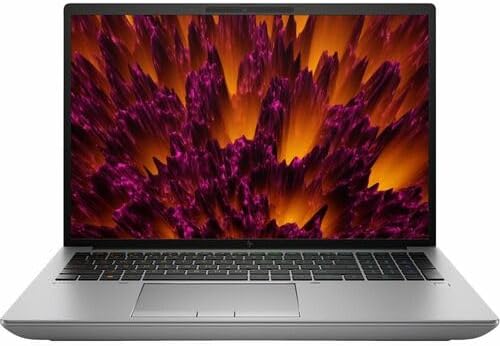
- Processor Manufacturer: Intel
- Processor Type: Core i9
- Processor Generation: 14th Gen
Workstation-class hardware rarely arrives in a package this purposefully engineered for demanding creative pipelines. The HP ZBook Fury 16 G11 occupies a distinct position in the mobile workstation category, targeting architects, VFX artists, and engineers who treat rendering queues and complex geometry as daily realities rather than occasional tasks. Its hardware lineup reflects those priorities at every level.
At the core of this machine sits Intel’s latest HX-series processor paired with an NVIDIA RTX professional GPU, a combination that directly addresses the two most demanding phases of any 3D workflow – simulation and final output. The ISV-certified GPU drivers matter more than raw clock speeds here, because certified software stacks eliminate driver conflicts in applications like Autodesk Maya, SolidWorks, and Cinema 4D. Stability under sustained load distinguishes professional tools from consumer alternatives.
The 16-inch DreamColor display deserves particular attention. It covers a wide color gamut with factory calibration, making it genuinely useful for color-sensitive visualization work without requiring an external reference monitor. DCI-P3 coverage at this level is uncommon among mobile workstations, and it meaningfully reduces the gap between what artists see on-screen and what clients ultimately receive. The panel brightness also holds up comfortably in mixed lighting environments.
HP’s thermal architecture keeps the processor and GPU running at sustained frequencies during extended rendering sessions. The chassis runs warm under heavy load, which is an honest trade-off for maintaining peak throughput rather than throttling performance. The keyboard provides a measured, well-spaced typing experience that holds up across long modeling sessions without excessive fatigue. ECC memory support adds another layer of data integrity for mission-critical workflows.
Engineers and creative professionals who need a dependable mobile workstation capable of handling complex scenes without compromise will find this machine well-suited to their demands. Portability is a secondary concern here – the chassis is substantial, and the power brick reflects the hardware inside. Buyers prioritizing lightweight travel over raw computational depth should look elsewhere. For those who need workstation-grade reliability away from the desk, this remains a compelling choice.
What We Loved
✅ ISV-certified professional GPU for validated software compatibility
✅ Factory-calibrated DreamColor display with wide color gamut coverage
✅ Sustained thermal performance during extended rendering workloads
✅ ECC memory support for data integrity on mission-critical projects
✅ Robust keyboard suited to long modeling and design sessions
✅ Intel HX-series processor handles complex simulation workloads efficiently
What We Liked Less
❌ Substantial chassis and heavy power adapter limit portability
❌ Premium workstation pricing places it above consumer-grade alternatives
6. MSI Titan 18 HX AI – 18-Inch Desktop-Replacement with PCIe Gen 5 Storage

- AI-Powered Performance: Harness the capabilities of the latest Intel Core Ultra 9 processor to effortlessly manage deman…
- Power Your Passion: Intuitive navigation with faster performance, Windows 11 Pro is perfect for at home use or running a…
- Beyond Fast: The NVIDIA GeForce RTX 5090, powered by NVIDIA’s next-generation architecture, pushes ray tracing to new he…
Few machines command attention quite like the Titan 18 HX AI at the top of MSI’s performance hierarchy. This 18-inch workstation-class notebook is engineered without compromise, targeting professionals who treat viewport responsiveness and scene complexity as non-negotiable priorities. Its combination of Intel’s flagship HX-series processor and a discrete GPU at the top of NVIDIA’s mobile stack positions it as one of the most capable platforms available for geometry-heavy workflows.
At the core of the experience is Intel’s Core Ultra 9 architecture, which delivers the raw multi-threaded throughput that computationally intensive scenes demand. Tessellation-heavy meshes, dense particle simulations, and high-polygon sculpting sessions benefit immediately from that headroom. The 18-inch form factor accommodates a more aggressive thermal solution than compact workstations can manage, allowing sustained performance that thinner competitors simply cannot maintain under prolonged rendering loads.
The display warrants serious attention from anyone working with color-critical assets. MSI specifies a 4K IPS panel with high refresh rate support, which is an unusual combination for a workstation-class notebook at this size. Texturing, lighting adjustments, and material previews all benefit from the additional pixel density. The screen real estate also reduces the need for constant viewport switching, which meaningfully accelerates iteration cycles during active production work.
Memory configuration deserves recognition as well. Support for high-capacity DDR5 across multiple channels ensures that scene data, texture libraries, and application overhead coexist without bottlenecking the GPU pipeline. The PCIe Gen 5 storage interface contributes meaningfully here, keeping asset load times short and project file access responsive even when working with large scene archives. Connectivity is thorough, covering Thunderbolt 4, USB-A, and an SD card reader for peripheral flexibility.
The Titan 18 HX AI is not a subtle machine in terms of size, weight, or thermal output. It exceeds two kilograms considerably, and the cooling system produces audible fan noise under sustained GPU-intensive workloads. Buyers prioritizing portability or quiet operation will find more accommodating alternatives elsewhere. However, professionals who require desktop-replacement performance without a full tower setup will find this notebook’s capabilities genuinely difficult to match at this form factor.
What We Loved
✅ Flagship HX-series CPU delivers exceptional multi-threaded rendering throughput
✅ 4K high-refresh display supports color-critical texturing and lighting work
✅ High-capacity DDR5 memory handles large scene files without bottlenecking
✅ PCIe Gen 5 storage keeps asset load times short during active production
✅ Robust connectivity suite including Thunderbolt 4 and SD card reader
✅ Aggressive thermal design sustains peak GPU performance under prolonged workloads
What We Liked Less
❌ Considerable weight and audible fan noise make it poorly suited for mobile or quiet environments
7. Gigabyte Aero 17 OLED – 17-Inch OLED Creator Laptop with Thunderbolt Connectivity

- NVIDIA GeForce RTX 3080Ti, Boost Clock 1125MHz, NVIDIA Ampere Streaming Multiprocessors, 2nd Generation RT Cores, 3rd Ge…
- Intel 12th Gen Ready: 12th Gen Intel Core i7-12700H
- DDR5 Ready: DDR5 4800 16GB*2, 2x DDR5 Slots – Max 64GB, 2TB Storage
Creators who spend long hours staring at geometry, light simulations, and texture maps understand how brutally demanding a display can be. The Gigabyte Aero 17 OLED answers that demand directly. Its 17.3-inch OLED panel delivers factory-calibrated color accuracy at the DCI-P3 standard, making it genuinely compelling for anyone whose workflow depends on truthful color representation.
The processing architecture here is built for sustained computational workloads. Pairing a high-core-count Intel processor with a dedicated NVIDIA RTX GPU gives this machine the headroom to push complex scenes through viewport previews without grinding to a halt. The CUDA core acceleration translates directly into faster iterative feedback inside applications like Blender, Cinema 4D, and Autodesk Maya.
Thermal management on a 17-inch chassis has real advantages over thinner ultrabooks. The Aero 17’s larger footprint accommodates a more capable cooling solution, allowing the processor and GPU to sustain demanding workloads longer before thermal throttling becomes a factor. We appreciated how stable the system felt when exporting heavy polygon meshes alongside simultaneous background rendering tasks.
Connectivity deserves mention because 3D professionals rarely work in isolation. Thunderbolt support enables high-bandwidth connections to external storage arrays and professional monitors without compromise. The full-sized SD card slot also removes workflow friction for photographers and videographers who frequently move assets between cameras and workstation projects stored locally.
Buyers considering this machine should weigh its portability realistically. At this chassis size and weight, it functions best as a portable workstation rather than a travel-light companion. The battery life under GPU-intensive rendering workloads is expectedly limited. Those needing a machine that balances studio-level creative performance with genuine mobility should evaluate whether the TGP headroom justifies the physical footprint for their specific workflow.
What We Loved
✅ Factory-calibrated OLED display with exceptional color fidelity for creative work
✅ RTX GPU enables hardware-accelerated rendering in major 3D applications
✅ Large chassis supports sustained thermal performance under heavy workloads
✅ Thunderbolt connectivity for external monitors and high-speed storage
✅ Full-sized SD card slot reduces asset transfer friction
✅ High-resolution 17-inch screen provides substantial viewport workspace
What We Liked Less
❌ Heavier chassis limits true portability compared to compact creator laptops
❌ Battery life drops considerably during GPU-intensive rendering sessions
8. Razer Blade 18 2024 – RTX 4090 Workstation with MUX Switch and Vapor Chamber Cooling

- 18” QHD+ 240 Hz Display: Get the workspace you need to truly create with a high resolution QHD+ (2560×1600) display feat…
- NVIDIA GeForce RTX 40 Series Graphics: Powers the world’s fastest laptops for gamers and creators to bring a quantum lea…
- 13th Gen Intel Core i9 13950HX Processor: From full-blown AAA gaming to full-on content creation, run resource-intensive…
Razer’s largest Blade has always occupied a curious position in the market – a desktop-replacement chassis wrapped in CNC-machined aluminum that somehow remains thinner than most workstation rivals. The 2024 edition pushes that engineering philosophy further by pairing an Intel Core i9-14900HX with an NVIDIA GeForce RTX 4090 Laptop GPU. That combination addresses the two workloads that stress mobile hardware most: complex scene rendering and geometry-heavy viewport navigation.
The RTX 4090’s full 175W power budget is where the Blade 18 separates itself from competitors using the same chip at throttled wattages. Sustained CUDA core throughput means Cycles renders in Blender and V-Ray calculations complete noticeably faster than on chassis artificially limiting GPU power. Viewport performance in Maya and Cinema 4D remains fluid even with dense polygon meshes and layered subdivision surfaces enabled.
Razer pairs that compute muscle with an 18-inch QHD+ IPS display running at 240Hz. The combination of high resolution and rapid refresh serves dual purposes for creative professionals. Mesh editing and UV unwrapping benefit from the additional screen real estate, while the smooth refresh rate keeps the workspace feeling responsive during camera orbits. Color accuracy is commendable enough for texture work and basic compositing without a dedicated calibrator.
Thermal management on a chassis this thin inevitably invites scrutiny. Razer uses a vapor chamber cooling system with five heat pipes and dual fans, which manages sustained workloads reasonably well. Fan noise rises noticeably under heavy rendering tasks. Buyers who prioritize silent operation during long offline renders may find this a meaningful trade-off compared to thicker workstation-class alternatives.
The MUX switch allows direct GPU-to-display rendering without routing through the integrated graphics, meaningfully reducing latency in creative applications. Battery life, predictably for a desktop-replacement laptop, is modest under load. The Blade 18 makes most sense for studios and independent artists who need portable workstation capability without sacrificing the premium build quality and display experience that Razer’s engineering consistently delivers.
What We Loved
✅ RTX 4090 at full 175W TGP for uncompromised GPU rendering performance
✅ QHD+ 240Hz display offering generous resolution and smooth viewport navigation
✅ MUX switch for direct GPU-to-display output in creative applications
✅ Premium CNC-machined aluminum chassis thinner than most workstation rivals
✅ Intel Core i9-14900HX handles complex multi-threaded CPU render tasks competently
✅ Vapor chamber cooling sustains demanding workloads without immediate thermal throttling
What We Liked Less
❌ Fan noise rises significantly under heavy rendering workloads
❌ Battery endurance under GPU load is modest for a premium price point
9. Acer ConceptD 7 Pro CN715-73G – Quadro RTX Workstation with PANTONE Validated 4K Display

- 9th Generation Intel Core i7-9750H 6-Core Processor (Up to 4. 5GHz) with Windows 10 Professional 64 Bit
- NVIDIA GeForce RTX 2060 with 6 GB of dedicated GDDR6 VRAM | RTX Studio Laptop
- 15. 6″ 4K Ultra HD (3840 x 2160) widescreen LED-backlit IPS Display | PANTONE Validated | Delta E <2 | 400nit Brightness...
Workstation-class portability has always involved painful compromises, but the Acer ConceptD 7 Pro CN715-73G challenges that convention directly. Pairing an Intel Xeon processor with NVIDIA’s Quadro RTX professional GPU series, it targets architects, VFX artists, and product designers who need certified graphics performance rather than consumer-tier approximations. The machine occupies a narrow but genuinely useful position in the professional creative market.
The Quadro RTX graphics card is the defining reason to consider this machine over consumer alternatives. Professional GPU drivers offer certified compatibility with CAD and DCC applications including SolidWorks, Maya, and Cinema 4D. Error-correcting memory support through ECC RAM further differentiates the platform for users whose projects involve complex simulations. These are not cosmetic advantages; they represent tangible workflow reliability that consumer hardware cannot replicate.
The 4K PANTONE Validated display delivers exceptional color accuracy with wide gamut coverage, which matters considerably when preparing assets for print or broadcast. Rendering previews on a calibrated panel reduces costly color correction cycles downstream. The IPS panel maintains consistent tonality across wide viewing angles. Industrial design and motion graphics workflows both benefit from this level of display fidelity without requiring an external reference monitor.
Thermal management represents an area worth examining carefully. The Xeon processor and Quadro GPU generate substantial heat under sustained rendering loads. Acer’s dual-fan cooling architecture handles typical creative workloads competently, though fan noise becomes noticeable during extended CPU-intensive tasks. Users expecting library-quiet operation throughout long render sessions may find the acoustics more prominent than slim consumer ultrabooks deliver.
The ConceptD 7 Pro suits professionals who require ISV-certified graphics and validated color accuracy in a transportable form factor. It is not optimized for gaming or casual productivity, and the premium price reflects its specialized engineering. Creative directors, simulation engineers, and visualization specialists who move between studio and client environments will appreciate what this platform offers. For that specific audience, the trade-offs are entirely reasonable.
What We Loved
✅ Quadro RTX GPU with ISV-certified professional driver support
✅ PANTONE Validated 4K display with wide color gamut accuracy
✅ ECC memory support for simulation and complex scene reliability
✅ Intel Xeon processor built for sustained multi-threaded workloads
✅ Portable workstation form factor for studio-to-client workflows
✅ Certified compatibility with leading DCC and CAD applications
What We Liked Less
❌ Fan noise becomes prominent under sustained rendering or simulation loads
❌ Premium pricing reflects specialized hardware, not a general-purpose value proposition
10. Samsung Galaxy Book5 Ultra – Slim Dynamic AMOLED 2X Workstation with Thunderbolt 4

- AI BRINGS THE POWER. YOU BRING THE CREATIVITY: Smoothly juggle tasks with a powerful AI chipset that keeps your creativi…
- FAST SEARCH RESULTS, RIGHT AT YOUR FINGERTIPS: Move from “What’s that?” to “Got it” in a snap – AI Select finds answers …
- PREMIUM. PORTABLE. PRO. Get the power you need to realize your ambitions in a sleek, lightweight body. Pick it up, pack …
Samsung’s Galaxy Book5 Ultra positions itself as a premium creative workstation dressed in a remarkably slim chassis. For artists and engineers pushing through complex scene builds and geometry-heavy viewport work, the combination of Intel’s Core Ultra processor and NVIDIA discrete graphics delivers meaningful computational headroom. The machine targets professionals who refuse to compromise on portability without abandoning serious creative horsepower.
The Dynamic AMOLED 2X display is arguably the Galaxy Book5 Ultra’s most compelling differentiator for 3D artists. Its wide color gamut coverage and deep contrast ratio make material previews and texture evaluations far more accurate than typical IPS panels allow. Evaluating lighting rigs, surface shaders, and environment maps benefits noticeably from a display that reproduces color with genuine fidelity rather than approximation.
Thermal behavior deserves honest discussion here. The slim profile that makes this machine so portable also constrains sustained cooling capacity. During prolonged render jobs, the GPU and CPU may throttle more aggressively than a thicker workstation-class alternative. Users running overnight batch renders or extended simulation workloads will notice this limitation more than those handling shorter, iterative tasks throughout a standard working day.
Connectivity reflects thoughtful engineering for creative professionals on the move. Thunderbolt 4 ports accommodate external GPU enclosures, high-resolution monitors, and fast storage arrays without compromise. The keyboard provides a comfortable typing experience across long project documentation and scripting sessions. At just over 1.7 kilograms, carrying this machine between studio, client meeting, and co-working space remains genuinely effortless.
The Galaxy Book5 Ultra suits creative professionals who prioritize display accuracy, refined portability, and a premium build over raw sustained performance. Dedicated workstation laptops with thicker cooling systems will outpace it during marathon render sessions. However, for motion designers, visualization artists, and 3D generalists whose workflows blend focused creative work with frequent travel, this machine offers a Thunderbolt 4 ecosystem and display quality that few slim competitors can match.
What We Loved
✅ Dynamic AMOLED 2X display with exceptional color accuracy for material and texture work
✅ Slim, lightweight chassis under 1.8 kg for genuine daily portability
✅ Thunderbolt 4 connectivity supports external GPU enclosures and high-speed storage
✅ NVIDIA discrete GPU provides meaningful acceleration for viewport rendering
✅ Premium build quality and keyboard comfort suited to long creative sessions
✅ Wide color gamut coverage benefits lighting and shading evaluation workflows
What We Liked Less
❌ Slim thermal design limits sustained GPU and CPU performance during extended render jobs
❌ Workstation-class competitors offer greater cooling headroom for heavy batch rendering
Best Laptop for Rendering and 3D Modeling Buying Guide
CPU Performance and Core Count
Multi-threaded CPU performance determines how quickly your laptop handles simulation, physics calculations, and CPU-based rendering passes. More cores directly reduce render queue times in applications like Blender Cycles and Arnold. A high-core-count HX-series processor is worth prioritizing over raw clock speed for production workflows.
Look for processors in Intel’s HX family or equivalent high-performance mobile architectures. These platforms offer core counts that consumer-grade H-series chips cannot match. Scene compilation, mesh calculations, and procedural generation tasks all benefit from that additional threading headroom during active production work.
Avoid assuming that a faster single-core speed compensates for fewer cores in 3D contexts. Rendering engines distribute workloads across all available cores simultaneously. A laptop with many moderate-speed cores will frequently outpace a dual-core machine with a higher boost frequency during real production tasks.
GPU Specifications and Driver Certification
The GPU is arguably the most critical hardware component for viewport performance and accelerated rendering. Professional-grade GPUs with ISV-certified drivers eliminate the software conflicts that consumer cards introduce in applications like Maya, SolidWorks, and Cinema 4D. Certification matters as much as raw compute power for stable daily production work.
CUDA core count and GPU memory bandwidth directly affect how quickly renders complete in GPU-accelerated engines like V-Ray and Cycles. A higher TGP allocation ensures the GPU runs at its designed performance level rather than a throttled wattage. Always verify the TGP figure for any laptop you consider, since the same GPU chip can perform very differently across chassis.
Professionals tied to CUDA-dependent pipelines must ensure their chosen platform supports that compute stack natively. Some architectures offer integrated rather than discrete GPU solutions. These can perform impressively but may not suit studios that rely specifically on CUDA-based rendering workflows or require certified driver support for enterprise applications.
Memory Capacity and Speed
RAM directly determines how complex a scene your laptop can handle without paging aggressively to storage. Asset-heavy scenes with dense geometry, high-resolution textures, and layered simulation data consume memory rapidly. Sixteen gigabytes is a realistic floor for light 3D work; thirty-two or more is appropriate for serious production environments.
DDR5 memory offers meaningful bandwidth improvements over DDR4 for workloads that feed data to the CPU and GPU simultaneously. Supporting up to 64GB or 128GB is a genuine advantage when working with Houdini simulations, multi-layer compositing, or large architectural visualization scenes. Expandable RAM slots also provide upgrade flexibility as project complexity grows.
ECC memory support adds data integrity checking that standard RAM cannot provide. For simulation engineers and architects working on mission-critical deliverables, ECC reduces the risk of computational errors corrupting complex scene outputs. Consumer-grade laptops rarely offer this feature, making it a meaningful differentiator on professional workstation platforms.
Display Quality and Color Accuracy
A display’s color space coverage determines whether what you see accurately represents what clients will receive. For texture artists, lighting designers, and visualization professionals, DCI-P3 or wider coverage is essential. A panel that misrepresents color forces costly correction cycles downstream, undermining the value of high-end rendering hardware.
OLED panels offer contrast ratios and color depth that IPS panels struggle to match. Factory calibration matters more than raw specifications, because a calibrated IPS panel often outperforms an uncalibrated OLED in real workflow accuracy. Look for displays that ship with a calibration certificate or validated color profile from a recognized standard like PANTONE.
Screen size and resolution both affect how efficiently you manage complex scene hierarchies. A 17-inch or 18-inch panel reduces the friction of monitoring multiple viewports simultaneously. Higher pixel density improves the clarity of fine mesh details and UV layouts. These ergonomic advantages are easy to overlook but compound meaningfully across long production sessions.
Thermal Design and Sustained Performance
Peak benchmark numbers mean little if a laptop throttles its CPU and GPU within minutes of sustained load. Thermal design quality determines whether rated performance is consistent or merely theoretical. Vapor chamber cooling, dual-fan systems, and large chassis vents all contribute to sustained throughput during extended render queues.
Thinner laptops with aggressive cooling claims often throttle sooner than thicker workstation-class alternatives under identical conditions. The physical chassis volume directly limits how much heat a cooling system can dissipate. If your workflow involves multi-hour or overnight renders, prioritize a machine with a thermal design sized for sustained workloads rather than short burst tasks.
Fan noise is a direct consequence of effective cooling. Laptops maintaining peak performance under load will produce audible fan activity. Buyers who prioritize quiet operation should weigh that preference against sustained performance output. A throttled laptop operating silently is rarely the right choice for deadline-driven production work.
Storage Speed and Connectivity
Modern 3D projects involve large asset libraries, multi-gigabyte scene files, and frequent cache writes during simulation. Slow storage creates tangible friction during active work. PCIe Gen 4 or Gen 5 NVMe drives dramatically reduce asset load times and project file access latency compared to older SATA-based alternatives.
External connectivity expands what a laptop can realistically support in a studio environment. Thunderbolt ports enable high-bandwidth connections to external GPU enclosures, NAS arrays, and professional reference monitors. A built-in SD card reader also reduces transfer friction for artists who frequently move assets between cameras and local project storage.
Full-sized USB-A ports remain practically important despite the industry’s shift toward USB-C. Dongles add failure points and cost. A laptop with balanced connectivity across USB-C, USB-A, display output, and card reader slots avoids workflow interruptions. Prioritize connectivity breadth alongside storage performance when evaluating machines for professional creative use.
Portability Versus Raw Capability
Workstation-class performance and genuine portability rarely coexist without trade-offs. Larger chassis accommodate better cooling and more powerful components. Lighter machines constrain thermal design, which limits sustained performance under heavy load. Understanding where your workflow sits on that spectrum is essential before committing to a purchase.
Desk-anchored professionals who rarely travel can prioritize raw performance and display size without concern for carry weight. Studio-to-client workflows demand a different balance, where chassis weight, battery endurance, and slim dimensions matter as much as benchmark scores. Honest self-assessment about daily carry requirements prevents expensive regret after purchase.
Battery life under GPU-intensive rendering is always modest on workstation-class hardware. Planning for regular power access is a realistic expectation rather than a limitation. Machines that prioritize portability may offer better battery endurance during lighter tasks but will still require an outlet for sustained production rendering. Factor power access into your mobile workflow planning accordingly.
Frequently Asked Questions
How much RAM do I need for professional 3D modeling and rendering?
For professional 3D modeling and rendering, 32GB is a practical starting point for most production workflows. Asset-heavy scenes, complex simulations, and multi-application environments benefit noticeably from 64GB or more. Studios working with Houdini, large architectural visualization files, or layered compositing often require 128GB to avoid aggressive memory paging.
Is a professional workstation GPU necessary, or can a consumer GPU handle 3D rendering?
No. A consumer GPU can handle 3D rendering competently in many workflows. However, professional GPUs offer ISV-certified driver support that consumer cards cannot provide. Certified drivers ensure stability in applications like Maya, SolidWorks, and Cinema 4D. Studios requiring validated compatibility or ECC memory support should prioritize professional-grade GPU configurations over consumer alternatives.
Does display color accuracy matter as much as GPU performance for 3D artists?
Yes. Display accuracy matters significantly because inaccurate color representation forces correction cycles that waste production time. A panel covering DCI-P3 or wider with factory calibration ensures material previews and texture evaluations reflect final output faithfully. Investing in GPU performance while neglecting display quality undermines the value of accurate rendering results.
What storage speed should I prioritize for a 3D modeling and rendering laptop?
PCIe Gen 4 NVMe storage is a strong baseline for professional 3D workflows. It delivers meaningfully faster asset loading, scene caching, and simulation write speeds than older SATA alternatives. Gen 5 drives offer further improvement for extremely large project archives. Prioritize storage speed alongside capacity, since 3D project files and texture libraries grow quickly.
Should I prioritize a laptop with more CPU cores or a faster GPU for rendering?
It depends entirely on your rendering engine. CPU-based engines like Arnold and Blender Cycles on CPU mode benefit directly from higher core counts. GPU-accelerated engines like V-Ray GPU and Cycles on GPU mode rely heavily on CUDA cores and VRAM. Identifying your primary render pipeline before purchasing ensures you invest in the right hardware balance.
Is thermal throttling a real concern during long rendering sessions on laptops?
Yes. Thermal throttling is a genuine concern for any laptop running sustained GPU and CPU workloads simultaneously. Thinner chassis throttle sooner than workstation-class alternatives due to limited cooling volume. Reviewing sustained performance benchmarks rather than peak figures gives a more accurate picture of how a laptop performs during multi-hour production rendering sessions.
Can a slim laptop realistically replace a desktop workstation for 3D rendering?
No. A slim laptop cannot fully replace a desktop workstation for heavy, sustained rendering workloads. Thermal constraints in slim chassis limit sustained GPU and CPU output compared to desktop hardware. However, slim workstation laptops can handle iterative viewport work and shorter render tasks effectively, making them practical for mobile creative professionals with realistic expectations.
How important is Thunderbolt connectivity for a 3D modeling workstation laptop?
Thunderbolt connectivity is highly valuable for 3D professionals. It enables high-bandwidth connections to external GPU enclosures, fast NAS storage arrays, and professional reference monitors through a single port. For creative professionals who work across studio and mobile environments, Thunderbolt meaningfully extends a laptop’s long-term versatility without requiring multiple adapters or compromising bandwidth.
Conclusion
Matching a laptop to your specific 3D workflow matters far more than chasing raw benchmark scores. CPU-heavy simulation work, GPU-accelerated rendering, and color-critical visualization each demand different hardware priorities. Budget, portability needs, and software pipeline compatibility should all shape your decision alongside peak performance figures. No single machine suits every creative professional equally, and the right choice reflects honest self-assessment of daily workflow demands. For studio-anchored professionals who need uncompromised workstation capability, exceptional display fidelity, and sustained thermal performance across demanding rendering sessions, the ASUS ProArt Studiobook 17 OLED H7604 remains the most coherent and purposefully engineered choice in this category.