
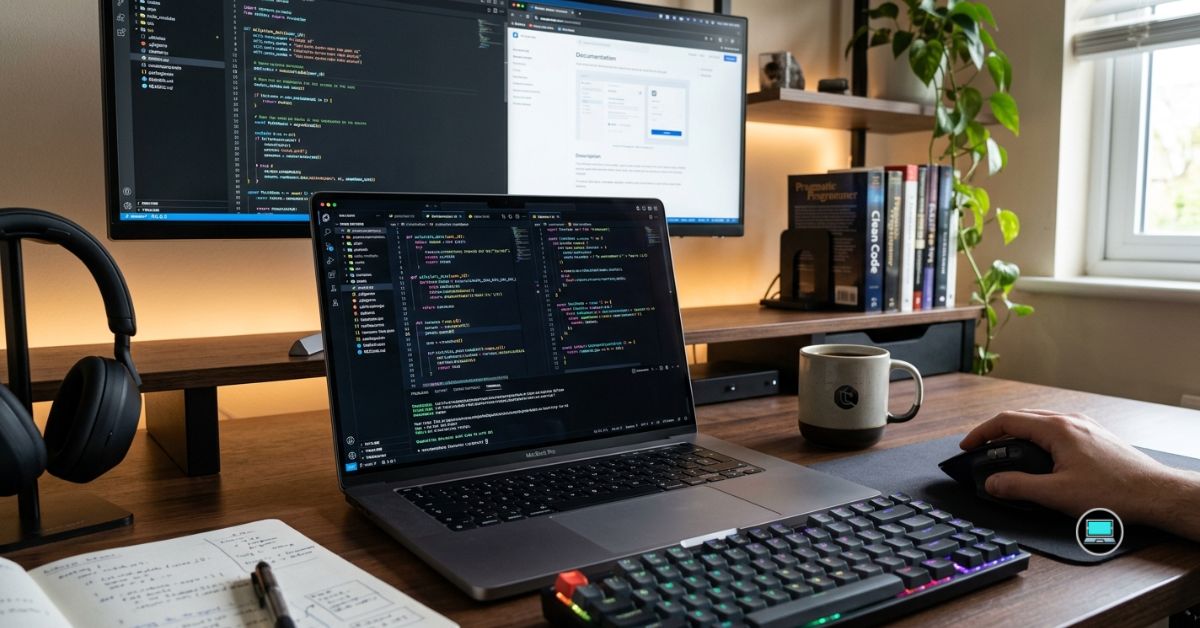
Buying a laptop with the fastest processor does not automatically make it the best machine for writing code. The best laptop features for programming are often the ones you notice after eight hours of debugging, compiling projects, and jumping between terminals, IDEs, documentation, and browser tabs. A comfortable keyboard, a sharp display, and dependable battery life can improve productivity far more than an extra benchmark point.
After testing laptops across software development, web development, data science, mobile app development, and machine learning projects, we found that certain features consistently made coding more enjoyable. The following are the laptop features that genuinely matter, along with our favorite implementation of each one.
Table of Contents
1. Comfortable Keyboard – Overall Best Laptop Feature for Programming
No matter how powerful a laptop becomes, every line of code still begins with the keyboard. After thousands of hours spent inside Visual Studio Code, IntelliJ IDEA, PyCharm, and terminal windows, we have learned that typing comfort directly affects productivity.
A great programming keyboard should provide consistent key travel, satisfying tactile feedback, and a layout that keeps your hands comfortable throughout the day. We noticed that laptops with shallow or inconsistent keyboards caused fatigue much sooner, especially during long debugging sessions or when writing large amounts of code.
Key spacing also plays an important role. Well-positioned modifier keys, responsive arrow keys, and a logical function row make navigation feel effortless. These small details become surprisingly important when constantly switching between shortcuts, terminals, and multiple development environments.
Although every programmer develops personal preferences, we consistently found ourselves gravitating toward laptops that allowed us to forget about the keyboard entirely and focus exclusively on solving problems.
Our Favorite Implementation: Lenovo ThinkPad X1 Carbon Gen 13
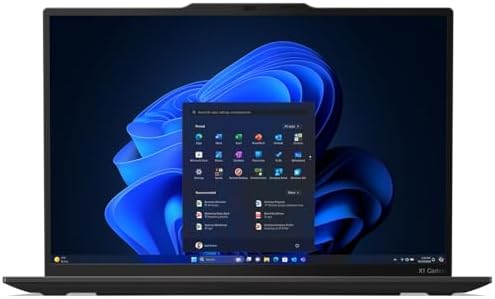
- Ultra-light & Premium Build: Weighing just0.98 kg (≈ 2.16 lb), this is the lightest 14″ ThinkPad ever — perfect for freq…
- Cutting-Edge Intel Performance + AI Ready: Powered by the Intel Core Ultra 7 258V with integrated Intel Arc Graphics and…
- Stunning 14″ 2.8K OLED Display: 2880×1800 resolution, 16:10 aspect ratio, OLED panel with 400 nits brightness, 100% DCI-…
The ThinkPad keyboard continues to set the benchmark for programming laptops. Excellent key travel, outstanding tactile feedback, and a spacious layout make it one of the few keyboards we genuinely enjoy using for entire workdays. Even after marathon coding sessions, it remained remarkably comfortable.
What Impressed Us Most
✅ Exceptional typing comfort
✅ Excellent key travel
✅ Well-spaced keyboard layout
✅ Comfortable for extended coding sessions
✅ Industry-leading typing experience
What Prevented a Higher Rating
❌ Some users may prefer a larger numeric keypad
2. High-Resolution Anti-Glare Display – Best for Long Coding Sessions
Developers spend far more time reading code than writing it, making display quality one of the most underrated aspects of a programming laptop. A sharp screen reduces eye strain, improves readability, and makes it easier to work with multiple files simultaneously.
Higher resolutions allow more code to remain visible without constant scrolling. We particularly appreciated displays that comfortably accommodated split-screen workflows, documentation, terminals, and IDE windows without feeling cramped.
The anti-glare coating also proved invaluable. During testing in brightly lit offices and coffee shops, matte displays consistently reduced reflections, allowing us to concentrate on development instead of constantly adjusting screen angles.
Brightness and color accuracy matter less than consistency for programming, but they still contribute to an enjoyable daily experience. The best coding displays simply disappear into the background and allow your attention to remain fixed on the code.
Our Favorite Implementation: Dell XPS 16

- Processor: Inte.l Core Ultra 7 155H (16 cores, up to 4.8 GHz)
- Graphics Card: NVIDI.A GeForce RTX 4060, 8 GB GDDR6, 50 W
- Display: 16.3″, Touch 4K OLED, 400 nit, 48-90Hz, InfinityEdge, Low Blue Light
The Dell XPS 16 pairs a sharp high-resolution display with excellent brightness and surprisingly effective reflection control. Whether we were reviewing thousands of lines of code or working across multiple windows, the screen remained comfortable from morning until late evening.
What Impressed Us Most
✅ Crisp text rendering
✅ Excellent screen brightness
✅ Effective anti-glare performance
✅ Spacious workspace
✅ Comfortable for extended coding sessions
What Prevented a Higher Rating
❌ High-resolution displays consume more battery than lower-resolution alternatives
3. Long Battery Life – Best for Mobile Developers
Few things interrupt productivity more quickly than searching for a power outlet halfway through a productive coding session. Battery life may not influence benchmark results, but it dramatically changes how freely you can work throughout the day.
We repeatedly appreciated laptops that allowed us to attend meetings, write code, test applications, and review pull requests without constantly checking the battery percentage. Long endurance also proved invaluable while traveling, attending conferences, or working remotely.
Efficient processors have transformed what modern laptops can achieve. Today’s best systems remain responsive even while running IDEs, Docker containers, browsers filled with documentation, and communication tools simultaneously.
Perhaps the greatest advantage of exceptional battery life is psychological. Once charging stops becoming a daily concern, the laptop simply feels more dependable.
Our Favorite Implementation: Apple MacBook Pro 14 (M4 Pro)

- SUPERCHARGED BY M4 PRO OR M4 MAX — The 14-inch MacBook Pro with the M4 Pro or M4 Max chip gives you outrageous performan…
- CHAMPION CHIPS — The M4 Pro chip blazes through demanding tasks like compiling millions of lines of code. M4 Max can han…
- BUILT FOR APPLE INTELLIGENCE—Apple Intelligence is the personal intelligence system that helps you write, express yourse…
Apple continues to lead in battery efficiency. During our testing, the MacBook Pro 14 consistently handled full development workloads while delivering outstanding endurance. Even with multiple development tools running, we rarely worried about carrying the charger.
What Impressed Us Most
✅ Outstanding battery endurance
✅ Excellent performance on battery power
✅ Quiet operation
✅ Reliable all-day productivity
✅ Efficient hardware and software integration
What Prevented a Higher Rating
❌ Premium hardware offers limited upgradeability
4. Powerful Multi-Core Processor – Best for Compiling Large Projects
Modern software development rarely involves a single application running in isolation. During our testing, we frequently had Visual Studio Code, IntelliJ IDEA, Docker, multiple browsers, databases, virtual machines, and communication tools open simultaneously. Those workloads quickly demonstrated why a capable processor remains one of the most valuable features for programmers.
A modern multi-core CPU dramatically reduces compile times, speeds up dependency installation, and makes multitasking feel effortless. Large C++, Java, .NET, and Android projects particularly benefited from additional processing cores. Even simple tasks like switching between applications felt noticeably smoother on higher-end processors.
We also appreciated processors that maintained their performance during sustained workloads. Long compile sessions can expose weak cooling systems, causing processors to throttle and slowing development. The best CPUs continued performing consistently without excessive fan noise or dramatic temperature spikes.
While web developers may not always require flagship processors, software engineers working with containers, virtual machines, AI models, or enterprise applications will quickly notice the difference.
Our Favorite Implementation: ASUS ROG Zephyrus G16

- Ultra 9 + RTX 5070 Performance–The all-around gaming laptop is powered by an Intel Core Ultra 9 285H processor and NVID…
- 16″ 2.5K OLED 240Hz Display–The 16-inch ROG Nebula OLED display delivers 2.5K resolution, 240Hz refresh rate, 0.2ms res…
- Slim, Light, and Ready to Move–ROG Zephyrus G16 is designed for portable performance, this silm laptop features a premi…
The ASUS ROG Zephyrus G16 combines a powerful Intel Core Ultra 9 processor with excellent cooling, allowing demanding development environments to run smoothly for hours. Large projects compiled quickly, virtualization remained responsive, and the laptop never felt overwhelmed even during intensive workloads.
What Impressed Us Most
✅ Excellent compile performance
✅ Smooth multitasking
✅ Strong sustained processing power
✅ Excellent thermal management
✅ Handles demanding development environments with ease
What Prevented a Higher Rating
❌ High-performance processors consume more battery under heavy workloads
5. Upgradeable RAM and SSD – Best for Future-Proofing
Software development has a habit of becoming more demanding over time. The laptop that feels fast today may struggle a few years later as IDEs grow larger, projects become more complex, and development tools require additional resources. That reality makes upgradeability one of the smartest long-term investments a programmer can make.
Being able to increase memory or replace storage dramatically extends the useful life of a laptop. Throughout our testing, machines with accessible components provided peace of mind because they could evolve alongside our workloads rather than forcing a complete replacement.
Storage upgrades proved especially valuable. Projects, Docker images, virtual machines, SDKs, and local databases consume space surprisingly quickly. Expanding from 1TB to 2TB or beyond often felt far more practical than constantly managing disk space.
Memory upgrades also became increasingly valuable when working with virtualization, AI development, and multiple development environments simultaneously. Instead of replacing the entire laptop, we simply appreciated having the option to grow with our needs.
Our Favorite Implementation: Framework Laptop 13
Few laptops embrace upgradeability like the Framework Laptop 13. Memory, storage, ports, and even the motherboard can be replaced or upgraded, making it one of the most future-proof laptops available for programmers who intend to keep their machines for many years.
What Impressed Us Most
✅ Exceptional upgradeability
✅ User-friendly repairs
✅ Modular expansion ports
✅ Excellent long-term value
✅ Sustainable design philosophy
What Prevented a Higher Rating
❌ Performance configurations are more limited than dedicated workstations
6. Excellent Linux Compatibility – Best for Open-Source Developers
Many programming workflows feel more natural on Linux, especially when working with servers, containers, automation, and open-source software. Unfortunately, not every laptop offers the same level of compatibility. Driver issues, unsupported hardware, and inconsistent firmware can quickly become frustrating.
The best programming laptops simply allow Linux to work without unnecessary troubleshooting. Wi-Fi, Bluetooth, suspend functionality, webcams, fingerprint readers, and display scaling should operate as expected from the moment installation finishes.
During our testing, laptops with strong Linux compatibility consistently required less maintenance. Ubuntu, Fedora, Debian, and Arch Linux all behaved predictably, allowing us to focus on development instead of solving hardware problems.
Whether building cloud applications, managing Kubernetes clusters, or contributing to open-source projects, dependable Linux support proved to be one of the most valuable features any programming laptop could offer.
Our Favorite Implementation: Lenovo ThinkPad T14 Gen 5

- Premium performance for business, study, and everyday productivity — Powered by Intel Core Ultra 7 165U vPro processor, …
- Crisp 14” WUXGA display for work and entertainment — 1920×1200 resolution delivers sharp visuals, extra vertical space f…
- Advanced security for peace of mind — Built-in face recognition, IR camera with privacy shutter, and smart card reader h…
The Lenovo ThinkPad T14 Gen 5 continues the ThinkPad tradition of outstanding Linux support. Ubuntu and Fedora installed effortlessly during our testing, and nearly every hardware component functioned correctly without requiring manual fixes or community workarounds.
What Impressed Us Most
✅ Excellent Linux compatibility
✅ Reliable driver support
✅ Stable hardware integration
✅ Strong enterprise reputation
✅ Outstanding developer experience
What Prevented a Higher Rating
❌ Enterprise-focused configurations can become expensive
7. Multiple Ports – Best for Professional Developers
Wireless connectivity has improved dramatically, but software development still relies on physical connections more often than many people realize. External monitors, Ethernet adapters, SSDs, security keys, development boards, and debugging hardware all compete for available ports throughout a typical workday.
Laptops with generous connectivity immediately made our workflow more efficient. We spent less time searching for dongles and more time writing code. Having Thunderbolt, USB-A, HDMI, and high-speed USB-C ports available simultaneously proved surprisingly liberating.
Developers working with embedded systems appreciated being able to connect microcontrollers directly. Mobile developers frequently relied on USB connections for testing physical devices, while cloud engineers benefited from fast external storage and docking stations.
A well-equipped laptop simply removes unnecessary obstacles from the development process.
Our Favorite Implementation: HP ZBook Power 16 G11

- Processor Manufacturer: AMD
- Processor Type: Ryzen 7
- Processor Model: 8845HS
The HP ZBook Power 16 G11 offers one of the most complete port selections available on a modern laptop. During our testing, it comfortably handled multiple external displays, high-speed storage, development boards, and peripherals without forcing us to carry additional adapters.
What Impressed Us Most
✅ Excellent port selection
✅ Multiple high-speed USB connections
✅ Great support for external displays
✅ Ideal for professional workstations
✅ Reduces reliance on adapters
What Prevented a Higher Rating
❌ Larger chassis sacrifices some portability
8. Quiet Cooling System – Best for Distraction-Free Coding
Performance means very little if the cooling system constantly reminds you the laptop is working. During our testing, we discovered that quieter machines naturally encouraged longer, more productive coding sessions because they simply faded into the background.
Software development rarely pushes hardware as aggressively as video editing or gaming, yet compiling projects, running virtual machines, and managing Docker containers can still generate sustained workloads. The best cooling systems maintained comfortable temperatures without forcing the fans into an endless cycle of loud bursts.
Noise also affects concentration more than many programmers realize. Whether working in a shared office, library, or late at night at home, quieter laptops created a noticeably more pleasant environment. We found ourselves focusing entirely on the code instead of the hardware beneath our fingertips.
A well-designed cooling system is not just about lower temperatures. It is about maintaining consistent performance while remaining unobtrusive throughout the workday.
Our Favorite Implementation: Microsoft Surface Laptop 7

- ULTRA-PORTABLE LAPTOP – Boost productivity and creativity with the Microsoft Surface Laptop 7 for Business in a sleek, u…
- POWERFUL PERFORMANCE – Powered by Snapdragon X Plus processor with Qualcomm Adreno Graphics, this system delivers fast, …
- EXCELLENT VISUAL – Enjoy stunning visuals on the 13.8″ 2K+ (2304 x 1536) touchscreen with 120Hz refresh rate. USB4 ports…
The Microsoft Surface Laptop 7 consistently impressed us with how quietly it handled everyday development workloads. Writing code, running IDEs, compiling projects, and browsing documentation rarely caused noticeable fan noise, making it one of the most relaxing programming laptops we tested.
What Impressed Us Most
✅ Exceptionally quiet operation
✅ Comfortable surface temperatures
✅ Consistent performance
✅ Excellent productivity experience
✅ Premium build quality
What Prevented a Higher Rating
❌ Sustained heavy workloads eventually activate the cooling system
9. Large 16-inch Display – Best for Multitasking
Every programmer eventually reaches the point where a single application is never enough. During our testing, we often worked with an IDE, terminal, browser, documentation, database tools, and communication platforms simultaneously. A larger display made that workflow dramatically more comfortable.
The additional screen space reduced the need to constantly switch between windows. Split-screen coding became significantly more practical, and reviewing documentation while writing code felt natural rather than cramped.
We also appreciated the extra vertical space. More visible lines of code meant less scrolling, making it easier to understand larger functions and maintain context while debugging complex applications.
Although larger displays naturally reduce portability, the productivity gains quickly outweighed that compromise whenever we settled in for a full day of development.
Our Favorite Implementation: LG gram Pro 16

- Pro AI Anywhere – LG gram Pro pairs ultra-light design with powerful AI performance. Weighing 2.7 lbs. and featuring a 1…
- Welcome to Copilot on Windows – Windows 11 brings you closer to what you love. Pursue your passions and maximize your pr…
- Hybrid AI: On-Device and Cloud Synergy – LG gram now includes a hybrid AI solution that blends on-device intelligence wi…
The LG gram Pro 16 combines a spacious 16-inch display with an incredibly lightweight chassis. It provided ample room for multitasking without becoming cumbersome to carry between home, the office, and client meetings.
What Impressed Us Most
✅ Spacious coding workspace
✅ Excellent multitasking experience
✅ Lightweight for its size
✅ Comfortable split-screen workflows
✅ Sharp, easy-to-read display
What Prevented a Higher Rating
❌ Larger laptops occupy more desk space
❌ Less convenient for frequent travel than 14-inch models
10. Fast Wi-Fi 7 and Thunderbolt 4/5 Connectivity – Best for Cloud Development
Programming increasingly extends far beyond the local machine. Cloud deployments, remote repositories, virtual development environments, and high-speed external storage have become everyday tools, making modern connectivity one of the most valuable laptop features.
Fast wireless networking noticeably reduced waiting times when cloning repositories, downloading development packages, synchronizing cloud environments, and transferring large datasets. Equally important was Thunderbolt connectivity, which simplified docking, external monitor support, and high-speed SSD access.
Throughout our testing, laptops with the latest connectivity standards felt more prepared for modern development workflows. Connecting multiple displays, external GPUs, development boards, and enterprise docking stations became effortless.
This feature may not attract the same attention as processors or memory, but it quietly improves productivity every single day.
Our Favorite Implementation: Dell Precision 5690
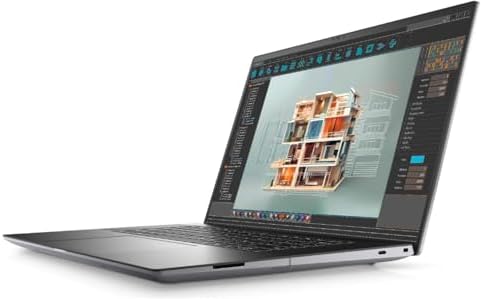
- With 32 GB of memory, users can run many programs without losing execution
- 16″ display with 1920 x 1200 resolution showcases movies, games and photos with impressive clarity
- 1 TB SSD for spacious storage with much faster data transfer speed than standard hard drives
The Dell Precision 5690 offers outstanding connectivity through Wi-Fi 7 and multiple Thunderbolt ports. It handled enterprise docking stations, external storage, multiple displays, and high-speed networking with ease, making it an excellent choice for developers working in modern cloud environments.
What Impressed Us Most
✅ Outstanding connectivity options
✅ Fast wireless networking
✅ Excellent Thunderbolt support
✅ Ideal for multi-monitor setups
✅ Future-ready hardware
What Prevented a Higher Rating
❌ Advanced connectivity features may be unnecessary for casual programmers
Frequently Asked Questions
Which laptop feature is most important for programming?
A comfortable keyboard remains the single most important feature because programmers spend thousands of hours typing code. Even the most powerful hardware cannot compensate for an uncomfortable typing experience.
Is 16GB RAM enough for programming?
Yes, for many web development and general programming tasks. However, developers using virtual machines, Docker, Android Studio, or AI frameworks will benefit significantly from 32GB or more.
Do programmers need a dedicated graphics card?
Not usually. Most programming workloads rely more heavily on the processor and memory. Dedicated graphics become valuable for game development, machine learning, 3D programming, and GPU-accelerated computing.
Is a 16-inch laptop better than a 14-inch laptop for coding?
A 16-inch display provides more workspace for multitasking and viewing larger sections of code, while a 14-inch laptop offers greater portability. The better choice depends on whether productivity or mobility is the higher priority.
Why is Linux compatibility important?
Many development tools, cloud platforms, and server environments are built around Linux. Strong Linux compatibility reduces setup time and helps developers avoid hardware-related issues.
Should programmers prioritize battery life or performance?
Ideally, a laptop should balance both. Developers who work remotely or travel frequently will appreciate long battery life, while those compiling large projects or running virtual machines should place greater emphasis on processing power.
Conclusion
The best programming laptop is not defined by a single specification. It is the combination of thoughtful features that allows developers to remain productive throughout long coding sessions without unnecessary distractions.
Among all the features we evaluated, a comfortable keyboard had the greatest impact on our daily experience. Strong battery life, a high-quality display, dependable cooling, and modern connectivity all followed closely behind, transforming ordinary laptops into excellent development machines.
Ultimately, the most valuable programming laptop is the one that quietly supports your workflow. When the keyboard feels natural, the display remains comfortable, the battery lasts all day, and the hardware keeps pace with your projects, you stop thinking about the laptop and focus entirely on building great software.