
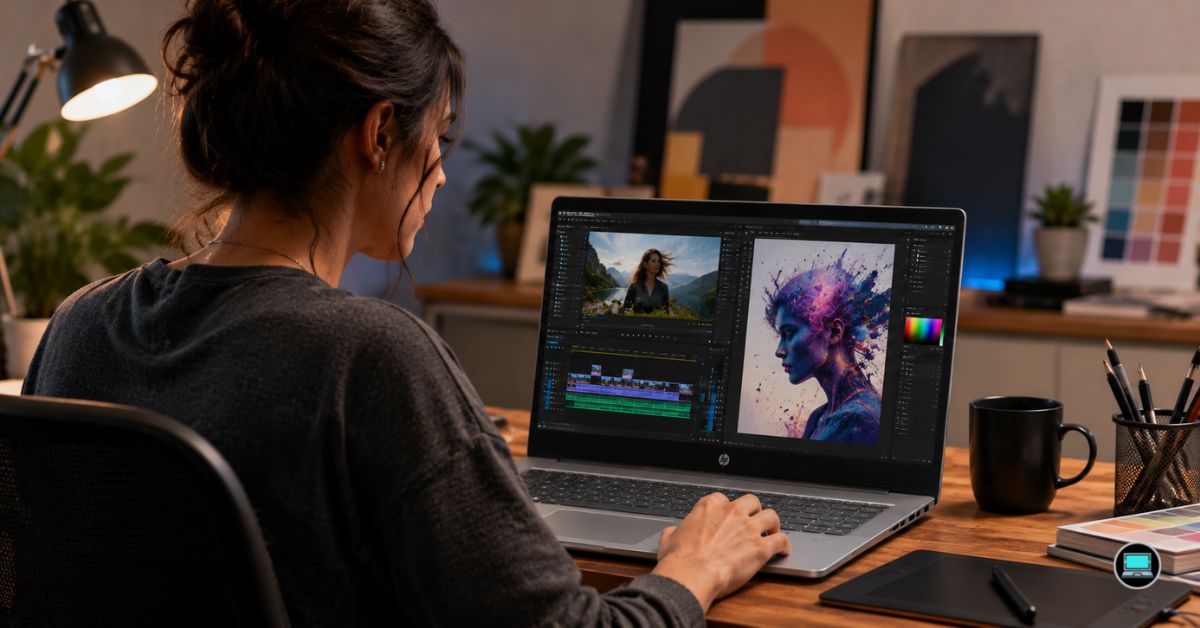
Creative work rarely stays inside a single application. One moment you are refining a logo in Illustrator, the next you are color grading footage in Premiere Pro or building motion graphics in After Effects. That overlap shaped our search for the best HP laptop for video editing and graphic design, where display quality, thermal stability, and overall comfort often mattered more than chasing the highest benchmark numbers.
Over several weeks, we alternated between Premiere Pro, DaVinci Resolve, Photoshop, Illustrator, Lightroom, and Blender while working with high-resolution images, multicam timelines, and GPU-accelerated effects. Some laptops distinguished themselves through sheer power, while others quietly earned our appreciation through their displays, battery life, and the way they disappeared into the background and allowed creativity to take center stage.
Table of Contents
1. HP Spectre Foldable PC – Overall Best HP Laptop for Video Editing and Graphic Design

- [Upgraded Memory & Storage & OS] Upgraded to 16GB DDR5 SDRAM 4800 MHz 1TB PCI-E NVMe,Solid State Drive for Storage.
- [Processor and Graphics] Intel Evo Core Ultra 7 155H 16-Core Processor (Up to 4.8 GHz with Intel Turbo Boost Technology …
- [14″ 2880×1800 120Hz Display] 14″ (2880 x 1800) 120Hz Touchscreen 400 nits UWVA, edge-to-edge glass, micro-edge, anti-re…
Most laptops force creative professionals to adapt to a fixed workspace. The Spectre Foldable PC approached the problem differently, and after spending time with it, we realized just how refreshing that flexibility could be.
Our review configuration featured an Intel Core Ultra processor, 32GB RAM, and a breathtaking 17-inch OLED panel that transforms between multiple modes. What initially seemed like an unconventional design gradually became one of the machine’s greatest strengths. Reviewing storyboards, editing images, and managing complex timelines felt remarkably natural thanks to the expansive display.
Photoshop and Illustrator workflows benefited enormously from the extra canvas. Having multiple panels open without feeling constrained improved productivity, while the exceptional contrast and color reproduction inspired confidence during design work. Gradients looked smooth, blacks appeared wonderfully deep, and text remained incredibly sharp.
Premiere Pro proved equally enjoyable. Although the machine is not intended to compete with heavy workstations, it handled social media projects, marketing videos, and lighter 4K timelines comfortably. The experience felt polished rather than compromised.
What surprised us most was how quickly the unusual design stopped feeling unusual. Within days, it simply felt like one of the most enjoyable creative devices we had used.
What Delivered in Real-World Use
✅ Stunning OLED display
✅ Flexible form factor for creative workflows
✅ Large workspace for multitasking
✅ Excellent Photoshop and Illustrator experience
✅ Premium construction
Areas That Need Refinement
❌ Not designed for intensive Blender rendering
❌ Premium hardware limits upgradeability
2. HP ZBook Create G7 – Best Creator Workstation Alternative
Long before creator laptops became fashionable, HP quietly built machines aimed directly at professionals working with demanding media applications. The ZBook Create G7 remains one of those underrated systems that deserves far more recognition.
Our test unit paired an Intel Core i9 processor with GeForce RTX graphics, 32GB RAM, and a color-accurate display. Even several generations later, the laptop still felt remarkably capable when juggling Premiere Pro, Photoshop, and Illustrator simultaneously.
Video editing performance impressed us immediately. Timeline scrubbing remained smooth, exports completed quickly, and GPU acceleration made advanced effects feel far more responsive than expected. The machine handled After Effects projects with confidence, while Blender viewport navigation remained fluid.
Thermals also stood out. Rendering sessions naturally increased fan noise, but performance stayed consistent. The chassis never gave the impression that it was struggling to keep up.
What ultimately made the ZBook Create memorable was balance. It delivered workstation reliability without becoming excessively bulky or sacrificing portability.
What Delivered in Real-World Use
✅ Reliable RTX acceleration
✅ Strong Premiere Pro performance
✅ Excellent thermal stability
✅ Comfortable keyboard
✅ Workstation-grade build quality
Areas That Need Refinement
❌ Older hardware trails modern flagship systems
3. HP ENVY 15 – Best Creator Value Option

- Model: HP ENVY x360 15-fe0053dx Processor: Intel Core i7 1355U Display: 15.6”, 1920 x 1080 pixels, RAM and Disk: 16GB 51…
Some laptops do not need to dominate benchmarks to become favorites. The ENVY 15 won us over because it consistently delivered a pleasant creative experience without demanding workstation-level investment.
Our review configuration featured an Intel Core i7 processor, RTX 3060 graphics, 32GB RAM, and a gorgeous OLED display. The screen immediately became one of the highlights. Colors appeared vibrant, contrast was excellent, and reviewing photographs or video footage felt genuinely enjoyable.
Adobe Creative Cloud applications felt right at home. Photoshop layer manipulation remained smooth, Illustrator projects opened quickly, and Premiere Pro delivered respectable export speeds. Even Blender proved surprisingly usable for moderate workloads.
Long editing sessions also revealed another strength. The keyboard remained comfortable, and the chassis maintained respectable temperatures under sustained workloads. It never felt like the machine was fighting against the software.
For freelancers, YouTubers, and creative enthusiasts, the ENVY 15 struck an appealing balance between capability and practicality.
What Delivered in Real-World Use
✅ Beautiful OLED panel
✅ Strong Adobe Creative Cloud performance
✅ Comfortable long-session ergonomics
✅ Smooth Premiere Pro workflow
✅ Excellent overall balance
Areas That Need Refinement
❌ Fan noise increases during prolonged rendering
❌ RTX 3060 limits heavier 3D workloads
4. HP Pavilion Aero 13 – Best Ultraportable Creator Laptop
There were days when we needed nothing more than a lightweight machine that could move effortlessly between client meetings, coffee shops, and editing sessions. The Pavilion Aero 13 consistently became the laptop we reached for during those moments.
Our review configuration paired an AMD Ryzen processor with Radeon graphics, 32GB RAM, and a sharp 13.3-inch display. The first thing that stood out was the weight. Carrying the machine around felt almost effortless, and after several days of commuting, we appreciated how little space it occupied inside a bag.
Despite its compact dimensions, Photoshop and Illustrator performed surprisingly well. Layer-heavy projects remained responsive, and Lightroom workflows felt fluid. Premiere Pro naturally demanded some compromises, but proxy workflows and lighter 4K timelines remained perfectly manageable.
Battery life proved to be another pleasant surprise. Long editing sessions away from a desk felt realistic, and the laptop remained quiet enough to use comfortably in shared spaces.
Although professional video editors will require more horsepower, the Pavilion Aero 13 impressed us with just how much creativity it enabled from such a lightweight package.
What Delivered in Real-World Use
✅ Exceptional portability
✅ Strong Ryzen efficiency
✅ Comfortable battery life
✅ Responsive Photoshop and Illustrator performance
✅ Quiet operation
Areas That Need Refinement
❌ Smaller display limits complex timelines
❌ Integrated graphics restrict advanced effects work
5. HP EliteBook 850 G11 – Best Large-Screen Business Creator Laptop
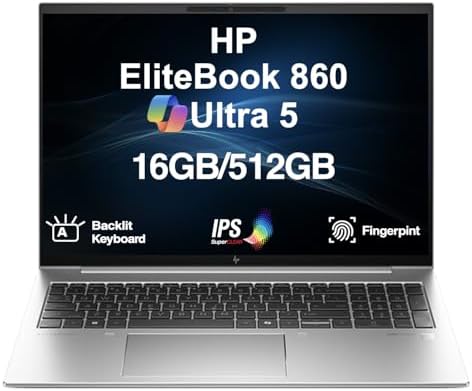
- [POWER, PRODUCTIVITY, AND BUSINESS-CLASS PERFORMANCE] – The HP EliteBook 860 G11 is engineered for professionals who dem…
- [FAST, EFFICIENT POWER FOR EVERYDAY TASKS] – Powered by a 15th Gen Intel Core Ultra 5-135U processor (up to 4.4GHz, 12MB…
- [SMOOTH MULTITASKING AND EXPANDED CONNECTIVITY] – Equipped with 16GB DDR5 RAM and a speedy 512GB PCIe NVMe SSD for quick…
Not every creator needs a gaming machine or workstation. Sometimes reliability, battery life, and comfort matter more. The EliteBook 850 G11 quickly earned our respect because it consistently delivered an enjoyable experience during long editing sessions.
Powered by an Intel Core Ultra processor with Intel Arc graphics and 32GB RAM, the machine felt surprisingly capable in Adobe applications. Photoshop remained smooth, Illustrator projects loaded quickly, and Premiere Pro handled lighter editing tasks without complaint.
What we appreciated most was the keyboard. Hours spent organizing footage, editing scripts, and refining graphics rarely resulted in fatigue. The spacious display also made multitasking easier, allowing us to keep timelines, panels, and reference material visible simultaneously.
Battery life ranked among the strongest in this roundup. Even after a day filled with meetings, creative work, and content reviews, the machine consistently had enough reserve to avoid reaching for the charger.
The EliteBook ultimately succeeded because it prioritized comfort and dependability over flashy specifications.
What Delivered in Real-World Use
✅ Excellent keyboard and ergonomics
✅ Strong battery life
✅ Comfortable large-screen workspace
✅ Premium build quality
✅ Smooth Adobe workflow
Areas That Need Refinement
❌ Integrated graphics limit demanding Resolve projects
6. HP OMEN Transcend 16 – Best for Motion Graphics and 3D Design

- [Superior Display] 14.0″ OLED 3K (2880×1800) 120Hz Display; 802.11ax Wifi, Bluetooth 5.4, Webcam, RGB KB Standard Keyboa…
- [Powerful Performance] 15th Gen Ultra 7-255H 2.00GHz Processor (upto 5.1 GHz, 24MB Cache, 16-Cores, 16-Threads, 6 Perfor…
- [High Speed and Multitasking] 32GB OnBoard RAM; 140W PSU, Type-C Power-In, 6-Cell 71 WHr Battery; Shadow Black Color
Motion graphics and 3D workflows have a habit of exposing weaknesses that ordinary editing projects never reveal. The OMEN Transcend 16 handled those challenges with an ease that continually impressed us.
Our test system featured an Intel Core Ultra 9 processor, RTX 4080 Laptop GPU, 32GB RAM, and a stunning high-resolution OLED display. After Effects compositions, Blender viewport navigation, and Premiere Pro timelines all felt remarkably fluid. GPU-accelerated effects responded quickly, and rendering times consistently ranked among the fastest we experienced.
The OLED panel deserves special praise. Color gradients looked beautiful, contrast was exceptional, and reviewing footage became one of the highlights of using the machine. Whether we were refining logos in Illustrator or adjusting footage in Resolve, the display inspired confidence.
Cooling performance also exceeded expectations. Long rendering sessions increased fan noise, but thermal throttling never became a concern. The machine simply felt comfortable operating under heavy loads.
Although the larger chassis sacrifices some portability, the payoff in sustained performance makes the compromise worthwhile for serious creators.
What Delivered in Real-World Use
✅ Powerful RTX 4080 Laptop GPU
✅ Outstanding Blender performance
✅ Excellent OLED display
✅ Strong cooling system
✅ Superb After Effects experience
Areas That Need Refinement
❌ Larger footprint reduces portability
❌ Fan noise becomes noticeable during prolonged renders
7. HP ProBook 440 G11 – Best Compact Productivity Machine

- BUSINESS‑ORIENTED LAPTOP – Within the ProBook line, HP ProBook 440 G11 delivers an excellent balance, offering a lighter…
- ADVANCE CONFIGURATION – Powered by the Intel Core Ultra 5 125U processor with integrated Intel graphics, this system sup…
- EXPANSIVE VISUAL CLARITY – Featuring a 14″ WUXGA (1920×1200) anti‑glare display with 300 nits brightness, this laptop de…
Creative professionals spend surprisingly little time rendering and a great deal of time communicating with clients, organizing assets, and refining projects. Those realities highlighted the strengths of the ProBook 440 G11 better than benchmark charts ever could.
Equipped with Intel Core Ultra processors and Intel Arc graphics, the laptop delivered dependable everyday performance. Photoshop, Illustrator, Lightroom, and browser-heavy workflows all felt responsive, and the machine consistently handled multitasking without drama.
The compact design made daily transport easy, while the sturdy construction inspired confidence. The keyboard also proved excellent during long editing sessions and endless rounds of revisions.
Although not intended for intensive 3D work, the ProBook excelled at the type of creative workloads many freelancers encounter every day.
What Delivered in Real-World Use
✅ Strong everyday responsiveness
✅ Durable construction
✅ Excellent portability
✅ Comfortable keyboard
✅ Dependable multitasking performance
Areas That Need Refinement
❌ Limited GPU capability for Blender and advanced effects
❌ Display quality trails creator-focused alternatives
8. HP Elite x360 1040 G11 – Best Premium Convertible

- Processor Manufacturer: Intel
- Processor Type: Core Ultra 7
- Processor Model: 165H
Creative ideas do not always arrive while sitting at a desk. Some of our best work happened while reviewing storyboards on the couch, sketching layouts during meetings, or making quick edits away from a traditional workspace. That flexibility made the Elite x360 1040 G11 surprisingly enjoyable to live with.
Our review configuration featured an Intel Core Ultra processor, Intel Arc graphics, 32GB RAM, and a bright touchscreen display. The convertible design quickly proved its worth. Tablet mode became useful for reviewing client presentations, annotating concepts, and browsing mood boards, while laptop mode provided the familiar comfort needed for longer editing sessions.
Photoshop and Illustrator performance felt smooth throughout testing. Layer-heavy files remained responsive, and the system handled Lightroom catalogs without complaint. Premiere Pro naturally benefited from proxy workflows, and lighter projects remained perfectly manageable.
Battery life was another highlight. Long days involving meetings, edits, and design revisions rarely forced us to search for an outlet. Combined with the excellent keyboard and premium construction, the Elite x360 felt every bit like a flagship business machine with creative ambitions.
What Delivered in Real-World Use
✅ Versatile convertible design
✅ Excellent battery life
✅ Premium build quality
✅ Comfortable keyboard and trackpad
✅ Strong Photoshop and Illustrator experience
Areas That Need Refinement
❌ Integrated graphics limit demanding video effects
9. HP Fortis x360 11 G1m – Best Durable Travel Companion

- Combined Processor Core: Octa-core
- Processor Manufacturer: ARM
- Processor Type: Cortex A76
Few creators intentionally abuse their equipment, yet life has a way of testing durability. The Fortis x360 11 G1m impressed us because it felt capable of surviving situations that would make many premium laptops nervous.
Designed with ruggedness in mind, the machine prioritizes reliability over raw horsepower. Equipped with Intel processors and integrated graphics, it naturally focuses on lighter creative tasks. Canva, Lightroom, Photoshop, and browser-based design tools all ran comfortably, and the compact design made it effortless to carry.
The convertible hinge proved useful during travel. Reviewing concepts, reading scripts, and sharing drafts with clients felt intuitive, while the smaller footprint made working in cramped spaces surprisingly comfortable.
Battery life also exceeded expectations. Long days away from the office never created anxiety, and the sturdy construction provided peace of mind that many ultrabooks simply cannot match.
The Fortis is certainly not aimed at professional editors working with demanding footage, but for creators who spend much of their lives on the move, it offers a unique kind of practicality.
What Delivered in Real-World Use
✅ Exceptional durability
✅ Compact and travel-friendly
✅ Strong battery endurance
✅ Useful 2-in-1 design
✅ Dependable everyday performance
Areas That Need Refinement
❌ Smaller display limits productivity
❌ Not intended for serious rendering workloads
10. HP Dragonfly Folio G3 – Best Digital Artist Companion

- Intel Core i7 1.70 GHz processor provides lightning fast speed and peak performance for the toughest of tasks and games
- With 16 GB of memory, users can run many programs without losing execution
- The 13.5″ 1920 x 1280 screen provides a great movie watching experience
Some devices blur the line between laptop and creative canvas, and the Dragonfly Folio G3 embodies that philosophy beautifully. From the moment we began using its pull-forward display, it became obvious that HP designed this machine with artists and designers in mind.
Our review unit featured Intel processors, Intel Iris Xe graphics, 32GB RAM, and a gorgeous display optimized for pen input. The unique form factor immediately transformed the way we interacted with Photoshop and Illustrator. Retouching images, sketching concepts, and making quick adjustments felt more direct and natural than on traditional laptops.
Lightroom workflows also benefited from the touchscreen experience. Reviewing photos and making subtle corrections became surprisingly enjoyable, while the premium construction elevated the overall experience. The keyboard remained excellent when it was time to transition back to scripts, emails, and administrative work.
Battery life consistently impressed us, and the machine remained remarkably quiet throughout our time with it. While Premiere Pro and Blender eventually exposed the limitations of integrated graphics, the Dragonfly Folio excelled as a creative companion for artists who value interaction and portability above raw horsepower.
What Delivered in Real-World Use
✅ Exceptional pen experience
✅ Innovative pull-forward display
✅ Premium construction
✅ Excellent battery life
✅ Fantastic Photoshop workflow
Areas That Need Refinement
❌ Integrated graphics restrict demanding video projects
Frequently Asked Questions
Which HP laptop is best for video editing and graphic design?
The HP Spectre Foldable PC earned the top spot because it delivered one of the most enjoyable creative experiences we encountered. Its expansive OLED display and flexible form factor made switching between editing and design tasks feel remarkably natural.
Is an OLED display important for graphic design and video editing?
A quality OLED panel provides excellent contrast, deep blacks, and vibrant colors, which can make color grading and image work more enjoyable. However, well-calibrated IPS displays can also deliver professional results.
How much RAM do creators need?
For Photoshop, Illustrator, Premiere Pro, and Lightroom, 32GB offers an excellent balance. More demanding workflows involving After Effects and Blender may benefit from 64GB.
Are gaming laptops good for creative work?
Yes. Models such as the HP OMEN Transcend 16 demonstrated that powerful RTX GPUs and robust cooling systems translate exceptionally well to video editing, motion graphics, and 3D applications.
Do graphic designers need dedicated graphics?
Not always. Many 2D design workflows run perfectly well on integrated graphics. Dedicated GPUs become increasingly valuable when working with Premiere Pro, After Effects, DaVinci Resolve, and Blender.
Which HP laptop is best for digital artists?
The HP Dragonfly Folio G3 stood out because its unique design and pen-focused experience made illustration, retouching, and concept work feel particularly intuitive.
Conclusion
Video editing and graphic design demand more than raw speed. Color accuracy, display quality, thermal stability, and overall comfort often matter just as much as benchmark numbers. Throughout our time with these machines, the systems that left the strongest impression were the ones that quietly supported creativity rather than constantly drawing attention to themselves.
The Spectre Foldable PC offered the most memorable overall experience, while the OMEN Transcend 16 delivered workstation-class performance for motion graphics and 3D work. Those seeking portability will appreciate the Pavilion Aero 13 and Dragonfly Folio G3, while professionals who value reliability may gravitate toward the ZBook Create G7 and EliteBook 850 G11.
Ultimately, the best creative laptop is the one that disappears into the background and allows ideas, rather than hardware limitations, to take center stage.