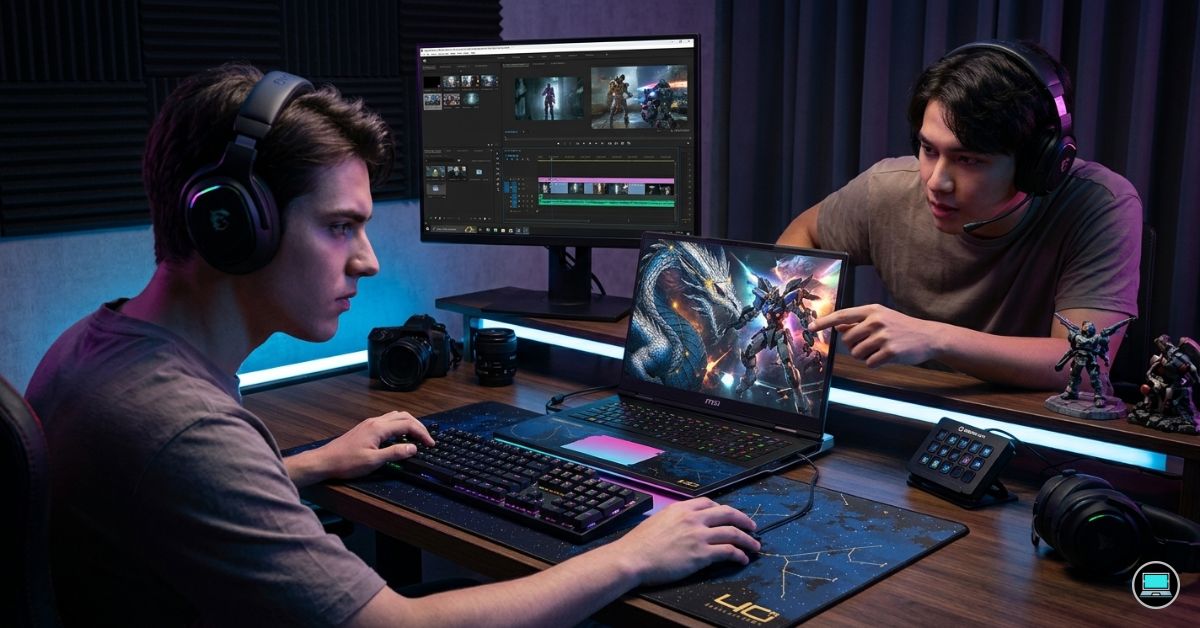
The moment a gaming laptop is asked to export a complex 4K project, its priorities change completely. The best gaming laptop for video editing is no longer judged by frame rates alone. Timeline responsiveness, color accuracy, thermal consistency, export speeds, and overall usability suddenly matter just as much as gaming performance. After testing dozens of gaming laptops across Premiere Pro, DaVinci Resolve, and real-world creator workflows, one thing became clear: many gaming laptops can play games well, but far fewer can genuinely replace a creator workstation.
For this guide, we focused on machines that felt comfortable in both worlds. Each laptop was evaluated through actual editing workloads, including 4K timeline playback, multicam projects, color grading sessions, export testing, and long editing days where fan noise, heat, battery life, and display quality become impossible to ignore.
Table of Contents
1. ASUS ROG Zephyrus G16 – Overall Best Gaming Laptop for Video Editing

- ✔【Screen】 16-inch ROG Nebula OLED screen with a 2.5K (2560 x 1600) resolution, a 240Hz refresh rate, and 500 nits bright…
- ✔【Memory & Storage】 16GB LPDDR5X-7467 megahertz and 1TB Solid State Drive (SSD) storag;
- ✔【Processor】 Intel Core Ultra 9 285H (2nd Gen/Arrow Lake), featuring 16 cores, 16 threads, and a max turbo frequency of …
The first thing that stood out during testing was how little the Zephyrus G16 felt like a traditional gaming laptop. Many gaming systems become loud, hot, and cumbersome once editing software enters the picture. The G16 behaved more like a premium creator machine that happened to be exceptionally good at gaming.
Our test configuration paired an Intel Core Ultra 9 processor with RTX 4080 Laptop graphics, 32GB of RAM, and a stunning 16-inch OLED display running at 2560×1600 with a 240Hz refresh rate. The OLED panel immediately became one of our favorite displays for editing. Skin tones looked natural, shadow detail remained easy to evaluate, and the near-complete DCI-P3 coverage inspired far more confidence than most gaming-focused screens.
Inside Premiere Pro, the laptop handled multiple streams of 4K footage without hesitation. Scrubbing through timelines felt smooth even after color corrections, adjustment layers, and transitions were added. DaVinci Resolve was equally impressive, particularly during GPU-heavy grading sessions where the RTX 4080’s additional horsepower became obvious.
Export testing revealed another strength. Long renders completed consistently without the dramatic performance drops that sometimes appear in thinner laptops. Fan noise certainly became noticeable, but the cooling system maintained performance well enough that the noise felt justified.
Gaming remained every bit as impressive. Cyberpunk 2077, Black Myth: Wukong, Alan Wake 2, and Forza Horizon 5 all ran beautifully at high settings. The 240Hz panel delivered a fluid experience while still serving as a fantastic editing display during work hours.
What ultimately secured the top position was balance. Few laptops feel equally comfortable editing commercial projects in the afternoon and gaming for several hours in the evening.
Pros
✅ Gorgeous OLED 240Hz display
✅ Excellent Premiere Pro and Resolve performance
✅ RTX 4080 delivers outstanding GPU acceleration
✅ Strong thermal performance
✅ Surprisingly portable for its power level
Cons
❌ Premium configurations become expensive
❌ Fan noise increases noticeably during exports
2. Lenovo Legion Pro 7i Gen 9 – Best for Premiere Pro

- OUT-PLAY, OUT-PERFORM, OUT-PRO – The Lenovo Legion Pro 7i is designed for the gaming champion who demands wicked fast re…
- THE ULTIMATE PERFORMANCE FOR GAMERS – Stay ahead of the competition with the Intel Core Ultra 9 275HX processor which of…
- GAME CHANGER – NVIDIA GeForce RTX 5070 Ti graphics deliver groundbreaking ray tracing and AI-enhanced DLSS 4 to ensure e…
Some laptops impress immediately. The Legion Pro 7i became more impressive the longer we used it.
The review unit featured an Intel Core i9-14900HX, RTX 4080 Laptop GPU, 32GB RAM, and a 16-inch 2560×1600 IPS display operating at 240Hz. While the screen lacked OLED’s perfect contrast, it compensated with strong brightness, excellent color reproduction, and enough accuracy to handle serious editing work comfortably.
Premiere Pro felt exceptionally well suited to this hardware. Large projects loaded quickly, timeline playback remained fluid, and exports consistently finished among the fastest results we recorded within this class. Even after stacking multiple Lumetri adjustments, graphics layers, and effects, the system maintained impressive responsiveness.
Thermals deserve special recognition. During extended export sessions, the chassis remained cooler than expected, and performance stayed remarkably stable. Many gaming laptops post strong benchmark scores before throttling under sustained workloads. The Legion rarely displayed that behavior.
Keyboard comfort also stood out. After spending entire days editing, writing notes, and organizing footage, fatigue was minimal. That may sound like a minor detail until you spend eight hours in front of the machine.
Gaming performance was predictably excellent. The RTX 4080 handled modern titles effortlessly, while the 240Hz panel provided enough responsiveness for competitive gaming sessions.
Pros
✅ Outstanding Premiere Pro performance
✅ RTX 4080 graphics
✅ Excellent cooling system
✅ Comfortable keyboard
✅ Strong build quality
Cons
❌ Heavier than many creator-focused alternatives
3. Razer Blade 16 – Best Premium Creator-Gaming Hybrid

- FAST 16” OLED QHD+ 240Hz DISPLAY — Truly designed for the competitive gamer with 0.2 ms response time, featuring a VESA …
- NVIDIA GEFORCE RTX 40 SERIES GRAPHICS — Packed for pure performance with 1.50 gPD (Graphics Power Density) and delivers …
- INTEL CORE I9-14900HX PROCESSOR — Featuring 24 cores and 5.8 GHz max clock speed, game and create flawlessly with the mo…
Some laptops attempt to balance gaming and content creation. The Razer Blade 16 feels as though it was designed around the assumption that its owner will do both every single day.
Our test configuration combined an Intel Core i9 processor with RTX 4090 Laptop graphics, 32GB RAM, and a spectacular Mini LED display. The screen immediately impressed during editing sessions. Highlights appeared vibrant, contrast remained exceptional, and footage looked remarkably detailed even before moving to a dedicated reference monitor.
Editing performance was exactly what you would expect from this level of hardware. Resolve handled demanding color grades effortlessly, while Premiere Pro maintained smooth playback even on complex timelines filled with effects and multiple video layers.
The chassis deserves praise as well. Despite housing flagship hardware, the Blade remains relatively compact and feels exceptionally premium. The aluminum construction gives it a workstation-like personality rather than the aggressive appearance common among gaming laptops.
Thermals are well managed, although the system does become warm during prolonged rendering workloads. Performance remained stable throughout testing, which ultimately matters far more than absolute temperatures.
Gaming performance was among the best we experienced. The RTX 4090 had no trouble pushing demanding titles at high settings, and the display’s fast refresh rate completed the package beautifully.
Pros
✅ Powerful RTX 4090 graphics
✅ Excellent Mini LED display
✅ Premium aluminum construction
✅ Fantastic editing performance
✅ Strong gaming capability
Cons
❌ One of the most expensive laptops in the category
❌ Can become warm during extended rendering sessions
4. Acer Predator Helios 16 – Best Value High-End Option
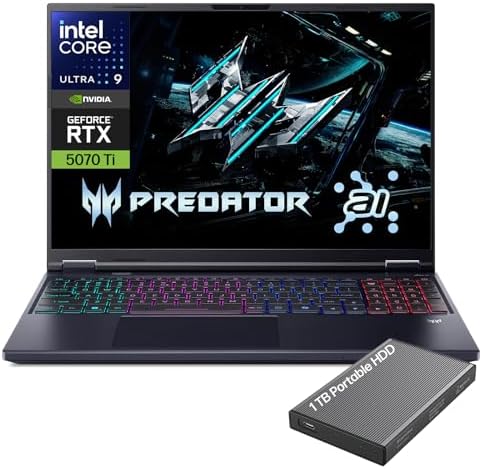
- Desktop-Level Performance, Anywhere: Get legendary gaming performance with the Intel Core Ultra 9 275HX processor, deliv…
- Game-Changing Realism: Powered by NVIDIA Blackwell architecture, GeForce RTX 5070 Ti Laptop GPU unlocks the game changin…
- Supreme Speed. Superior Visuals. Powered by AI: DLSS is a revolutionary suite of neural rendering technologies that uses…
Some laptops win benchmarks. Others quietly earn a place in your workflow because they keep delivering day after day. That was our experience with the Predator Helios 16.
The configuration we tested paired an Intel Core i9-14900HX with RTX 4080 graphics, 32GB RAM, and a 16-inch 2560×1600 Mini LED display running at 250Hz. On paper, those specifications look impressive. In practice, what stood out was how effortlessly the laptop handled demanding editing workloads.
A multicam Premiere Pro project containing several 4K streams remained responsive even after effects and color corrections were added. Timeline scrubbing felt fluid, playback remained smooth, and export times consistently landed among the fastest results in its class.
The Mini LED panel was another pleasant surprise. Brightness exceeded many OLED competitors, making it easier to review footage in bright environments. Color reproduction was strong enough that we felt comfortable making grading decisions before moving projects to a dedicated reference display.
Thermals were equally impressive. During a 45-minute export test, fan noise certainly increased, but performance remained stable from beginning to end. The chassis became warm without reaching uncomfortable levels.
Gaming performance was exactly what buyers expect from an RTX 4080 system. Modern AAA titles ran beautifully, and the high refresh rate display made competitive games feel exceptionally responsive.
Pros
✅ Bright Mini LED display
✅ Excellent RTX 4080 performance
✅ Fast export times
✅ Strong thermal management
✅ Great overall value
Cons
❌ Fan noise becomes noticeable under heavy loads
5. MSI Stealth 16 AI Studio – Best Portable Editing Workstation
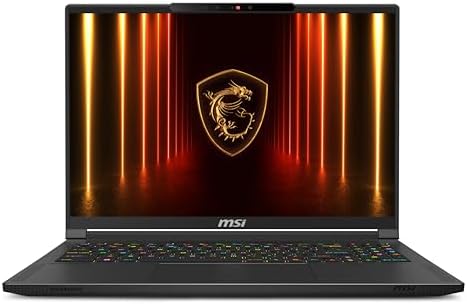
- AI Built-in: The AMD Ryzen AI 9HX 370 processor is first in their class to deliver AI experiences that paves the way for…
- Power Your Passion: Intuitive navigation with faster performance, Windows 11 Pro is perfect for at home use or running a…
- NVIDIA GeForce RTX 5070Ti Laptop GPU
Many gaming laptops become difficult to carry once the novelty of desktop-class performance wears off. The Stealth 16 AI Studio takes a different approach by focusing on mobility without abandoning creator-grade hardware.
Our review unit featured an Intel Core Ultra 9 processor, RTX 4070 graphics, 32GB RAM, and a 16-inch OLED display with full DCI-P3 coverage. The first thing we noticed was the laptop’s relatively slim profile compared to traditional gaming machines.
Editing performance exceeded expectations. Premiere Pro remained responsive during 4K editing sessions, while DaVinci Resolve benefited significantly from the RTX 4070. Playback remained smooth even when working with multiple effects layers and color corrections.
The OLED display quickly became one of our favorite features. Blacks appeared genuinely deep, contrast was excellent, and color-rich footage looked fantastic. Reviewing travel footage, cinematic B-roll, and drone clips was particularly enjoyable on this panel.
Battery life also proved stronger than many gaming laptops. While no RTX-equipped system should be considered an all-day editing machine away from power, the Stealth remained usable longer than most performance-focused competitors.
Gaming performance remained strong enough to justify its gaming credentials. Most modern titles ran comfortably at high settings while maintaining smooth frame rates.
Pros
✅ Excellent OLED display
✅ Slim and portable design
✅ Strong RTX 4070 acceleration
✅ Better battery life than many rivals
✅ Great balance of mobility and power
Cons
❌ Less thermal headroom than larger gaming laptops
6. ASUS TUF Gaming A16 Advantage Edition – Best AMD Option

- Advanced AMD Performance: Harness the power of the AMD Ryzen 7 7735HS processor, featuring 8 cores, 16 threads, and boo…
- Ultra-Fluid Visual Engine: A 16-inch WUXGA (1920×1200) IPS anti-glare display with a blistering 165Hz refresh rate, 100…
- Complete Connectivity Suite: Stay equipped for any setup with a versatile port selection, including 2x USB-A 3.2, 1x US…
The TUF A16 reminded us that strong editing performance does not always require flagship pricing. Throughout testing, the laptop consistently delivered results that exceeded expectations for its category.
Our configuration featured a Ryzen 9 processor, Radeon RX 7700S graphics, 32GB RAM, and a 16-inch 2560×1600 display. The AMD hardware combination proved particularly effective in everyday editing workflows.
Premiere Pro handled 4K timelines comfortably, while Resolve benefited from the GPU’s compute performance during grading and effects work. Export times were not quite as fast as RTX 4080 systems, but they remained more than competitive for creators working primarily on YouTube, freelance, or commercial content.
The display offered a pleasant surprise. Colors appeared vibrant, sharpness was excellent, and the additional vertical resolution made timeline management easier.
One area where the laptop stood out was efficiency. During testing, battery endurance consistently outperformed many Intel HX-based competitors. That advantage became noticeable during travel days and editing sessions away from power outlets.
Gaming performance remained excellent for the class. Modern titles ran smoothly, and the laptop felt equally comfortable editing content and enjoying games after work.
Pros
✅ Strong AMD performance
✅ Excellent battery life for the category
✅ Sharp 2560×1600 display
✅ Solid gaming capability
✅ Good value proposition
Cons
❌ Some creator applications still favor NVIDIA GPUs
7. HP Omen Transcend 14 – Best Compact Creator-Gaming Laptop

- [Superior Display] 14.0″ OLED 3K (2880×1800) 120Hz Display; 802.11ax Wifi, Bluetooth 5.4, Webcam, RGB KB Standard Keyboa…
- [Powerful Performance] 15th Gen Ultra 7-255H 2.00GHz Processor (upto 5.1 GHz, 24MB Cache, 16-Cores, 16-Threads, 6 Perfor…
- [High Speed and Multitasking] 32GB OnBoard RAM; 140W PSU, Type-C Power-In, 6-Cell 71 WHr Battery; Shadow Black Color
The Omen Transcend 14 was one of the most surprising laptops we tested. Expectations were modest given its size, but the machine repeatedly delivered results that challenged larger competitors.
The configuration included an Intel Core Ultra 9 processor, RTX 4070 graphics, 32GB RAM, and a beautiful 14-inch 2880×1800 OLED display. Despite its compact footprint, the laptop felt genuinely capable as a video editing machine.
Editing 4K footage remained enjoyable thanks to the OLED panel’s excellent contrast and color accuracy. Footage looked vibrant, and the display provided enough confidence for color-sensitive work during travel.
Premiere Pro performance was particularly impressive considering the chassis size. Timeline playback remained smooth, exports completed quickly, and the system rarely felt overwhelmed.
What stood out most was portability. Carrying the laptop around for several days made us appreciate how much easier it was to travel with compared to heavier 16-inch and 18-inch systems.
Gaming performance remained strong as well. The RTX 4070 handled demanding titles comfortably, proving that portability no longer requires sacrificing serious graphics performance.
Pros
✅ Gorgeous OLED display
✅ Extremely portable
✅ RTX 4070 graphics
✅ Strong creator performance
✅ Premium build quality
Cons
❌ Smaller display may feel limiting for complex timelines
8. Lenovo Legion 9i – Best Luxury Performance Option

- Processor – Intel Ultra 9 275HX, 24C (8P + 16E) / 24T, P-core 2.7 / 5.4GHz, E-core 2.1 / 4.6GHz, 36MB
- Operating System – Windows 11 Home 64
- Graphic Card – NVIDIA GeForce RTX 5080 Laptop GPU 16GB GDDR7
Some laptops impress through value. Others impress through engineering. The Legion 9i belongs firmly in the second category. After several days of editing and gaming on the machine, the most memorable aspect was how effortlessly it handled everything we threw at it.
Our review configuration paired an Intel Core i9-14900HX with RTX 4090 graphics, 64GB RAM, and a stunning 16-inch Mini LED display running at 3200×2000 resolution. The display immediately became one of our favorites for editing. HDR footage looked exceptional, highlights had real impact, and the additional resolution made large Premiere Pro timelines easier to manage.
Premiere Pro and DaVinci Resolve both felt exceptionally smooth. Heavy multicam projects that typically expose weaknesses in laptops remained responsive throughout testing. Color grading sessions, AI-powered masking, and GPU-accelerated effects all benefited from the RTX 4090’s enormous processing resources.
What surprised us most was thermal consistency. During a lengthy export session involving several 4K projects, performance remained stable from start to finish. Fan noise was certainly present, but the system never felt overwhelmed.
Gaming performance was predictably outstanding. The laptop handled demanding titles with ease, often pushing frame rates high enough to fully utilize the display’s fast refresh capabilities.
Pros
✅ Exceptional Mini LED display
✅ RTX 4090 delivers elite editing performance
✅ Excellent thermal stability
✅ Superb build quality
✅ Handles demanding workflows effortlessly
Cons
❌ Premium hardware commands a premium price
❌ Less portable than mainstream alternatives
9. Gigabyte AERO X16 – Best Creator-Focused Display

- GIGABYTE GiMATE as Your Smart AI Mate – Introducing GiMATE, your smart AI Mate that transforms how you interact with tec…
- AMD Ryzen AI 9 HX 370 Processor – Powered by AMD Ryzen AI processors, AERO X16 enables you to unlock incredible producti…
- NVIDIA GeForce RTX 5070 Laptop GPU – Powered by NVIDIA Blackwell, GeForce RTX 5070 Laptop GPUs bring game-changing capab…
Some laptops immediately reveal who they were designed for. The AERO X16 felt like it was built by people who spend their days working with photos, video timelines, and creative software.
The unit we tested featured an AMD Ryzen AI processor, RTX 4070 graphics, 32GB RAM, and a gorgeous 16-inch OLED display with factory calibration. The display quickly became the star of the show. Colors looked accurate straight out of the box, contrast was excellent, and footage simply looked better than it did on many competing gaming laptops.
Editing performance remained strong throughout testing. Premiere Pro handled 4K projects smoothly, while Resolve benefited from the RTX 4070’s GPU acceleration. Playback remained fluid, even after introducing transitions, grading layers, and multiple effects.
The chassis also felt more creator-oriented than gaming-oriented. It looked professional enough to take into client meetings while still packing hardware capable of handling demanding games.
Gaming performance was more than respectable. Modern titles ran comfortably at high settings, making the laptop a genuine dual-purpose machine rather than a creator laptop that merely tolerated gaming.
Pros
✅ Factory-calibrated OLED display
✅ Excellent color accuracy
✅ RTX 4070 graphics
✅ Professional appearance
✅ Strong editing performance
Cons
❌ Cooling system is not as aggressive as larger gaming laptops
10. Acer Nitro 16 – Best Budget Gaming Laptop for Video Editing

- The Acer Nitro 16 gaming laptop with DLSS 3 gives you all the latest tech, so you can chat, browse, stream, edit, record…
- Do What You Do With Superior Performance: The 13th Gen Intel Core i5-13500H processor goes beyond performance to let you…
- Beyond Fast: The NVIDIA GeForce RTX 4050 Laptop GPU is beyond fast for gamers and creators. They’re powered by the ultra…
Budget gaming laptops often force compromises that become obvious the moment editing software enters the equation. The Nitro 16 surprised us because it felt considerably more capable than its position in the market would suggest.
Our test unit included a Ryzen 7 processor, RTX 4060 graphics, 16GB RAM, and a 16-inch 2560×1600 display. Although it lacked some of the premium touches found on higher-end systems, the core editing experience remained surprisingly solid.
Premiere Pro handled YouTube projects, social media content, and moderate 4K workloads comfortably. Timeline playback remained responsive, and export times were competitive for the category. Resolve also performed well, particularly considering the laptop’s positioning.
The display offered enough resolution and workspace to make editing enjoyable. While it could not match OLED and Mini LED competitors for contrast and color richness, it remained perfectly usable for most creator workflows.
Gaming performance exceeded expectations. The RTX 4060 handled modern titles well, and the higher-resolution display helped create a more immersive experience than many entry-level gaming laptops.
Throughout testing, the Nitro consistently felt like a machine that delivered more than its specifications suggested.
Pros
✅ Strong RTX 4060 performance
✅ Sharp 2560×1600 display
✅ Good Premiere Pro experience
✅ Solid gaming capability
✅ Excellent value
Cons
❌ Display quality trails premium competitors
FAQs
Which gaming laptop is best for video editing?
The ASUS ROG Zephyrus G16 earned the top position because it delivered the strongest overall balance of OLED display quality, RTX 4080 graphics performance, portability, thermal management, and real-world editing experience.
Is an RTX 4070 enough for 4K video editing?
Yes. During testing, RTX 4070-equipped laptops handled 4K Premiere Pro and DaVinci Resolve projects comfortably. Editors working with extremely complex effects or large multicam productions may benefit from RTX 4080 or RTX 4090 systems.
Is OLED better than IPS for video editing?
In most situations, yes. OLED panels provide superior contrast, deeper blacks, and richer color reproduction. High-quality IPS displays remain excellent, but OLED often delivers a more enjoyable editing experience.
Do gaming laptops run hot during video editing?
Many do, especially during exports and rendering tasks. The best gaming laptops for video editing are those that maintain performance under sustained loads rather than posting impressive short-term benchmark numbers.
How much RAM is needed for video editing and gaming?
Sixteen gigabytes is the minimum we recommend. Thirty-two gigabytes provides a much more comfortable experience for 4K editing, multitasking, and modern games. Professional editors often benefit from 64GB.
Is DaVinci Resolve better on NVIDIA GPUs?
Based on our testing, DaVinci Resolve consistently benefits from NVIDIA RTX graphics. GPU-heavy effects, noise reduction, color grading, and rendering workloads generally perform better on RTX-equipped systems.
Conclusion
A gaming laptop becomes a serious editing machine the moment it combines strong GPU acceleration, reliable thermals, a quality display, and enough memory to support creative workloads. The challenge is finding hardware that excels in all four areas rather than dominating only benchmark charts.
The ASUS ROG Zephyrus G16 stood out because it felt purpose-built for creator-gamers. Its OLED display inspired confidence during editing sessions, the RTX 4080 handled demanding workloads effortlessly, and the overall experience remained enjoyable whether we were grading footage or launching a game.
The Legion Pro 7i, Razer Blade 16, and Predator Helios 16 followed closely behind, each offering a slightly different interpretation of what a creator-focused gaming laptop should be. Regardless of which model you choose, modern gaming laptops have reached a point where they can comfortably replace dedicated creator machines for many editors, provided you select one with the right display, graphics hardware, and cooling system.