
A decade ago, choosing the best budget laptop for programming and coding was relatively simple because most development work revolved around lightweight editors and modest hardware requirements. Today’s developers often run VS Code, Docker containers, Linux environments, local databases, AI coding assistants, browsers with dozens of tabs, Git clients, and testing frameworks simultaneously. As a result, the definition of a good programming laptop has changed dramatically.
The challenge is that programming is no longer a single discipline. A Python developer may spend most of the day working with Jupyter notebooks and APIs. A web developer could be juggling React projects, Node.js servers, and browser debugging tools. A cybersecurity student might rely on Linux virtual machines, while a computer science student needs a machine capable of handling coursework across multiple languages. Each workflow places different demands on hardware.
Many buyers make the mistake of focusing entirely on processor specifications while overlooking factors that directly affect day-to-day development. Keyboard quality matters when you’re writing thousands of lines of code every week. Battery life becomes important when attending classes or working remotely. Display quality affects comfort during long debugging sessions. Thermal management determines whether performance remains consistent under sustained workloads.
The laptops in this guide were selected because they provide the best combination of coding performance, portability, battery life, keyboard comfort, multitasking capability, and long-term value. Whether you’re learning Python, building web applications, studying computer science, contributing to open-source projects, or preparing for a software engineering career, these machines provide a strong foundation.
Table of Contents
1. Lenovo ThinkPad E14 Gen 6

- ROBUST & RELIABLE DESIGN – The device is built to meet MIL-STD 810H standards, ensuring durability and reliability in va…
- POWERFUL PERFORMANCE – Packs an AMD Ryzen 5 7535U Processor (6 Cores 12 Threads, up to 4.55GHz) and Integrated AMD Radeo…
- VIBRANT VISUALS – 14″ WUXGA (1920×1200) IPS 300nits display, featuring TÜV Low Blue Light and Anti-glare. The 1080P FHD …
Few laptop brands have developed a stronger reputation among programmers than ThinkPad. The ThinkPad E14 Gen 6 continues that legacy by focusing on the features developers actually use every day rather than chasing flashy specifications.
The keyboard remains one of the biggest reasons to consider this laptop. Programmers spend more time typing than most professionals, and keyboard quality can have a surprisingly large impact on productivity. The E14 provides the kind of typing experience that remains comfortable during long coding sessions, whether you’re building APIs, debugging applications, or solving algorithm problems.
Performance is well suited to modern development environments. VS Code, IntelliJ IDEA, Docker, GitHub Desktop, terminal windows, and browser tabs can all run comfortably together. Developers working with Python, JavaScript, Java, C++, and other common languages will find plenty of performance for everyday projects.
The laptop also excels as a long-term investment. ThinkPads are known for durability and reliability, making them particularly attractive to students who need a machine that will survive an entire degree program and remain useful afterward.
Pros
✅ Outstanding keyboard
✅ Excellent durability
✅ Strong multitasking performance
✅ Great for students and professionals
✅ Reliable long-term ownership experience
Cons
❌ Conservative design
❌ Display focuses on productivity over entertainment
2. ASUS Vivobook 16

- Copilot+ PCs. A New AI Era Begins Turn your ideas from text prompts into generated artwork. With Recall1, search across …
- Stunning 16-inch WUXGA Display Indulge in stunning visuals in breathtaking 1920 x 1200 resolution (16:10) and a 300-nit …
- Ultrafast AMD Ryzen AI 7 350 Processor Unleash performance with AMD XDNA NPU, designed for the ultimate in AI processing…
Screen space becomes increasingly valuable as programming projects grow. The ASUS Vivobook 16 addresses this need by providing a larger display that makes multitasking significantly easier without pushing buyers into premium workstation territory.
Developers often work across multiple windows simultaneously. A typical workflow may involve source code, documentation, browser developer tools, terminal sessions, and communication platforms all running together. The larger display helps keep everything accessible without constantly switching between windows.
Performance remains strong across a wide range of coding disciplines. Whether you’re building websites, developing desktop applications, learning Python, or experimenting with machine learning tools, the Vivobook handles modern development environments comfortably.
Battery life and portability remain respectable despite the larger screen. Students and remote workers will appreciate the balance between workspace and mobility, particularly when moving between classrooms, offices, and home workspaces.
Pros
✅ Large productivity-friendly display
✅ Strong coding performance
✅ Comfortable multitasking experience
✅ Good overall value
✅ Suitable for multiple programming languages
Cons
❌ Larger footprint than compact alternatives
❌ Not as business-focused as ThinkPad models
3. Acer Swift Go 14

- Ready, Set Go!: Say hi to the all-new Swift Go 14 AMD—your AI PC featuring AMD Ryzen 7 8845HS processor equipped with Ry…
- Premium Performance on the Go: With the unparalleled performance of the AMD Ryzen 7 8845HS processor and built-in AMD Ra…
- Indulge Your Eyes: The Swift Go 14 with a 14-inch 16:10 WUXGA (1920 x 1200) touchscreen display offers vivid color accur…
Many aspiring developers want a laptop that feels modern, portable, and capable enough to handle a variety of programming tasks. The Acer Swift Go 14 fits that description exceptionally well.
Portability is one of its biggest advantages. Students attending lectures, coding bootcamp participants, and remote developers often spend significant time carrying their laptops. The Swift Go remains easy to transport while still providing enough performance for serious development work.
The display contributes positively to long coding sessions. Reading documentation, reviewing code, debugging applications, and managing Git repositories all become more comfortable when text remains clear and easy to read. Developers frequently underestimate how much display quality affects productivity until they spend hours staring at code.
Performance remains more than capable for modern workflows. Python development, web development, mobile app projects, Git workflows, AI coding tools, and cloud development environments all run smoothly. The laptop feels responsive even when multiple productivity applications are active simultaneously.
The Swift Go 14 is particularly attractive to students, junior developers, and self-taught programmers who want a machine that balances performance, portability, and affordability.
Pros
✅ Lightweight and portable
✅ Strong display quality
✅ Good battery life
✅ Handles modern development tools comfortably
✅ Excellent student option
Cons
❌ Limited upgrade options
❌ Large virtualization workloads may require more powerful hardware
4. HP Pavilion Plus 14
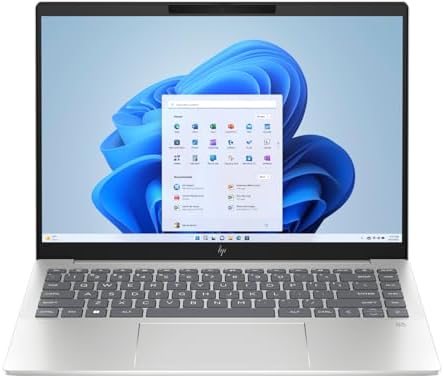
- (Memory Disk and System): 16GB DDR5 SDRAM, 1TB PCI-E NVMe M.2 SSD for Storage, Pre-install Windows 11 Pro
- (Processor): AMD Ryzen 7 8845HS 8-Core Processor (Up to 5.1 GHz, 16 MB Smart cache, 8 Cores, 16 Threads)
- (Screen and Graphics): Brilliant 14″ 2880×1800 (2880 x 1800) 400 nits UWVA, micro-edge, BrightView, Low Blue Light, SDR …
Programming habits have changed significantly over the last few years. Many developers now spend as much time inside browsers, cloud dashboards, GitHub repositories, and AI coding assistants as they do writing code directly. The HP Pavilion Plus 14 is particularly well suited to this modern workflow because it balances portability, display quality, and development performance exceptionally well.
One of the biggest advantages is the display. Reading code for hours at a time places unique demands on a screen. Developers constantly switch between source files, documentation, stack traces, terminal output, and browser-based tools. A sharp display reduces eye strain and makes long coding sessions noticeably more comfortable.
The laptop also performs well when multitasking. Running VS Code alongside Chrome, Docker, Postman, GitHub Desktop, and multiple terminal sessions rarely feels restrictive. Students learning software engineering and developers building web applications will find enough performance for years of productive use.
Battery life further strengthens its appeal. Developers who work remotely, attend classes, or spend time in coworking spaces often prioritize mobility. The Pavilion Plus 14 remains productive throughout much of a workday without constantly relying on a charger.
For aspiring developers, computer science students, and full-stack programmers, the Pavilion Plus 14 delivers a highly balanced coding experience.
Pros
✅ Excellent display quality
✅ Strong everyday coding performance
✅ Good battery life
✅ Portable and lightweight
✅ Comfortable multitasking environment
Cons
❌ Limited upgrade options
❌ Heavy virtualization workloads may require more powerful hardware
5. Dell Inspiron 14 Plus
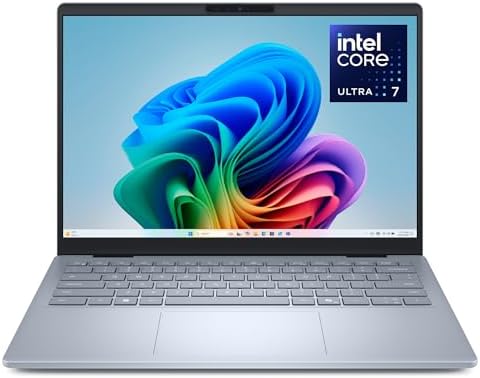
- Effortlessly tackle the newest AI experiences: Built from the ground up with Intel’s latest and most advanced client com…
- Be unstoppable with AI: Get real time intelligent assistance anywhere you go: let AI draft quick emails, summarise docum…
- Elevated audio and visuals: See and hear your content truly come to life for photo or video editing, coding, collaborati…
Many programming laptops focus heavily on portability, but developers often discover that additional performance headroom becomes valuable as projects grow. The Dell Inspiron 14 Plus occupies a sweet spot between compact ultrabooks and larger workstation-style systems, making it particularly attractive for growing developers.
Modern coding workflows rarely involve a single application. Developers may be running VS Code, Docker containers, local databases, browser developer tools, testing frameworks, and AI-assisted coding platforms simultaneously. The Inspiron handles these environments comfortably and maintains responsiveness even under heavier workloads.
Build quality also contributes positively to daily use. Long debugging sessions, coding interviews, open-source contributions, and project work all become easier when the laptop remains stable and dependable. Dell has built a reputation for delivering practical machines, and the Inspiron continues that tradition.
The larger performance envelope also makes it attractive for developers interested in learning multiple disciplines. Whether you’re moving from Python into machine learning, experimenting with Linux environments, or learning backend frameworks, the laptop provides enough flexibility to grow with your skills.
Pros
✅ Strong multitasking performance
✅ Excellent for full-stack development
✅ Handles Docker comfortably
✅ Good long-term growth potential
✅ Suitable for multiple programming disciplines
Cons
❌ Slightly heavier than ultraportables
❌ Battery life favors performance over maximum endurance
6. Framework Laptop 13
Most programming languages evolve. Development frameworks evolve. Technology stacks evolve. The Framework Laptop 13 embraces that reality better than almost any laptop currently available. Instead of forcing users to replace their machines every few years, it allows developers to upgrade components as requirements change.
This philosophy resonates strongly with programmers. Developers naturally appreciate modular systems, maintainability, and flexibility. The ability to upgrade major components without replacing the entire laptop provides a level of future-proofing rarely found in the industry.
Performance remains more than capable for modern coding environments. Python projects, Java development, React applications, Node.js backends, Docker containers, Linux environments, and cloud development workflows all run smoothly. The laptop feels particularly well suited to developers who enjoy experimenting with different technologies.
Repairability is another major advantage. Students and professionals investing in a machine for the long term often appreciate knowing that components can be replaced rather than forcing a complete upgrade. This approach not only reduces ownership costs but also extends the useful life of the laptop.
The Framework Laptop 13 is ideal for developers who think several years ahead and want maximum control over their hardware.
Pros
✅ Industry-leading upgradeability
✅ Repair-friendly design
✅ Strong coding performance
✅ Excellent long-term value
✅ Highly future-proof platform
Cons
❌ Less mainstream support than major brands
❌ Upgrade ecosystem continues to mature
7. Lenovo IdeaPad Slim 5
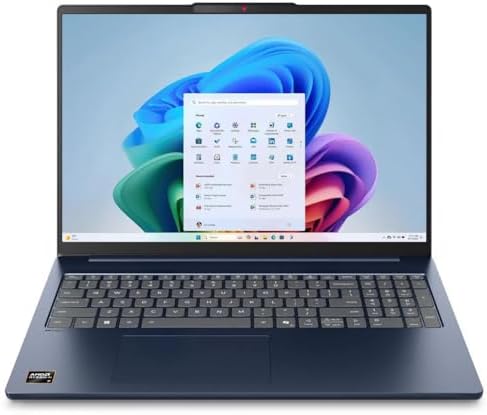
- 【Lifetime Office】Pre-installed free activated Lifetime Microsoft Office Professional Plus. Including Word, Excel, OneNot…
- 【Processor】 Intel Core i7-13620H, 1.8 GHz up to 4.9 GHz, 10-Core.
- 【Display】 14″ 1920 x 1080 Full HD 250 nits TN Anti-glare Display, 45% NTSC.
Not every developer needs a business laptop or a premium ultrabook. Many simply want a reliable machine that can handle coursework, coding projects, technical interviews, and everyday development without creating unnecessary financial pressure. The Lenovo IdeaPad Slim 5 fits that role exceptionally well.
One of its biggest strengths is versatility. Students often move between Python assignments, web development projects, Java coursework, SQL databases, and Git repositories throughout a single semester. The IdeaPad adapts comfortably to these changing requirements and remains responsive under typical development workloads.
The keyboard experience is surprisingly good for the category. While it doesn’t quite reach ThinkPad standards, it remains comfortable during extended coding sessions. Developers spending hours inside VS Code, PyCharm, or IntelliJ IDEA should find the typing experience more than adequate.
Battery life further enhances its appeal. Programming students frequently work in lecture halls, libraries, coffee shops, and study groups where power outlets may not always be available. The IdeaPad remains productive long enough to support these environments effectively.
For coding bootcamp students, computer science majors, and self-taught developers, the IdeaPad Slim 5 represents one of the strongest all-around values currently available.
Pros
✅ Excellent value for programmers
✅ Comfortable keyboard
✅ Strong everyday coding performance
✅ Good battery life
✅ Suitable for multiple development environments
Cons
❌ Display quality varies by configuration
❌ Less premium than Yoga or Surface models
8. Samsung Galaxy Book5 360

- BE UNSTOPPABLE WITH UP TO 31 HOURS OF POWER: Stay focused on your day without slowing down to recharge.
- THIN. LIGHT. READY TO GO: Carry Galaxy Book5 360 everywhere you go – its thin, lightweight design makes it easy to tote …
- THE LATEST INTEL PROCESSOR DRIVING THIS NEXT GEN AI PC: Experience a new level of transformative power on Galaxy Book5 3…
Many developers spend their days switching between coding, studying, note-taking, documentation, and collaboration. The Samsung Galaxy Book5 360 excels in these mixed workflows because it combines strong development performance with exceptional flexibility.
The convertible design makes it particularly useful for students and professionals who regularly consume technical content alongside development work. Reviewing documentation, watching training courses, sketching application ideas, and attending online classes all feel natural on the device.
Programming performance remains strong. VS Code, GitHub Desktop, Docker, Python environments, browser development tools, and terminal sessions run comfortably. Most developers focused on web development, scripting, automation, and application development will find plenty of performance available.
The display is another standout feature. Developers spend countless hours reading text, reviewing code, and navigating documentation. A high-quality screen contributes directly to comfort and productivity, especially during long study sessions.
Battery life remains one of the strongest reasons to consider the Galaxy Book5 360. Developers who spend much of their day away from a desk will appreciate the additional flexibility.
Pros
✅ Flexible 2-in-1 design
✅ Excellent display quality
✅ Strong battery life
✅ Lightweight and portable
✅ Great for students and remote workers
Cons
❌ Convertible design may not appeal to everyone
❌ Not intended for heavy virtualization workloads
9. Lenovo Yoga Slim 7i

- CREATE LIMITLESSLY – The Lenovo Slim 7i Aura Edition packs 17 hours of battery life in a lightweight chassis that starts…
- READY FOR ANYTHING – Ultra-portable and perfect for creators on the move, the Lenovo Slim 7i Aura Edition is thinner, li…
- TRUE-TO-LIFE COLOR AND CLARITY – Experience the display’s sparkling clarity and true-to-life color with DisplayHDR True …
Modern software development increasingly blends productivity, creativity, collaboration, and problem-solving. The Lenovo Yoga Slim 7i reflects that reality by offering a premium experience that feels equally comfortable during coding sessions and everyday work.
Build quality is one of the first things developers notice. The laptop feels solid, refined, and designed for long-term use. While specifications matter, the overall ownership experience becomes increasingly important when a laptop serves as your primary development machine for several years.
Performance remains highly capable across modern programming workflows. Whether you’re building React applications, learning Python, deploying APIs, working with Linux subsystems, or experimenting with AI-assisted coding tools, the Yoga Slim 7i remains responsive and dependable.
The display contributes positively to long coding sessions. Sharp text, strong brightness, and overall visual quality make reading source code and technical documentation more comfortable. Developers who spend entire days in front of their screens will appreciate the difference.
Portability also remains a major strength. The laptop is easy to carry while still providing enough power to support serious development work. This combination makes it particularly attractive to students, consultants, and remote professionals.
Pros
✅ Premium build quality
✅ Excellent display
✅ Strong programming performance
✅ Lightweight and portable
✅ Great long-term ownership experience
Cons
❌ Premium design may increase overall cost
❌ Limited upgradeability compared to Framework Laptop 13
10. LG Gram 14

- Incredibly Light. Surprisingly Thin. – LG gram is designed to go wherever you do. Weighing just 2.5 lbs. with an ultra-s…
- Remarkably Light. Reliably Strong. – LG gram has passed seven military-grade durability tests, striking an impressive ba…
- Power that Last with Smart Efficiency – LG gram combines a high-capacity 72Wh battery with AI-driven power management to…
Developers often assume that portability comes at the expense of productivity, but the LG Gram 14 challenges that assumption. Despite its remarkably lightweight design, it remains a highly capable machine for coding, debugging, and everyday software development.
The biggest advantage becomes apparent when carrying it every day. Students moving between lectures, remote developers working from different locations, and consultants traveling frequently all benefit from a machine that adds very little weight to a backpack. Over months and years, that convenience becomes surprisingly valuable.
Programming performance remains strong across common development environments. VS Code, PyCharm, Git clients, Docker, browser-based developer tools, and terminal sessions all run comfortably. The laptop feels especially well suited to Python development, web development, and cloud-focused workflows.
Battery life is another standout feature. Developers who spend hours working away from a desk can remain productive throughout most of the day without constantly monitoring battery levels. That flexibility makes the Gram particularly attractive to mobile professionals.
Pros
✅ Extremely lightweight
✅ Excellent battery life
✅ Comfortable for remote work
✅ Strong productivity performance
✅ Great for students and consultants
Cons
❌ Less upgradeable than Framework Laptop 13
❌ Not designed for highly demanding local workloads
11. Microsoft Surface Laptop

- Qualcomm Snapdragon X Plus
- 16GB Memory 1 TB NVMe SSD
- 13.8″ Touchscreen (2304 x 1536)
Many programmers spend more time reading code than writing it. The Microsoft Surface Laptop excels in that environment because it delivers one of the most refined user experiences available for developers who value simplicity and consistency.
The display is a major strength. Reading documentation, reviewing pull requests, debugging applications, and navigating source code all benefit from sharp text and excellent clarity. Developers who spend entire days inside editors and browsers often appreciate display quality more than raw benchmark numbers.
The keyboard and touchpad also contribute positively to the overall experience. Everyday programming involves constant navigation between files, terminals, browser tabs, and documentation sources. A refined input experience reduces friction throughout the workday.
Performance remains more than capable for modern development workflows. Web development, Python programming, API development, scripting, cloud engineering, and AI-assisted coding tools all run comfortably. The laptop maintains responsiveness while handling multiple productivity applications simultaneously.
For developers seeking a premium, distraction-free environment for coding, the Surface Laptop remains one of the strongest options available.
Pros
✅ Premium user experience
✅ Excellent display quality
✅ Comfortable keyboard and touchpad
✅ Strong battery life
✅ Great for coding and productivity
Cons
❌ Limited upgradeability
❌ Enterprise-focused users may prefer traditional business laptops
12. ASUS Vivobook S 15

Artificial intelligence has rapidly become part of modern development workflows. Whether developers are using GitHub Copilot, Cursor, Claude Code, ChatGPT, or local AI tools, laptops increasingly need enough performance to support these emerging workflows. The ASUS Vivobook S 15 is particularly well positioned for this new generation of programming.
The laptop combines strong multitasking performance with a spacious display, making it easy to keep editors, terminals, browsers, documentation, and AI assistants visible simultaneously. Developers experimenting with modern coding workflows will appreciate this flexibility.
Display quality remains another highlight. Long coding sessions become easier when text appears sharp and easy to read. The screen is particularly useful for developers who regularly switch between code, documentation, design assets, and browser testing environments.
Performance is strong enough for a broad range of development tasks. Full-stack development, Python programming, Java coursework, machine learning experimentation, Docker containers, and Linux environments all run comfortably. The system provides enough headroom to support increasingly demanding projects.
For developers looking toward AI-assisted coding and future development trends, the Vivobook S 15 is one of the most forward-looking laptops in this category.
Pros
✅ Excellent multitasking performance
✅ High-quality display
✅ Strong support for modern development workflows
✅ Comfortable keyboard
✅ Suitable for AI-assisted coding tools
Cons
❌ Larger than ultraportable alternatives
❌ Business laptops may offer stronger durability
13. MSI Modern 14

- 【 RAM & Storage】This computer comes with 16GB RAM | 512GB SSD
- 【14″ Full HD display 】14″ FHD 60Hz 45%NTSC IPS-Level.
- 【Intel Core i5-1155G7processor】The processor Intel Core i5-1155G7 is developed on the 10 nm technology node and architec…
Many beginners enter programming through self-study, coding bootcamps, online courses, or personal projects. The MSI Modern 14 is particularly appealing to this audience because it focuses on delivering practical performance without unnecessary complexity.
The laptop handles common programming environments comfortably. VS Code, Python environments, GitHub projects, browser development tools, and introductory databases all run smoothly. Students learning their first programming language rarely need more hardware than the Modern provides.
Portability contributes positively to the overall experience. Developers frequently move between classes, libraries, cafes, and workspaces. A lightweight machine helps support that flexibility without sacrificing productivity.
The straightforward design is another advantage. Rather than overwhelming new developers with workstation-level hardware, the laptop provides a balanced experience that allows users to focus on learning and building projects.
For beginners, coding bootcamp students, and aspiring developers, the MSI Modern 14 offers a practical entry point into software development.
Pros
✅ Strong value for beginners
✅ Lightweight and portable
✅ Comfortable everyday performance
✅ Good student option
✅ Handles common coding tasks easily
Cons
❌ Less powerful than premium alternatives
❌ Limited long-term upgrade potential
14. Acer Aspire 14 AI

- It’s possible on your Intel AI PC – Equipped with an Intel Core Ultra 5 processor (Series 2), the Aspire 14 Al brings ne…
- New AI Superpowers – Discover the power of Recall (preview), improved Windows search, and Click to Do (preview) on Copil…
- Indulge Your Eyes – Immerse yourself in a world of vibrant detail with a breathtaking 14″ WUXGA 1920 x 1200 ultra high-r…
Not every programming laptop needs to target professional software engineers. Many buyers are students, hobbyists, aspiring developers, or career changers learning Python, JavaScript, SQL, and web development for the first time. The Acer Aspire 14 AI fits this audience exceptionally well because it combines modern hardware with a practical, approachable design.
One of the biggest strengths of the Aspire 14 AI is how adaptable it feels. A student might start by learning Python fundamentals, then move into web development, APIs, databases, machine learning basics, and eventually cloud computing. The laptop provides enough performance to support that progression without feeling obsolete after a single semester.
Battery efficiency is another advantage. Programming often involves long periods of reading documentation, watching tutorials, debugging projects, and experimenting with code. The Aspire handles these tasks comfortably while maintaining strong mobility. Developers who study away from home or split time between multiple locations will appreciate that flexibility.
The laptop also performs well with modern development tools. VS Code, GitHub Desktop, Python virtual environments, browser debugging tools, PostgreSQL, and Linux subsystems all run smoothly. While it is not intended for enterprise-scale workloads, it offers more than enough capability for most learning and development scenarios.
For students entering computer science, coding bootcamp participants, and self-taught programmers, the Aspire 14 AI provides a strong balance of performance, portability, and long-term value.
Pros
✅ Excellent for learning programming
✅ Good battery efficiency
✅ Portable and lightweight
✅ Strong value proposition
✅ Handles modern coding tools comfortably
Cons
❌ Not intended for advanced enterprise workloads
❌ Limited upgrade flexibility
15. Acer TravelMate P4

- This Renewed product is tested and certified to look and work like new, with limited to no signs of wear. The refurbishi…
- 【Upgraded】 Seal is opened for Hardware/Software upgrade only to enhance performance. 14.0″ WUXGA (1920×1200) 60Hz Displa…
- 【Powerful Performance with Ryzen 5 PRO 6650U Hexa Core】 6th Gen Ryzen 5 PRO 6650U 2.90GHz Processor (upto 4.5 GHz, 16MB …
The programming community often focuses on consumer laptops, but many professional developers spend their careers using business machines. The Acer TravelMate P4 demonstrates why. It prioritizes reliability, consistency, and productivity rather than flashy features, making it a surprisingly effective coding laptop.
One area where the TravelMate excels is stability. Developers frequently spend entire days working inside development environments, browser-based dashboards, issue trackers, and collaboration tools. A dependable machine that performs consistently can be more valuable than one that occasionally posts higher benchmark scores.
The keyboard is well suited to long coding sessions. Writing code, reviewing pull requests, documenting projects, and navigating terminal environments all feel comfortable. Combined with strong battery life, this creates a machine that supports sustained productivity throughout the day.
Performance remains more than capable for software development. Python, JavaScript, Java, C#, SQL, Docker, Git, and Linux-based workflows all run smoothly. The laptop handles modern development environments confidently while maintaining good mobility.
For professional developers, consultants, cybersecurity students, and remote workers, the TravelMate P4 is one of the more underrated programming laptops available today.
Pros
✅ Reliable business-oriented design
✅ Comfortable keyboard
✅ Good battery life
✅ Strong productivity focus
✅ Excellent for professional development workflows
Cons
❌ Conservative appearance
❌ Display quality trails premium alternatives
FAQs
What is the most important specification for programming and coding?
For most developers, RAM and processor performance matter more than graphics hardware. Modern coding workflows often involve IDEs, browsers, databases, containers, and development tools running simultaneously. A system with sufficient memory and a capable processor will remain responsive under these workloads.
Is 16GB RAM enough for programming?
Yes. For Python, JavaScript, Java, C#, web development, mobile development, and most computer science coursework, 16GB is an excellent starting point. Developers who regularly run multiple virtual machines or advanced containerized environments may benefit from 32GB.
Which laptop is best for computer science students?
The Lenovo ThinkPad E14 Gen 6, Lenovo IdeaPad Slim 5, Acer Aspire 14 AI, and HP Pavilion Plus 14 are particularly strong options because they balance performance, battery life, portability, and long-term usability.
Do programmers need a dedicated graphics card?
Most programmers do not. Integrated graphics are sufficient for coding, web development, backend engineering, database management, scripting, and cloud development. Dedicated graphics become more useful for machine learning, game development, 3D programming, and certain AI workloads.
Which programming languages can these laptops handle?
Every laptop in this guide can comfortably support Python, Java, JavaScript, TypeScript, C++, C#, Go, Rust, PHP, SQL, and modern web development frameworks. They are also capable of handling Git workflows, Docker containers, Linux environments, and cloud development tools.
Is battery life important for developers?
Absolutely. Developers often work from classrooms, offices, coworking spaces, cafes, airports, and home workstations. Strong battery life provides flexibility and reduces the need to constantly carry chargers or search for power outlets.
What is the best laptop for AI-assisted coding?
The ASUS Vivobook S 15 stands out because it provides strong multitasking performance and enough resources to comfortably support AI coding assistants such as GitHub Copilot, Cursor, Claude Code, ChatGPT, and other emerging development tools.
Conclusion
The requirements for modern programmers have evolved significantly. Coding today often involves far more than writing source code in a text editor. Developers regularly interact with cloud platforms, containerized environments, AI coding assistants, databases, APIs, testing frameworks, and collaborative development tools. Choosing the best budget laptop for programming and coding therefore requires evaluating the complete development experience rather than focusing on a single specification.
The strongest laptops in this guide succeed because they address different programming workflows. Business-focused systems such as the ThinkPad E14 Gen 6 and TravelMate P4 emphasize reliability and long-term productivity. Portable options such as the LG Gram 14 and Galaxy Book5 360 focus on mobility. Meanwhile, future-oriented devices like the Framework Laptop 13 and ASUS Vivobook S 15 provide flexibility for developers exploring emerging technologies.
For most programmers, the Lenovo ThinkPad E14 Gen 6 remains the strongest overall recommendation. It combines an outstanding keyboard, dependable performance, strong durability, and a developer-friendly design that remains effective across virtually every programming discipline. Students seeking value may gravitate toward the IdeaPad Slim 5 or Acer Aspire 14 AI, while developers interested in long-term ownership should take a serious look at the Framework Laptop 13.
Ultimately, the best programming laptop is the one that allows you to spend less time managing hardware limitations and more time building software. A machine that remains responsive, comfortable, and reliable throughout years of coding will deliver far greater value than one chosen solely for its specifications.