Finding the best budget friendly laptop for video editing is no longer simply about buying the fastest processor available. Modern editing software relies on a combination of processor performance, graphics acceleration, storage speed, display quality, thermal management, and battery efficiency. A laptop that excels in one area but struggles in another can quickly become frustrating when deadlines are involved.
Video editing places unique demands on hardware. Importing footage, organizing media libraries, applying effects, scrubbing through timelines, color grading, and exporting finished projects all stress different parts of a system. Many laptops perform well during short benchmark tests yet struggle during lengthy rendering sessions where sustained performance becomes more important than peak speeds.
For creators, display quality matters almost as much as performance. Editors spend countless hours reviewing footage, adjusting colors, evaluating transitions, and ensuring final projects look professional. A poor display can negatively affect editing decisions and increase fatigue during long sessions.
Portability is another consideration that many buyers underestimate. Content creators increasingly work from coffee shops, coworking spaces, client offices, classrooms, and while traveling. A laptop that offers strong battery life and dependable unplugged performance often provides a better real-world experience than a heavier machine that spends most of its life connected to power.
The laptops in this guide were selected because they deliver strong creator-focused performance while remaining practical for everyday use. Some focus on mobility, others prioritize rendering speed, and several offer outstanding displays for visual work. Together they represent the strongest options currently available for YouTubers, freelancers, filmmakers, students, marketers, and content creators.
Table of Contents
1. Apple MacBook Air 15-inch M4 – Overall Best Budget Friendly Laptop for Video Editing

- SPEED OF LIGHTNESS — MacBook Air with the M4 chip lets you blaze through work and play. With Apple Intelligence,* up to …
- SUPERCHARGED BY M4 — The Apple M4 chip brings even more speed and fluidity to everything you do, like working between mu…
- BUILT FOR APPLE INTELLIGENCE — Apple Intelligence is the personal intelligence system that helps you write, express your…
The Apple MacBook Air 15-inch M4 demonstrates how efficiency can sometimes outperform brute force. While many editing laptops rely on larger cooling systems and higher power consumption, Apple continues to focus on extracting maximum productivity from highly optimized hardware. The result is a machine that feels remarkably responsive for everyday content creation tasks.
For creators producing YouTube videos, tutorials, podcasts, interviews, social media content, and marketing projects, the Air delivers a polished experience. Timeline navigation remains smooth, media imports happen quickly, and export performance is often faster than many users expect from a fanless design. This creates a workflow that feels fluid rather than technical.
The larger display significantly improves usability compared to smaller laptops. Video editing applications require space for timelines, media bins, preview windows, audio controls, and effects panels. The additional screen real estate reduces clutter and makes editing more comfortable without immediately requiring an external monitor.
Battery performance remains one of the strongest reasons to consider this machine. Many creators spend long periods away from their desks. The ability to edit footage, review projects, and complete exports without constantly searching for power outlets provides genuine productivity benefits. Unlike some competing systems, performance remains surprisingly consistent when operating on battery power.
Thermal behavior follows Apple’s efficiency-focused philosophy. The system stays quiet and cool during most workflows. Extremely demanding projects may eventually reveal the limitations of a fanless design, but most creators working with standard content formats will find performance more than adequate.
This laptop is ideal for YouTubers, students, remote professionals, freelance creators, and editors who prioritize portability. Creators regularly handling advanced visual effects, large multicam projects, or complex professional productions may benefit from more powerful alternatives.
Pros
✅ Outstanding battery life
✅ Large and color-accurate display
✅ Excellent performance efficiency
✅ Silent operation
✅ Highly portable design
Cons
❌ Internal upgrades are unavailable
❌ Intensive professional workloads may require active cooling
2. ASUS Vivobook Pro 15 OLED

- Aspect Ratio:16:9
- 15.6” OLED FHD 400 nits display with ultra-slim 4-sided NanoEdge bezels
- Latest Intel Core i5-11300H Processor (8M Cache, up to 4.4GHz) and NVIDIA GeForce GTX 1650 Max Q graphics
The ASUS Vivobook Pro 15 OLED earns its place in this guide because it successfully combines creator-focused hardware with practical everyday usability. It represents one of the strongest examples of a laptop designed specifically for modern content creation rather than general productivity alone.
The OLED display immediately distinguishes the Vivobook from many competitors. Editing often involves evaluating color, contrast, brightness, and fine visual details. ASUS delivers a viewing experience that feels significantly more premium than many similarly positioned laptops. This improves confidence during editing and reduces the likelihood of unpleasant surprises when content is viewed on other devices.
Performance is another area where the Vivobook consistently impresses. Video editing workloads frequently involve switching between editing software, asset management tools, browsers, communication platforms, and graphic design applications. The laptop handles these multitasking demands comfortably while maintaining a smooth overall experience.
For creators researching the best budget friendly laptop for video editing, this model deserves particular attention because it delivers capabilities that often resemble significantly more expensive creator-focused systems. Timeline responsiveness remains strong, rendering speeds are competitive, and overall workflow efficiency remains high across a wide variety of editing scenarios.
Thermal management remains effective during lengthy export sessions. Rendering video places sustained pressure on system components, yet the Vivobook generally maintains performance without excessive throttling. This helps preserve productivity during larger projects where export times can become substantial.
The laptop is well suited to YouTubers, freelance editors, content marketers, students, and creators building their editing skills. While portability is reasonable, mobility-focused users may still prefer lighter alternatives.
Pros
✅ Excellent OLED display
✅ Strong creator-focused performance
✅ Competitive rendering capability
✅ Comfortable multitasking experience
✅ Suitable for a wide range of editing software
Cons
❌ Heavier than some portable alternatives
❌ Battery endurance trails efficiency-focused competitors
3. Acer Swift X 14

- Unlock Transformational AI Experiences: Upgraded with an AMD XDNA 2 architecture, powered by the new AMD Ryzen AI 7 350 …
- Game Changer: Powered by NVIDIA Blackwell, GeForce RTX 5060 Laptop GPUs bring game-changing capabilities to gamers and c…
- Made for Makers: Every pixel is perfected on a 3K 120Hz OLED Eyesafe display protected by smudge-resistant Corning Goril…
The Acer Swift X 14 occupies a unique position in the creator market because it successfully balances portability and performance. Many laptops capable of handling demanding editing workloads become noticeably larger and heavier. Acer instead focuses on providing enough performance for serious content creation while remaining practical for everyday transport.
This balance becomes particularly valuable for students, freelancers, and remote professionals. Editing projects rarely happen in a single location. Creators frequently move between classrooms, offices, studios, homes, and client sites. A portable machine that still performs well during editing tasks can dramatically improve overall workflow flexibility.
Display quality plays an important role in the Swift X experience. Video editors spend long hours evaluating footage, refining transitions, adjusting colors, and reviewing final exports. A high-quality display improves both accuracy and comfort throughout these processes. Acer delivers a viewing experience that supports extended creative sessions without feeling compromised.
Performance remains dependable across a wide variety of workloads. Timeline playback feels responsive, project navigation remains smooth, and rendering speeds stay competitive for a laptop of this size. These characteristics become increasingly important as projects become more complex and client expectations continue to rise.
Battery performance remains practical for mobile creators. Intensive editing naturally consumes more power than general productivity work, but the Swift X still provides enough endurance to remain useful away from a charger. This flexibility helps creators maintain productivity regardless of location.
The laptop is particularly suitable for freelance editors, students, content creators, and YouTubers who frequently travel. It demonstrates that portability does not automatically require sacrificing meaningful editing capability.
Pros
✅ Excellent balance of portability and performance
✅ Strong display quality
✅ Reliable editing workflow performance
✅ Good mobility for creators
✅ Suitable for travel and remote work
Cons
❌ Battery life decreases under sustained editing loads
❌ Larger creator laptops can sustain higher performance levels
4. Lenovo IdeaPad Pro 5

- Cutting-Edge AMD Ryzen AI Performance: Runs on AMD Ryzen AI Series processor — delivering strong CPU power plus AI-accel…
- Vivid 16″ 2.8K OLED Display: Stunning 2880 × 1800 OLED panel, 16:10 aspect ratio, 120 Hz refresh + VRR support — perfect…
- Discrete Graphics (RTX) + Integrated GPU: The NVIDIA GeForce RTX 5050 GPU is ideal for graphics, rendering, video editin…
The Lenovo IdeaPad Pro 5 is one of those laptops that rarely receives the same attention as creator-focused models, yet it consistently performs well in real editing environments. Lenovo has built a reputation for producing practical machines, and the IdeaPad Pro 5 continues that tradition by focusing on the areas that matter most to content creators rather than chasing flashy marketing features.
What makes this laptop appealing is its balance between performance and usability. Video editing workflows often involve much more than editing footage. Creators regularly switch between Premiere Pro, browser tabs, cloud storage platforms, music libraries, thumbnail design tools, and communication applications. The IdeaPad Pro 5 handles these multitasking scenarios comfortably, helping maintain productivity throughout the day.
Display quality is another major strength. Editing requires accurate visual feedback, particularly when adjusting exposure, contrast, and color. The display provides a pleasant workspace for long editing sessions while remaining sharp enough for detailed work. Creators who spend hours reviewing footage will appreciate the additional clarity and screen quality.
Thermal management remains dependable during demanding workloads. Exporting video often exposes weaknesses in laptop cooling systems, especially during longer projects. The IdeaPad Pro 5 maintains stable performance under sustained load, helping ensure that rendering times remain predictable. This consistency becomes valuable when deadlines are approaching and reliability matters more than benchmark scores.
Battery life is respectable for a machine with creator-focused ambitions. While demanding editing workloads naturally reduce endurance, the laptop remains useful away from a charger for scripting, project planning, footage review, and lighter editing tasks. This flexibility helps creators remain productive throughout the day.
The IdeaPad Pro 5 is particularly suitable for YouTubers, content marketers, freelance editors, and students who want strong all-around capability without carrying a bulky workstation.
Pros
✅ Strong overall creator performance
✅ Quality display for editing work
✅ Good thermal stability
✅ Comfortable multitasking experience
✅ Well-balanced design
Cons
❌ Battery life decreases during intensive rendering
❌ Not as portable as lighter creator-focused alternatives
5. ASUS Zenbook 14 OLED

- UNLEASH EFFORTLESS PERFORMANCE — Power through any task with Windows 11 Home, a blazing-fast AMD Ryzen 9 processor with …
- STUNNING, SMOOTH VISUALS — 14” 3K (2880 x 1800) 120Hz ASUS Lumina OLED display delivers extremely smooth and vivid visua…
- SO SLIM, SO LIGHT — Incredibly portable at just 0.63” thin, and weighs only 2.87 lbs
The ASUS Zenbook 14 OLED proves that a compact laptop can still deliver a highly satisfying editing experience. While larger machines often dominate discussions around video production, many creators prioritize portability because their work extends beyond a fixed desk setup. The Zenbook successfully addresses that need while maintaining enough performance for meaningful editing workloads.
The OLED display is the first thing most editors notice. Color accuracy, contrast, and sharpness contribute directly to editing confidence, particularly when creating content for platforms where visual quality matters. Reviewing footage, adjusting color profiles, and designing thumbnails all benefit from the display’s excellent image quality.
Performance remains impressive considering the laptop’s compact dimensions. Editing applications launch quickly, timelines remain responsive, and project navigation feels smooth during typical creator workloads. While the Zenbook is not intended to compete with larger performance-focused systems, it handles social media content, YouTube projects, tutorials, and marketing videos very effectively.
Portability is one of the laptop’s biggest advantages. Creators who travel frequently or move between multiple workspaces will appreciate how easy it is to carry. The lightweight design reduces daily fatigue while making remote work considerably more convenient. This becomes particularly important for creators who spend long periods working away from home.
Battery endurance further enhances mobility. A creator laptop that performs well away from a charger provides more freedom and flexibility than one that constantly depends on power outlets. The Zenbook remains productive throughout much of a typical workday, helping support mobile editing workflows.
This laptop is particularly attractive to YouTubers, students, freelancers, and content creators who value portability almost as much as editing performance. It may not be the fastest machine in this guide, but it delivers an excellent overall experience.
Pros
✅ Beautiful OLED display
✅ Lightweight and portable
✅ Strong battery life
✅ Smooth editing workflow
✅ Excellent travel companion
Cons
❌ Limited upgrade options
❌ Heavy professional projects may benefit from more powerful hardware
6. Dell Inspiron 16 Plus
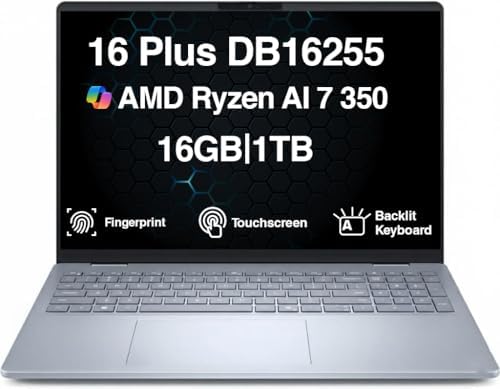
- [Superior Display] 16.0″ IPS WUXGA (1920×1200) 60Hz Touchscreen Display; 802.11be, Bluetooth 5.4, Webcam, Fingerprint, B…
- [Powerful Performance] Zen 5 Gen Ryzen AI 7 350 2.00GHz Processor (upto 5 GHz, 16MB Cache, 8-Cores, 16-Threads, ); AMD R…
- [High Speed and Multitasking] 16GB OnBoard RAM; 65W PSU, Type-C Power-In, 4-Cell 64 WHr Battery; Ice Blue Color
The Dell Inspiron 16 Plus stands out because it prioritizes workspace and performance over extreme portability. Many creators eventually discover that editing becomes easier when there is more room for timelines, preview windows, media panels, and project organization. Dell addresses this need by providing a larger display and stronger overall capability.
The larger screen immediately improves productivity. Video editing applications can feel crowded on smaller displays, particularly when working with multiple panels. The Inspiron 16 Plus provides enough space to reduce constant window switching, allowing editors to focus more on creative decisions and less on interface management.
Performance is another major advantage. Modern editing software increasingly relies on hardware acceleration, multicore processing, and graphics capabilities. The Inspiron handles these workloads confidently, maintaining responsiveness even when projects become more complex. Editors working with higher-resolution footage or more demanding timelines will appreciate the additional performance headroom.
Thermal behavior remains well controlled under sustained workloads. Rendering, transcoding, and exporting can place significant stress on system components for extended periods. Dell’s cooling solution helps preserve consistent performance, reducing the likelihood of dramatic slowdowns during long projects.
The laptop also serves as a strong option for creators who produce content professionally. Client projects often involve larger media libraries, tighter deadlines, and more demanding workflows. The additional screen space and stronger hardware provide meaningful advantages in these situations.
Battery life remains respectable given the larger display and performance capabilities, though mobility is naturally less impressive than smaller alternatives. Most creators will view this as a worthwhile tradeoff for the increased workspace and performance.
The Inspiron 16 Plus is particularly suitable for serious YouTubers, freelance editors, marketing professionals, and creators who spend significant time editing complex projects.
Pros
✅ Large display improves editing productivity
✅ Strong performance for demanding projects
✅ Good thermal management
✅ Excellent multitasking capability
✅ Suitable for professional creator workflows
Cons
❌ Larger and heavier than portable alternatives
❌ Battery life trails smaller efficiency-focused laptops
7. HP Pavilion Plus 16

- INTEL EVO PLATFORM – With the Intel Core Ultra 7 155H processor, experience powerful and responsive performance to help …
- WQXGA RESOLUTION, IPS DISPLAY – 2560×1600 pixels bring out the vibrant details of your movies and games with crisp resol…
- STUNNING GRAPHICS – Unleash your imagination with Intel Arc graphics solutions, hardware, software, and services. All bu…
The HP Pavilion Plus 16 is a laptop that often surprises creators once they begin using it for real editing work. It may not receive the same level of attention as some creator-focused competitors, but it offers a combination of display quality, processing power, and usability that makes it highly effective for content production.
One of the first things editors notice is the larger display. Video editing benefits enormously from additional workspace because timelines, media bins, preview windows, audio tracks, and effects panels all compete for screen real estate. The Pavilion Plus 16 reduces that feeling of congestion, making longer editing sessions more comfortable and productive.
Display quality further strengthens the experience. Reviewing footage, adjusting color, and designing thumbnails require visual clarity and consistency. HP provides a panel that feels well suited to these tasks, helping creators make confident editing decisions without constantly second-guessing what they see on screen.
Performance remains dependable across a variety of creator workflows. Whether working with YouTube content, client projects, tutorials, promotional videos, or educational material, the laptop maintains responsiveness while handling editing applications and supporting software. Timeline navigation feels smooth, and exporting projects remains reasonably efficient.
Thermal performance is another positive aspect. Video rendering can place sustained pressure on a laptop for extended periods. The Pavilion Plus 16 manages heat effectively enough to maintain a comfortable balance between noise levels and performance consistency. This helps ensure predictable behavior during larger projects.
Battery life remains respectable for a laptop in this category, though most creators will naturally achieve the best results when performing intensive exports while connected to power. For general editing, project reviews, and content planning, mobility remains perfectly practical.
The Pavilion Plus 16 is particularly attractive to YouTubers, marketing professionals, freelance editors, and students seeking a larger workspace without stepping into workstation territory.
Pros
✅ Large display improves workflow efficiency
✅ Good creator-focused performance
✅ Comfortable editing experience
✅ Reliable thermal management
✅ Strong multitasking capabilities
Cons
❌ Less portable than smaller alternatives
❌ Battery endurance decreases during intensive editing
8. Acer Nitro V 15

- 16GB DDR4 | 512GB SSD
- Equipped With The Most Powerful and Fast 13th Gen Intel 8-core i5-13420H
- 15.6″ FHD (1920×1080) IPS 165Hz, Dedicated NVIDIA GeForce RTX 5050 8GB GDDR7 Graphics
The Acer Nitro V 15 enters this list from a different angle. While many creator laptops emphasize elegance and portability, the Nitro V focuses more heavily on performance. Although marketed primarily toward gamers, it offers characteristics that translate surprisingly well into video editing workflows.
Video editing software increasingly benefits from graphics acceleration, particularly when working with effects, transitions, color grading, and higher-resolution footage. The Nitro V leverages this advantage effectively, helping improve timeline responsiveness and reducing export times in supported applications.
One of the laptop’s biggest strengths is performance headroom. As editing projects become more complex, weaker systems can begin to feel restrictive. Multiple video layers, effects, graphics, and high-bitrate footage all increase system demands. The Nitro V provides additional resources that help maintain a smoother editing experience as workloads grow.
Thermal management is generally stronger than many mainstream productivity laptops. Gaming-focused designs often include cooling solutions capable of handling sustained workloads, and video editors benefit directly from this capability. Longer rendering sessions remain more consistent because the system can manage heat effectively.
The display delivers a solid editing experience, though creators focused heavily on color-critical work may eventually prefer more specialized panels. For general editing, YouTube content, social media projects, and freelance work, it remains more than capable.
Battery life represents the primary tradeoff. Performance-oriented hardware naturally consumes more power, meaning mobile endurance cannot match efficiency-focused alternatives. Creators who spend most of their editing time near power outlets may find this compromise worthwhile.
The Nitro V is particularly suitable for creators who prioritize rendering performance, Premiere Pro workflows, and hardware acceleration over maximum portability.
Pros
✅ Strong editing performance
✅ Good hardware acceleration support
✅ Effective cooling system
✅ Handles demanding projects well
✅ Excellent performance headroom
Cons
❌ Battery life is below ultra-portable alternatives
❌ Heavier than productivity-focused creator laptops
9. Lenovo LOQ 15
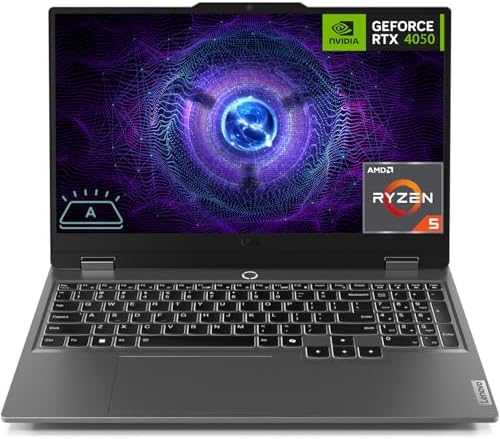
- 【Processor】 Intel Core i5-12450HX Processor (8 Cores, 12 Threads, 12+MB Intel Smart Cache, Base Frequency at 2.4 GHz, Up…
- 【Graphics】NVIDIA GeForce RTX 2050 4GB GDDR6.
- 【Display】 15.6 inch Non-Touch Display, 144Hz, FHD (1920 x 1080), IPS, anti-glare, 300 nits, Low Blue Light.
The Lenovo LOQ 15 demonstrates how gaming-inspired hardware can serve content creators exceptionally well. While the laptop is positioned toward users who need stronger graphics capability, many of the same characteristics that benefit gaming also improve video editing performance.
The first advantage is sustained performance. Video editing often involves prolonged workloads that can expose cooling limitations. The LOQ’s design helps maintain stable operating temperatures, allowing export speeds and timeline responsiveness to remain more consistent throughout longer sessions.
Editing applications benefit significantly from the additional graphics resources available in this class of laptop. Timeline playback, visual effects, transitions, and rendering workloads often feel smoother, particularly when working with larger projects or higher-resolution footage. Creators handling frequent exports may notice meaningful productivity improvements.
The keyboard and overall usability also deserve recognition. Content creation involves much more than editing. Creators spend time organizing assets, communicating with clients, writing descriptions, managing uploads, and handling administrative tasks. The LOQ remains comfortable throughout these broader productivity activities.
Display quality supports long editing sessions effectively. While some specialized creator laptops may offer superior color-focused panels, the LOQ still provides a comfortable environment for reviewing footage, editing timelines, and managing projects. Most creators will find the display more than adequate for everyday work.
Battery life is acceptable but clearly secondary to performance. This is a laptop designed for users who prioritize capability first and mobility second. For creators working primarily from home, studios, offices, or fixed workspaces, this tradeoff often makes sense.
The Lenovo LOQ 15 is particularly attractive to YouTubers, freelance editors, content producers, and creators who regularly work with more demanding projects and want stronger long-term performance potential.
Pros
✅ Strong sustained editing performance
✅ Excellent cooling capability
✅ Smooth timeline responsiveness
✅ Suitable for demanding projects
✅ Good long-term performance value
Cons
❌ Less portable than creator-focused ultrabooks
❌ Battery life prioritizes performance over endurance
10. ASUS TUF Gaming A15

- READY FOR ANYTHING – Jump right into the action with Windows 11, an AMD Ryzen 5 7535HS processor, and NVIDIA GeForce RTX…
- SWIFT MEMORY AND STORAGE – Multitask faster with 8GB of DDR5-5600MHz memory and speed up loading times with 512GB of PCI…
- NEVER MISS A MOMENT – Keep up with the pros thanks to the fast FHD 144Hz display. Adaptive-Sync technology reduces lag, …
The ASUS TUF Gaming A15 completes this guide because it offers something that many video editors eventually discover they need: sustained performance. While thin and lightweight laptops are excellent for portability, longer editing sessions can expose their limitations. The TUF Gaming A15 approaches content creation from the opposite direction, prioritizing cooling capacity and performance consistency.
What immediately stands out is how comfortably the laptop handles demanding workloads. Modern editing software increasingly relies on hardware acceleration for timeline playback, effects processing, color grading, and exporting. The TUF Gaming A15 provides the resources necessary to keep projects moving smoothly, even as timelines become more complex.
Editors working with Premiere Pro often benefit from stronger graphics hardware because GPU acceleration plays an increasingly important role in overall workflow responsiveness. Scrubbing through footage, previewing effects, and rendering projects generally feel more fluid when sufficient graphics resources are available. The TUF Gaming A15 leverages this advantage effectively.
Cooling performance is one of the laptop’s greatest strengths. Rendering a large project can place heavy demands on a system for extended periods. Many thin laptops begin reducing performance as temperatures rise. The TUF Gaming A15 maintains more consistent behavior, helping creators complete exports without significant performance degradation.
The larger chassis naturally results in increased weight, but many creators view this as a worthwhile compromise. Editors who primarily work from home, studios, offices, or fixed workspaces often place greater value on sustained performance than maximum portability. In those scenarios, the TUF Gaming A15 becomes particularly attractive.
Battery life is respectable for a performance-oriented machine, though it cannot match efficiency-focused ultrabooks. Most creators considering this category of laptop are likely prioritizing editing capability over all-day mobility.
For YouTubers, freelance editors, filmmakers, and content creators who regularly handle demanding projects, the TUF Gaming A15 offers one of the strongest performance-focused experiences available within this segment.
Pros
✅ Excellent sustained editing performance
✅ Strong hardware acceleration support
✅ Effective cooling during rendering
✅ Handles complex timelines well
✅ Strong value for demanding creators
Cons
❌ Larger and heavier than ultrabooks
❌ Battery life trails portability-focused alternatives
FAQs
How much RAM do I need for video editing?
For most creators, 16GB of RAM remains a practical starting point. It provides enough memory for editing applications, browser tabs, media management tools, and general multitasking. Editors working with large 4K projects, advanced effects, or professional workflows should strongly consider 32GB because it provides more breathing room as projects become increasingly complex.
Is a dedicated graphics card necessary for video editing?
Not always. Modern integrated graphics have improved dramatically and can handle many editing tasks effectively. However, creators working with Adobe Premiere Pro, DaVinci Resolve, motion graphics, color grading, or high-resolution footage often benefit significantly from dedicated graphics hardware because it improves timeline responsiveness, playback smoothness, and rendering performance.
Which laptop is best for Adobe Premiere Pro?
The ASUS TUF Gaming A15, Lenovo LOQ 15, and Acer Nitro V 15 stand out for Premiere Pro users because they offer stronger graphics capabilities and cooling systems. These advantages become increasingly valuable as project complexity grows and hardware acceleration plays a larger role in the editing process.
Which laptop is best for DaVinci Resolve?
DaVinci Resolve tends to benefit heavily from graphics performance. The Lenovo LOQ 15 and ASUS TUF Gaming A15 are particularly attractive options because they provide the resources Resolve can leverage effectively. Editors working extensively with color grading and advanced effects will generally appreciate the additional performance headroom these systems provide.
Is battery life important for video editors?
Battery life matters more than many creators initially realize. Editing often takes place in classrooms, client offices, coworking spaces, airports, hotels, and remote locations. A laptop that remains productive away from a charger provides greater flexibility and allows creators to continue working regardless of where inspiration or business opportunities arise.
Should I prioritize display quality or performance?
Both are important, but the answer depends on your workflow. Editors who spend substantial time color grading, reviewing footage, and designing thumbnails may benefit more from a higher-quality display. Creators working with demanding projects and frequent exports may prioritize performance. Ideally, the best creator laptops provide a balanced combination of both.
What is the best budget friendly laptop for video editing overall?
For the widest range of creators, the ASUS Vivobook Pro 15 OLED stands out because it combines a superb display, strong editing performance, effective cooling, and creator-focused features. It delivers an experience that feels significantly more premium than many competitors while remaining accessible to creators who need serious editing capability without stepping into workstation territory.
Conclusion
Choosing the right video editing laptop is ultimately about understanding your workflow rather than chasing specifications. Some creators spend most of their time editing short-form content for social media. Others produce long-form YouTube videos, client projects, documentaries, tutorials, or commercial work. Each workflow places different demands on hardware, making it important to prioritize the features that will have the greatest impact on daily productivity.
The good news is that creators now have more capable options than ever before. Modern processors, graphics solutions, displays, and battery technologies have made high-quality editing accessible across a wide range of devices. Whether portability, display quality, rendering performance, or battery life matters most to you, there is a laptop in this guide that aligns with your priorities.
For most creators, the ASUS Vivobook Pro 15 OLED offers the strongest overall balance of display quality, editing capability, thermal performance, and everyday usability. The MacBook Air 15-inch M4 remains an outstanding choice for mobile creators who prioritize battery life, while the Dell Inspiron 16 Plus provides valuable workspace for editors handling larger projects. Creators focused on maximum performance should strongly consider the Lenovo LOQ 15 or ASUS TUF Gaming A15.
Ultimately, the best budget friendly laptop for video editing is the one that supports your workflow consistently, allows you to create without frustration, and remains productive long after the initial purchase. Focusing on real-world usability rather than marketing claims will help ensure you select a machine that continues serving your creative goals for years to come.