
The first few weeks of learning to code rarely expose the weaknesses of a laptop. A browser, a code editor, and a handful of small projects can run on almost anything. The search for the best cheap laptop for learning programming usually begins later, when IDEs become heavier, coursework expands, virtual environments multiply, and dozens of browser tabs start competing for memory.
That’s why choosing a beginner programming laptop isn’t really about finding the cheapest machine available. It’s about finding hardware that won’t become frustrating six months from now. A responsive keyboard, sufficient RAM, a comfortable display, strong battery life, and a processor capable of handling modern development tools often have a greater impact on the learning experience than raw benchmark numbers.
Table of Contents
1. Lenovo ThinkPad E14 Gen 6 – Overall Best Cheap Laptop for Learning Programming

- ROBUST & RELIABLE DESIGN – The device is built to meet MIL-STD 810H standards, ensuring durability and reliability in va…
- POWERFUL PERFORMANCE – Packs an AMD Ryzen 5 7535U Processor (6 Cores 12 Threads, up to 4.55GHz) and Integrated AMD Radeo…
- VIBRANT VISUALS – 14″ WUXGA (1920×1200) IPS 300nits display, featuring TÜV Low Blue Light and Anti-glare. The 1080P FHD …
Few laptop families have earned as much trust among developers as the ThinkPad line. While flagship ThinkPads often target enterprise buyers, the E14 Gen 6 brings many of those qualities into a far more accessible package, making it an excellent starting point for aspiring programmers.
Depending on configuration, the laptop can be equipped with AMD Ryzen 7 7735U or newer Ryzen 8000-series processors. These chips combine strong single-core performance with enough multi-core capability to handle VS Code, IntelliJ IDEA, PyCharm, Docker containers, Git workflows, and dozens of browser tabs without feeling sluggish. In Geekbench multi-core testing, Ryzen 7 configurations routinely outperform many older H-series processors while consuming significantly less power.
The 14-inch display is available in 1920×1200 resolution rather than traditional 1080p. That extra vertical space may sound minor on paper, but programmers spend their days reading code, documentation, and terminal windows. Seeing more lines of code without scrolling constantly becomes surprisingly valuable over time.
Memory is another area where the E14 stands out. Configurations supporting up to 64GB RAM provide a level of future-proofing that is uncommon in this category. Most beginners won’t need that much memory immediately, but students moving into virtualization, Android development, machine learning coursework, or multiple Docker environments will appreciate the upgrade path.
Battery life typically lands between 8 and 12 hours depending on workload. During note-taking, coding sessions, research, and browser-based development, it comfortably lasts through a day of lectures or study sessions.
The keyboard remains one of the strongest reasons to buy a ThinkPad. Key travel feels deeper than many modern ultrabooks, reducing fatigue during long coding sessions. After several hours of writing Java classes, debugging Python projects, or documenting coursework, the difference becomes noticeable.
Linux support is also excellent. Ubuntu, Fedora, and other popular distributions generally install without major issues, making the laptop particularly attractive for learners exploring open-source development.
Pros
✅ Excellent ThinkPad keyboard
✅ Upgradeable memory up to 64GB
✅ Strong Ryzen performance for IDEs and multitasking
✅ 1920×1200 display improves coding productivity
✅ Excellent Linux compatibility
Cons
❌ Display color accuracy prioritizes productivity over media creation
2. Apple MacBook Air 13 (M4) – Best macOS Option

- SPEED OF LIGHTNESS — MacBook Air with the M4 chip lets you blaze through work and play. With Apple Intelligence,* up to …
- SUPERCHARGED BY M4 — The Apple M4 chip brings even more speed and fluidity to everything you do, like working between mu…
- BUILT FOR APPLE INTELLIGENCE — Apple Intelligence is the personal intelligence system that helps you write, express your…
A growing number of developers begin their programming journey on macOS because it offers a Unix-based environment while maintaining the simplicity of a consumer operating system. The MacBook Air M4 continues to be one of the most approachable entry points into that ecosystem.
The M4 processor delivers outstanding single-core performance, which is particularly relevant for coding workloads. IDE responsiveness, code compilation, browser performance, and application launches all feel exceptionally quick. In many benchmark suites, the M4 competes with significantly larger laptops despite operating inside a fanless chassis.
The 13.6-inch Liquid Retina display runs at 2560×1664 resolution and reaches approximately 500 nits of brightness. Text rendering is remarkably sharp, which matters more to programmers than many realize. Reading documentation, reviewing code, and navigating complex projects becomes noticeably easier on a high-density display.
Battery life remains one of the laptop’s defining strengths. Many users report well over 15 hours of mixed productivity work, allowing students to attend classes, work on projects, and study without carrying a charger everywhere.
Memory selection deserves careful consideration. While the base model performs well, developers planning to use Docker containers, virtual machines, Android Studio, or multiple IDEs simultaneously should strongly consider additional Unified Memory.
The overall experience feels effortless. The trackpad remains one of the best available on any laptop, the chassis feels exceptionally refined, and macOS provides direct access to many development tools used across professional software engineering environments.
Pros
✅ Outstanding M4 processor efficiency
✅ Exceptional battery life
✅ Sharp Liquid Retina display
✅ Excellent build quality
✅ Strong Unix-based development environment
Cons
❌ Memory upgrades increase overall cost
❌ Limited hardware upgradeability after purchase
3. HP ProBook 445 G11 – Best Business Laptop for Students

- HP ProBook 4 G1ah 16″ (Latest 2025 Model) with AMD Ryzen 5 AI CPU | Brand New from HP AI Focused Business Laptop with fu…
- AMD Ryzen 5 220 Processor and Integrated AMD Radeon 740M Graphics | 512GB SSD | 16GB RAM | HP Standard Notebook Keyboard…
- 16″ Full HD+ (1920×1200) UWVA IPS Display Non Touch 300-Nits | MediaTek Wi-Fi 6E RZ616 (2×2) and Bluetooth 5.3 wireless …
Programming students often overlook business laptops in favor of gaming machines. That can be a mistake. The HP ProBook 445 G11 focuses on reliability, battery life, keyboard quality, and practical performance, which happen to align closely with what many learners actually need.
Powered by AMD Ryzen 7000-series processors, the ProBook provides more than enough performance for Java development, Python projects, web development, SQL coursework, and introductory data structures classes. Multi-core performance remains strong enough to keep IntelliJ IDEA, VS Code, browser tabs, and documentation running simultaneously without excessive slowdowns.
The 14-inch IPS display typically uses a 1920×1200 resolution panel. Similar to the ThinkPad, the additional vertical workspace improves productivity when working with code editors and terminal windows.
One area where the ProBook earns praise is serviceability. Memory and storage upgrades are generally more accessible than on many thin-and-light consumer laptops. That flexibility extends the lifespan of the machine and allows students to upgrade as their coursework becomes more demanding.
Battery life often reaches 9-11 hours during typical academic workloads, making it well suited for campus use. Combined with a relatively understated design, the laptop feels equally comfortable in lectures, libraries, study groups, and internships.
Typing also feels excellent. HP has steadily improved its business keyboards, and the ProBook continues that trend with a comfortable layout that supports long coding sessions without becoming tiring.
Pros
✅ Strong Ryzen 7 productivity performance
✅ Business-class reliability
✅ Good battery life
✅ Upgrade-friendly design
✅ Comfortable keyboard
Cons
❌ Speakers are merely average
❌ Not as premium-feeling as some ultrabook competitors
4. ASUS Vivobook S 14 – Best OLED Display

- UNLEASH EFFORTLESS PERFORMANCE — Power through any task with Windows 11 Home, a blazing-fast AMD Ryzen 9 processor with …
- STUNNING, SMOOTH VISUALS — 14” 3K (2880 x 1800) 120Hz ASUS Lumina OLED display delivers extremely smooth and vivid visua…
- SO SLIM, SO LIGHT — Incredibly portable at just 0.63” thin, and weighs only 2.87 lbs
Hours spent coding rarely feel demanding at first. Then a semester passes, projects become larger, documentation multiplies, and suddenly you’re staring at a screen for six to eight hours a day. The Vivobook S 14 distinguishes itself by improving the part of the laptop programmers interact with most: the display.
Its 14-inch OLED panel is one of the strongest you’ll find in this category. Depending on configuration, the display can offer resolutions up to 2880×1800 with a 120Hz refresh rate. Text appears razor sharp, syntax highlighting pops beautifully, and dark-themed IDEs benefit from OLED’s perfect black levels. Reading documentation on this screen simply feels more comfortable than on the average budget laptop.
Performance is equally capable. Ryzen 7 8845HS and Intel Core Ultra configurations provide plenty of horsepower for VS Code, IntelliJ IDEA, PyCharm, Android Studio, and Docker workloads. Multi-core performance remains strong enough for local databases, containers, and multiple development environments running simultaneously.
Battery life generally lands between 8 and 11 hours during programming-focused workloads. That’s respectable considering the higher-resolution display and stronger processors available.
The laptop also feels surprisingly premium. At around 3 pounds, it remains easy to carry between classes while maintaining enough performance headroom for several years of learning.
Pros
✅ Beautiful OLED display
✅ 120Hz refresh rate improves responsiveness
✅ Strong Ryzen and Core Ultra options
✅ Lightweight design
✅ Excellent typing experience
Cons
❌ OLED panels can consume more power at higher brightness levels
5. Dell Inspiron 14 Plus – Best for Computer Science Students
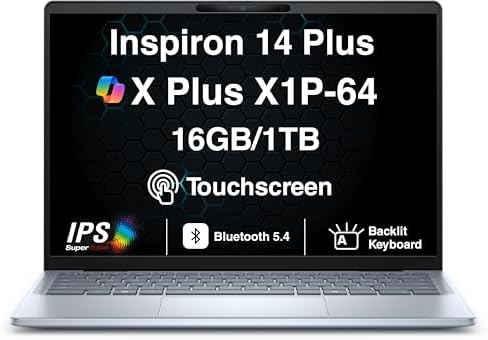
- AI-POWERED PERFORMANCE FOR MODERN PRODUCTIVITY – The Dell Inspiron 14 Plus Copilot+ PC is powered by the Snapdragon X Pl…
- FAST MULTITASKING AND HIGH-SPEED STORAGE – Features 16GB onboard LPDDR5X memory and a fast 1TB PCIe NVMe SSD, providing …
- STUNNING 14″ 2.5K TOUCHSCREEN DISPLAY – Enjoy vivid visuals on a 14.0-inch WQXGA (2560×1600) 2.5K touchscreen display wi…
Computer science students often place unique demands on a laptop. One week might involve Java programming, the next might require database projects, Linux virtual machines, or introductory machine learning coursework. The Inspiron 14 Plus handles that variety particularly well.
Intel Core Ultra 7 configurations deliver excellent performance for development environments. The processor’s combination of performance and efficiency cores allows IntelliJ, VS Code, Docker, browser tabs, and background processes to coexist comfortably. Cinebench and Geekbench results consistently place it ahead of many traditional U-series laptops that target basic productivity.
The 14-inch display typically features a 2.2K resolution panel running at 90Hz. That additional resolution provides more room for code, terminals, documentation, and debugging windows. Once you’ve worked with extra vertical space, returning to basic 1080p displays feels restrictive.
Memory configurations commonly start at 16GB and scale higher depending on the model. For students exploring virtualization or Android Studio, that additional memory headroom becomes increasingly valuable.
The keyboard may not reach ThinkPad levels, but it remains comfortable for extended coding sessions. Combined with a sturdy aluminum chassis, the laptop feels more substantial than many consumer-focused competitors.
Pros
✅ Excellent Core Ultra 7 performance
✅ Sharp 2.2K display
✅ Strong multitasking capabilities
✅ Premium build quality
✅ Well suited for CS coursework
Cons
❌ Battery life trails some ARM-based competitors
6. Acer Aspire 14 AI – Best Battery Life

- Spectacular Visual Delights–【14″ WUXGA IPS Touch Display】Delivers sharp, detailed visuals with wide viewing angles and …
- Reliable CPU Performance–【Intel Core Ultra 5 226V Processor】Delivers efficient AI-enhanced performance with advanced mu…
- Memory & Storage–【16GB LPDDR5X】Boost productivity with fast, efficient memory that handles multiple applications with e…
A programming laptop doesn’t always need workstation-level power. Sometimes the most useful machine is the one that survives a full day of lectures, coding sessions, research, and study groups without searching for an outlet.
The Aspire 14 AI leverages Intel’s latest Core Ultra platform and integrated Intel Arc Graphics to create an efficient development environment. Everyday programming workloads feel smooth, whether you’re writing Python scripts, building web applications, managing Git repositories, or working through programming exercises.
Its 14-inch WUXGA display runs at 1920×1200 resolution, providing additional vertical space compared to traditional Full HD panels. The productivity benefit becomes obvious when splitting the screen between code, documentation, and terminal windows.
Battery endurance is where the laptop truly separates itself. Real-world usage frequently stretches into double-digit hours, making it one of the strongest options for students who spend entire days moving between classrooms, libraries, and study spaces.
Thermals are another pleasant surprise. The laptop remains quiet during most programming tasks because coding workloads rarely stress hardware the way gaming or video editing does.
From a usability perspective, the Aspire feels practical rather than flashy. It focuses on reliability, efficiency, and portability instead of chasing unnecessary specifications.
Pros
✅ Excellent battery life
✅ Efficient Core Ultra platform
✅ Quiet operation
✅ Lightweight and portable
✅ Comfortable for daily coding
Cons
❌ Integrated graphics limit heavier technical workloads
7. Microsoft Surface Laptop Go 3 – Best Portable Option

- 8 GB memory is ready to run powerful programs with efficient performance
- The 12.4″ 1536 x 1024 screen provides a great movie watching experience
- 128 GB total SSD capacity keeps your running programs active while your computer resumes from suspension in seconds
Not every learner wants a large 14-inch or 15-inch laptop. Some prioritize portability above everything else because their machine spends more time in a backpack than on a desk. The Surface Laptop Go 3 targets that audience exceptionally well.
Powered by Intel Core i5 processors and fast SSD storage, the system handles beginner programming workloads without issue. VS Code, browser-based development tools, Python environments, and Git workflows run comfortably within its capabilities.
The 12.4-inch PixelSense touchscreen display is smaller than many competitors, but its 3:2 aspect ratio creates a surprisingly productive workspace. More vertical content fits on screen, which is especially useful when reading documentation or reviewing source code.
Battery life typically falls between 10 and 13 hours during realistic productivity workloads. Combined with a weight of roughly 2.5 pounds, the laptop almost disappears inside a backpack.
What stands out most is how pleasant the overall experience feels. The keyboard is comfortable, the trackpad is responsive, and the build quality exceeds what many people expect from a compact laptop in this category.
Pros
✅ Extremely portable design
✅ Good battery life
✅ Excellent build quality
✅ Comfortable keyboard
✅ Great for beginners
Cons
❌ Smaller display limits multitasking
❌ Less suitable for advanced development workloads
8. MSI Modern 15 – Best Budget Productivity Laptop
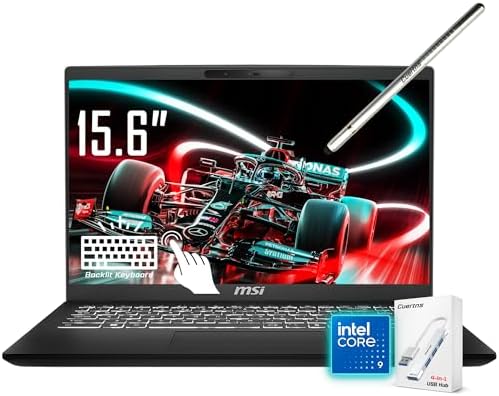
- [Processor]: Intel Core 9 270H processor, 14 cores, 20 threads, 24 MB cache, up to 5.8 GHz frequency. Integrated Intel A…
- [Ample Storage]: 32GB RAM. 1TB SSD allows for fast boot and load times, 15X faster performance than a traditional hard d…
- [Display]: 15.6″ FHD(1920 x 1080) touchscreen display, 45% NTSC, 16:9 aspect ratio. Your touch makes everything easier, …
Learning to program rarely pushes hardware to its limits during the first few months. More often, the challenge comes from juggling an IDE, documentation, browser tabs, Git clients, communication tools, and perhaps a local database. The MSI Modern 15 handles that style of workload surprisingly well while remaining affordable.
Configurations featuring Ryzen 7 7730U processors or Intel Core i7 variants provide enough performance for Python, Java, JavaScript, SQL, and web development projects. While benchmark numbers won’t challenge gaming laptops, Cinebench and Geekbench results remain strong enough to keep development tools responsive throughout a typical study session.
The 15.6-inch Full HD IPS display gives programmers something increasingly rare: workspace. A larger screen means more visible code, larger debugging windows, and less constant switching between tabs. For beginners learning syntax and debugging techniques, that extra room often improves productivity more than raw processor speed.
Battery life generally falls between 7 and 10 hours depending on brightness and workload. Since programming tasks rarely stress hardware continuously, the laptop remains relatively efficient throughout the day.
Typing feels comfortable thanks to the spacious keyboard layout. Long coding sessions, note-taking, and documentation work all benefit from the larger chassis.
Pros
✅ Large 15.6-inch display
✅ Strong productivity performance
✅ Comfortable keyboard layout
✅ Lightweight for its size
✅ Good value for students
Cons
❌ Display color quality is merely average
❌ Integrated graphics limit advanced GPU workloads
9. Samsung Galaxy Book4 – Best Thin-and-Light Option

- ⚡Intel Core 7-150U Performance — Powered by a 10-core, 12-thread Intel Core 7 Series 1 processor with up to 5.4GHz boost…
- 🖥️ 15.6 inch Full HD Display — The 1920 x 1080 FHD LED screen with 300 nits brightness provides clear visuals for docume…
- 🚀 Fast Memory & SSD Storage — Equipped with 16GB LPDDR4X RAM at 6000MHz and a up to 4TB SSD, this Samsung laptop ensures…
Some laptops disappear into the background so effectively that you stop thinking about them. That’s one of the Galaxy Book4’s greatest strengths. It doesn’t attempt to dominate benchmark charts. Instead, it focuses on making everyday computing effortless.
Intel Core Ultra processors paired with Intel Arc Graphics provide more than enough performance for programming environments. VS Code, IntelliJ IDEA, PyCharm, Docker, GitHub Desktop, browser tabs, and local development servers all operate comfortably within the system’s capabilities.
Samsung’s display expertise remains evident. The AMOLED panel available on select configurations delivers excellent contrast, vibrant colors, and sharp text rendering. Reading technical documentation, API references, and source code feels particularly pleasant on the display.
Battery life frequently reaches 10 to 14 hours depending on workload. Students moving between lectures, libraries, and study groups will appreciate not having to carry a charger constantly.
The laptop’s weight is another advantage. Carrying a heavy machine every day becomes surprisingly tiresome over the course of a semester. The Galaxy Book4 remains easy to transport while still providing a comfortable development environment.
Pros
✅ Excellent AMOLED display
✅ Strong battery life
✅ Lightweight design
✅ Efficient Core Ultra processor
✅ Premium overall feel
Cons
❌ Upgrade options are limited
10. LG Gram 14 – Best Lightweight Laptop

- Incredibly Light. Surprisingly Thin. – LG gram is designed to go wherever you do. Weighing just 2.5 lbs. with an ultra-s…
- Remarkably Light. Reliably Strong. – LG gram has passed seven military-grade durability tests, striking an impressive ba…
- Power that Last with Smart Efficiency – LG gram combines a high-capacity 72Wh battery with AI-driven power management to…
Weight rarely appears near the top of a specification sheet, yet it becomes one of the first things owners notice after carrying a laptop every day for several months. The LG Gram 14 was built around that reality.
At roughly 2.2 pounds, the laptop feels almost impossibly light for a full-featured productivity machine. Despite that portability, LG still manages to include Intel Core Ultra processors capable of handling modern programming workloads with ease.
The 14-inch 1920×1200 IPS display provides additional vertical workspace, allowing more code to remain visible on screen. Combined with the laptop’s thin bezels, the overall experience feels more spacious than the dimensions suggest.
Battery endurance remains one of the Gram’s defining characteristics. Many users can comfortably exceed 12 hours of mixed productivity work. For students attending classes all day or developers working remotely, that flexibility can dramatically improve the ownership experience.
Programming workloads feel perfectly at home on the system. VS Code, IntelliJ, browser-based development environments, terminals, Git tools, and cloud development platforms all run smoothly. While it isn’t designed for heavy virtualization or machine learning projects, it excels at the tasks most learners perform daily.
The keyboard deserves recognition as well. Despite the slim chassis, key travel remains comfortable enough for lengthy coding sessions.
Pros
✅ Extremely lightweight design
✅ Outstanding battery life
✅ Comfortable keyboard
✅ Strong portability
✅ Excellent productivity machine
Cons
❌ Not intended for demanding virtualization workloads
FAQs
Is 8GB RAM enough for learning programming?
For basic Python, HTML, CSS, and JavaScript, 8GB can still work. However, 16GB is strongly recommended because modern IDEs, browsers, and development tools consume significantly more memory than they did a few years ago.
Which programming language requires the most powerful laptop?
Languages themselves rarely determine hardware requirements. The tools surrounding them matter more. Android Studio, machine learning frameworks, Docker containers, and virtual machines place far greater demands on a system than Python or Java syntax itself.
Do I need a dedicated GPU to learn programming?
No. Most beginner and intermediate programming workloads run perfectly well on integrated graphics. Dedicated GPUs become relevant for machine learning, game development, 3D programming, AI projects, and certain engineering applications.
Is macOS good for learning programming?
Yes. Many developers appreciate macOS because it provides a Unix-based environment while maintaining excellent software support and battery life. It’s particularly popular among web developers and software engineers.
Should I choose a business laptop or a gaming laptop?
For learning programming, business laptops are often the better choice. They typically offer superior keyboards, better battery life, quieter operation, and a more comfortable everyday experience.
Can cheap laptops run IntelliJ IDEA?
Absolutely. Modern laptops equipped with Ryzen 7, Core Ultra, or Apple M-series processors handle IntelliJ IDEA comfortably, especially when paired with 16GB or more memory.
Conclusion
The laptop that helps someone learn programming isn’t necessarily the one with the highest benchmark score. Consistent battery life, a comfortable keyboard, enough memory for modern development tools, and a display that reduces fatigue often contribute far more to the learning experience than raw processing power.
The Lenovo ThinkPad E14 Gen 6 earns the top position because it balances nearly everything a programming student needs: excellent keyboard quality, strong Ryzen performance, upgrade flexibility, Linux compatibility, and enough headroom to remain useful long after introductory coursework ends. Learners who prefer macOS will find the MacBook Air M4 exceptionally capable, while those prioritizing portability may gravitate toward the LG Gram 14, Galaxy Book4, or Surface Laptop Go 3.
Programming is ultimately a skill built through repetition. The right laptop won’t write code for you, but it can remove distractions, reduce frustration, and create an environment where learning feels far more enjoyable.