
The conversation around video-editing laptops has changed dramatically over the last few hardware generations. Not long ago, shopping for the best budget laptop for video editing under 1000 dollars meant accepting weak displays, entry-level processors, and export times long enough to interrupt the creative process. Today, laptops equipped with RTX 4050 graphics, modern H-series processors, fast NVMe storage, and 16GB of memory have pushed capabilities much further down the price ladder.
That shift matters because most creators aren’t grading Netflix originals or cutting Hollywood productions. They’re producing YouTube videos, client projects, tutorials, podcasts, product reviews, reels, documentaries, and online courses. The challenge is no longer finding a machine that can edit video. The challenge is identifying which models provide the best editing experience without wasting money on specifications that won’t significantly improve your workflow.
Table of Contents
1. Acer Nitro V 15 – Best Overall

- 16GB DDR4 | 512GB SSD
- Equipped With The Most Powerful and Fast 13th Gen Intel 8-core i5-13420H
- 15.6″ FHD (1920×1080) IPS 165Hz, Dedicated NVIDIA GeForce RTX 5050 8GB GDDR7 Graphics
A laptop doesn’t become a strong editing recommendation simply because it carries a gaming label. The reason the Acer Nitro V 15 earns the top position is that its hardware allocation aligns remarkably well with what modern editing software actually demands.
Most recommended configurations pair an Intel Core i7-13620H with an NVIDIA RTX 4050 Laptop GPU. The processor’s 10-core architecture provides enough horsepower to handle footage ingestion, proxy generation, background rendering, and export tasks simultaneously. Meanwhile, the RTX 4050’s 6GB of VRAM gives Premiere Pro and DaVinci Resolve meaningful GPU resources for timeline acceleration, transitions, effects processing, and hardware-assisted exports.
The 15.6-inch Full HD IPS panel typically operates at 144Hz. While refresh rate isn’t a deciding factor for video editing, smoother scrolling and timeline navigation do make the editing experience feel more responsive. Color coverage generally lands around 65-70% sRGB, which means the display is perfectly usable for YouTube content and social media projects but less ideal for color-critical commercial work.
A major advantage appears once projects become larger. The Nitro V usually supports memory upgrades beyond the factory configuration, allowing creators to move from 16GB to 32GB RAM later. That’s particularly useful because Premiere Pro and DaVinci Resolve can consume memory aggressively once multiple clips, effects layers, and browser tabs enter the picture.
During actual editing sessions, the laptop feels surprisingly composed. Playback remains smooth on 1080p timelines, while moderate 4K projects become manageable when proxies are used appropriately. Fan noise increases during exports, yet thermal throttling remains relatively controlled compared to many competing systems.
Battery life typically falls between 5 and 7 hours during general productivity tasks. Once editing software enters the equation, expect closer to 2-4 hours depending on workload intensity.
Pros
✅ RTX 4050 provides excellent editing acceleration
✅ Intel Core i7-13620H handles multitasking well
✅ Upgradeable RAM and storage
✅ Good thermal performance for the category
✅ Strong value for Premiere Pro and Resolve users
Cons
❌ Display color accuracy limits advanced grading work
❌ Battery life favors plugged-in editing sessions
2. ASUS TUF Gaming A15 – Best Performance Value

- READY FOR ANYTHING – Jump right into the action with Windows 11, an AMD Ryzen 5 7535HS processor, and NVIDIA GeForce RTX…
- SWIFT MEMORY AND STORAGE – Multitask faster with 8GB of DDR5-5600MHz memory and speed up loading times with 512GB of PCI…
- NEVER MISS A MOMENT – Keep up with the pros thanks to the fast FHD 144Hz display. Adaptive-Sync technology reduces lag, …
Raw benchmark numbers rarely tell the full story, yet the ASUS TUF Gaming A15 consistently posts results that translate into tangible editing benefits. Depending on configuration, the laptop combines a Ryzen 7 7735HS or Ryzen 7 8845HS processor with an RTX 4050, creating one of the strongest performance-per-dollar combinations available.
AMD’s Ryzen architecture excels during heavily threaded workloads. Exporting projects, transcoding footage, generating proxies, and multitasking across creative applications all benefit from the processor’s strong multi-core capabilities. In many creator-focused benchmarks, Ryzen systems remain highly competitive against similarly priced Intel alternatives.
The RTX 4050 continues to play a significant role here. Premiere Pro’s GPU acceleration has become increasingly important, and the card’s CUDA support helps improve playback performance while reducing rendering times. DaVinci Resolve users see even greater benefits because the software relies heavily on graphics acceleration for grading and effects processing.
Most configurations include a 15.6-inch 144Hz IPS panel. Brightness generally sits around 250-300 nits, which is sufficient indoors but less comfortable in bright environments. While the display isn’t factory calibrated for professional editing, it remains adequate for the vast majority of budget-conscious creators.
The cooling system deserves recognition because sustained workloads reveal weaknesses in many affordable laptops. During long exports, the TUF maintains clock speeds more effectively than expected, helping prevent the dramatic performance drops that sometimes affect thinner competitors.
Battery endurance usually lands in the 6-8 hour range during light productivity work. That’s respectable considering the hardware inside, though editors should still expect significantly shorter runtimes when actively rendering or grading footage.
Typing on the TUF feels surprisingly comfortable. Key travel is deeper than many modern thin-and-light laptops, making script writing, project planning, and client communication easier during long workdays.
Pros
✅ Strong Ryzen 7 multi-core performance
✅ RTX 4050 handles GPU-accelerated workloads well
✅ Good sustained performance under load
✅ Upgrade-friendly design
✅ Better battery life than many gaming rivals
Cons
❌ Display quality varies by configuration
3. Lenovo LOQ 15 – Best for Premiere Pro
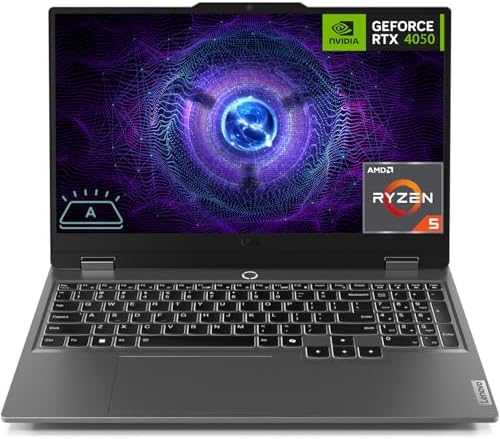
- 【Processor】 Intel Core i5-12450HX Processor (8 Cores, 12 Threads, 12+MB Intel Smart Cache, Base Frequency at 2.4 GHz, Up…
- 【Graphics】NVIDIA GeForce RTX 2050 4GB GDDR6.
- 【Display】 15.6 inch Non-Touch Display, 144Hz, FHD (1920 x 1080), IPS, anti-glare, 300 nits, Low Blue Light.
Lenovo’s LOQ series occupies an interesting position in the market. It borrows engineering concepts from the more expensive Legion family while targeting buyers who care more about performance than premium materials.
Recommended editing configurations frequently pair an Intel Core i7-13650HX with an RTX 4050. The HX-series processor is particularly noteworthy because it operates closer to desktop-class hardware than many mobile chips. That extra processing headroom becomes valuable when working with longer timelines, higher-bitrate footage, or export-heavy workflows.
Premiere Pro benefits considerably from this combination. PugetBench results from similarly configured systems consistently place HX-based laptops ahead of many thin-and-light creator machines. Timeline responsiveness remains strong, media imports complete quickly, and export performance feels competitive for the price bracket.
The 15.6-inch IPS display generally features a 144Hz refresh rate and approximately 300 nits of brightness. While color coverage won’t satisfy professional colorists, it provides a comfortable editing environment for YouTube creators, educators, and freelance editors producing online content.
Thermal behavior is arguably the laptop’s most underrated quality. Borrowing cooling principles from Lenovo’s gaming lineup allows the LOQ to maintain stable performance during extended rendering sessions. Instead of delivering a short burst of speed followed by aggressive throttling, it sustains productivity-oriented workloads more effectively than many direct competitors.
Storage expansion is another practical advantage. Video projects grow rapidly, and having room to add additional SSD capacity can significantly extend the laptop’s useful life.
From a day-to-day usability standpoint, the keyboard remains one of the best in the category. Lenovo’s typing experience continues to stand out, particularly for creators who split their time between editing, scripting, research, and client communication.
Pros
✅ Excellent Premiere Pro performance
✅ Intel Core i7-13650HX delivers strong processing power
✅ Effective cooling system
✅ Comfortable keyboard
✅ Expandable storage options
Cons
❌ Heavier than many productivity-focused laptops
❌ Battery life trails efficiency-focused alternatives
4. HP Victus 15 – Best Budget Creator Laptop

- 【Memory & Storage】16GB high-bandwidth DDR5 RAM to smoothly run multiple applications and browser tabs all at once; 512GB…
- 【AMD Processor】AMD Ryzen 5 7535HS ( 3.3 GHz base clock, up to 4.55 GHz max boost clock, 16 MB cache, 6 cores, 12 threads…
- 【Display】15.6″ diagonal, FHD (1920 x 1080) 144Hz Anti-Glare, 1080p Full High Definition resolution for smooth, crisp gam…
Not every editor wants a laptop that looks like it belongs at an esports tournament. HP took a different route with the Victus 15, delivering hardware capable of handling serious editing workloads while maintaining a design that feels comfortable in classrooms, offices, client meetings, and coffee shops.
Configurations equipped with a Ryzen 7 8845HS or Intel Core i7-13620H alongside an RTX 4050 provide a surprisingly capable editing platform. The GPU accelerates Premiere Pro effects, transitions, playback, and exports, while the processor handles encoding, background rendering, and media management tasks efficiently. For YouTube creators and freelance editors, the performance difference between integrated graphics and an RTX 4050 remains immediately noticeable.
The 15.6-inch display is available in 144Hz variants, although color reproduction varies depending on configuration. Most units deliver approximately 300 nits of brightness, making them usable indoors but less impressive than premium creator-focused displays. Editors producing content for YouTube, TikTok, Instagram, and online courses will likely find the panel sufficient, though professional color grading is best reserved for an external monitor.
One area where the Victus performs well is acoustics. During timeline editing and light exports, fan noise remains reasonably controlled. Once rendering workloads become sustained, the cooling system becomes more audible, but temperatures generally stay within acceptable limits.
Battery life tends to land around 6 hours during mixed productivity work. Heavy editing workloads predictably reduce that figure, but the laptop remains competitive within its category.
Using the Victus feels less like operating a gaming machine and more like working on a capable multimedia workstation. That subtle distinction helps explain its popularity among creators.
Pros
✅ RTX 4050 offers strong editing acceleration
✅ Professional-looking design
✅ Comfortable keyboard
✅ Respectable thermals
✅ Good balance of performance and portability
Cons
❌ Display quality depends heavily on configuration
❌ Not ideal for color-critical editing work
5. Dell G15 – Best Thermal Performance

- Dell G15 5515 Laptop 15.6″ Non-Touch Screen Grey
- AMD Ryzen 7 Ryzen 7-5800H Eight-Core Processor 3.2GHz (4.4GHz With Turbo Boost)
- 512GB SSD Hard Drive & 16GB RAM Memory
Few things frustrate editors more than watching performance disappear halfway through a render. Export times lengthen, clocks drop, and workloads that should finish quickly begin dragging. The Dell G15 earns its place on this list because it approaches cooling more aggressively than many competitors in the same price bracket.
Recommended configurations typically combine Intel Core i7 processors or Ryzen 7 chips with an RTX 4050. On paper, those specifications look similar to many competing laptops. The difference becomes apparent once the workload extends beyond a few minutes. The larger chassis and robust cooling solution help maintain higher sustained performance during exports and rendering sessions.
The display generally features a 15.6-inch Full HD IPS panel running at 120Hz or 165Hz depending on configuration. Brightness usually falls within the 250-300 nit range. Color coverage is adequate for content creation but doesn’t approach the standards expected by professional colorists.
Premiere Pro users benefit from the thermal headroom. Longer exports remain relatively consistent, while timeline playback stays responsive during complex projects. DaVinci Resolve users also appreciate the laptop’s ability to sustain GPU performance under heavier grading workloads.
Battery life isn’t the G15’s strongest attribute. Most users can expect around 4-6 hours of general productivity and significantly less during active editing. This is fundamentally a machine designed to perform best while plugged in.
The keyboard feels solid, though the overall chassis is noticeably larger than many competitors. For editors who primarily work from a desk, that’s often a worthwhile tradeoff.
Pros
✅ Excellent thermal management
✅ Stable performance during long renders
✅ RTX 4050 accelerates creative workloads
✅ Upgradeable RAM and storage
✅ Strong build quality
Cons
❌ Larger and heavier than many alternatives
6. Apple MacBook Air 13 (M4) – Best macOS Option

- SPEED OF LIGHTNESS — MacBook Air with the M4 chip lets you blaze through work and play. With Apple Intelligence,* up to …
- SUPERCHARGED BY M4 — The Apple M4 chip brings even more speed and fluidity to everything you do, like working between mu…
- BUILT FOR APPLE INTELLIGENCE — Apple Intelligence is the personal intelligence system that helps you write, express your…
The MacBook Air occupies a fascinating position in the editing market. Unlike most laptops in this price range, it doesn’t rely on dedicated graphics hardware. Instead, Apple’s M4 chip leverages a highly optimized architecture that delivers surprisingly strong editing performance despite its thin and fanless design.
The 13.6-inch Liquid Retina display runs at 2560×1664 resolution and reaches approximately 500 nits of brightness. Color reproduction remains one of its strongest assets, with excellent P3 color gamut coverage making footage appear vibrant and accurate. Although the display lacks the high refresh rates found in gaming laptops, editors often value color fidelity more than 144Hz panels.
Performance is where Apple’s optimization becomes evident. Final Cut Pro feels exceptionally smooth, while DaVinci Resolve and Premiere Pro perform far better than many buyers expect from a fanless machine. Hardware media engines accelerate H.264, HEVC, and ProRes workflows, helping reduce export times and improve playback efficiency.
Battery life separates the Air from virtually every Windows competitor in this category. Light productivity can exceed 15 hours, while editing workloads often remain practical for far longer than similarly priced gaming laptops. That flexibility makes it particularly attractive to students, travelers, and mobile creators.
The biggest limitation is thermal capacity. Without active cooling, sustained workloads eventually reduce performance. For occasional editing, the effect is minor. For editors exporting large projects daily, more powerful systems may be better suited.
Pros
✅ Excellent P3 color accuracy
✅ Outstanding battery life
✅ Extremely portable
✅ Efficient media engine acceleration
✅ Superb build quality
Cons
❌ Fanless design limits sustained performance
❌ Less upgrade flexibility than Windows alternatives
7. MSI Thin A15 – Best Entry-Level RTX Laptop

- Spectacular Visual Delights–【15.6″ FHD 144Hz Display】Get the upper hand with an expanded field of view, allowing you to…
- Reliable CPU Performance–【AMD Ryzen 5 7535HS Processor】Delivers powerful and efficient multi-core performance, enabling…
- Memory & Storage–【8GB DDR5 RAM】Seamless multitasking lets you work more efficiently and increase productivity.【512GB PC…
Every budget category needs a laptop that pushes performance ahead of refinement. The MSI Thin A15 fills that role. It doesn’t have the premium materials of a MacBook Air or the cooling capacity of a Dell G15, but it places powerful hardware within reach of creators working with tighter budgets.
Many configurations pair the Ryzen 7 7735HS with an RTX 4050 Laptop GPU, a combination that performs surprisingly well in Premiere Pro and DaVinci Resolve. The RTX 4050’s CUDA acceleration helps improve playback performance when effects, transitions, and color corrections start accumulating on a timeline. For editors moving from integrated graphics, the difference feels substantial.
The 15.6-inch Full HD IPS display typically runs at 144Hz. Brightness hovers around 250 nits, and color coverage is adequate rather than exceptional. This isn’t a laptop for professional color grading, but it remains perfectly usable for YouTube videos, social content, online courses, and freelance editing projects.
Storage expansion remains straightforward, which matters because video files rarely stay small for long. Most creators eventually discover that the SSD filling up is often a bigger problem than raw processing power.
Where the Thin A15 earns praise is responsiveness. Applications launch quickly, timeline scrubbing remains smooth, and export times compare favorably against many productivity-focused laptops in the same budget range.
Pros
✅ RTX 4050 offers excellent entry-level creator performance
✅ Fast application loading
✅ Good value for Premiere Pro users
✅ Upgradeable storage
✅ Lightweight compared to many gaming rivals
Cons
❌ Display quality trails creator-focused laptops
❌ Cooling system becomes audible under heavy load
8. Gigabyte G6X – Best for Multicam Editing
Editing a single camera stream is one thing. Managing multiple angles, synchronized audio tracks, overlays, and graphics is where weaker systems begin to struggle. The Gigabyte G6X earns its place because it brings hardware normally found in more expensive laptops into a relatively affordable package.
Most recommended configurations feature Intel’s Core i7-13650HX processor alongside an RTX 4060, which is notable because many competitors in this price range stop at the RTX 4050. The additional CUDA cores and larger graphics budget become useful when working with multicam timelines, advanced effects, and GPU-intensive grading tasks.
The 16-inch display provides more screen real estate than many 15-inch competitors. While the panel remains Full HD+ rather than OLED, the additional workspace helps when managing editing panels, timelines, bins, and preview windows simultaneously.
Benchmark-wise, RTX 4060-equipped laptops often show measurable gains in DaVinci Resolve compared with RTX 4050 systems, particularly once color grading and effects-heavy projects enter the workflow. Premiere Pro users also benefit from stronger GPU acceleration.
The keyboard feels surprisingly solid for a performance-oriented machine, while the cooling system manages to keep temperatures under control despite the more powerful hardware.
Pros
✅ RTX 4060 delivers stronger GPU acceleration
✅ Excellent multicam editing capability
✅ Larger 16-inch workspace
✅ Strong performance-per-dollar ratio
✅ Handles demanding Resolve projects well
Cons
❌ Battery life favors desk-based workflows
❌ Display color accuracy is average
9. Samsung Galaxy Book4 – Best Battery Life

- ⚡Intel Core 7-150U Performance — Powered by a 10-core, 12-thread Intel Core 7 Series 1 processor with up to 5.4GHz boost…
- 🖥️ 15.6 inch Full HD Display — The 1920 x 1080 FHD LED screen with 300 nits brightness provides clear visuals for docume…
- 🚀 Fast Memory & SSD Storage — Equipped with 16GB LPDDR4X RAM at 6000MHz and a up to 4TB SSD, this Samsung laptop ensures…
A different type of creator exists outside the studio. Some edit between classes, others work while traveling, and many spend more time away from power outlets than beside them. The Galaxy Book4 targets that audience by prioritizing efficiency without abandoning editing capability altogether.
Powered by Intel Core Ultra processors and integrated Intel Arc Graphics, the laptop won’t compete with RTX-equipped systems in raw rendering performance. What it does offer is a remarkably balanced experience for lighter editing workloads. CapCut, Filmora, Premiere Rush, and moderate Premiere Pro projects remain perfectly manageable.
The AMOLED display deserves attention. While budget editing laptops often sacrifice display quality first, Samsung continues leveraging its expertise in panels. The result is vibrant colors, strong contrast, and an enjoyable viewing experience for content creators.
Battery endurance is where the machine separates itself from the field. Depending on usage, double-digit battery life remains realistic, something gaming laptops simply cannot match. For creators prioritizing mobility, that tradeoff may be worthwhile.
The laptop also feels noticeably more refined than many gaming-focused alternatives. It’s thin, light, quiet, and easy to carry throughout the day.
Pros
✅ Beautiful AMOLED display
✅ Outstanding battery life
✅ Lightweight and portable
✅ Quiet operation
✅ Excellent travel companion
Cons
❌ Integrated graphics limit demanding editing workloads
10. Microsoft Surface Laptop 7 – Best Portable Editing Laptop

- This Certified Refurbished product is tested and certified to look and work like new. The refurbishing process includes …
- 13.8-inch (2304 x 1536) IPS Touchscreen LED Display
- Qualcomm Snapdragon X Plus Processor (Deca-Core, 1.0GHz, 42MB Cache)
Sometimes the most valuable laptop isn’t the fastest one. It’s the machine that’s always with you when inspiration strikes, a client sends revisions, or an upload needs last-minute adjustments. The Surface Laptop 7 embodies that philosophy exceptionally well.
Powered by Qualcomm’s Snapdragon X Elite platform, the Surface Laptop 7 delivers one of the most interesting combinations of efficiency and responsiveness currently available. The processor performs particularly well in productivity workloads while maintaining battery life levels that rival some tablets.
The PixelSense touchscreen display offers sharp visuals, strong brightness, and excellent color reproduction. Although it’s not a dedicated creator display, footage looks clean and vibrant, making it suitable for reviewing projects, assembling rough cuts, and managing lighter editing workflows.
Battery life is arguably its defining characteristic. Real-world endurance frequently reaches levels that traditional x86 competitors struggle to match. For creators spending entire days away from chargers, that advantage becomes difficult to ignore.
Editing performance varies depending on software compatibility and optimization. Applications that have embraced the new architecture perform impressively, while others continue improving through updates. The experience today is significantly better than many early ARM skeptics expected.
The laptop itself feels polished. The keyboard is excellent, the trackpad remains among the best on any Windows machine, and the overall experience prioritizes comfort during long work sessions.
Pros
✅ Excellent Snapdragon X Elite efficiency
✅ Outstanding battery life
✅ Premium build quality
✅ Excellent keyboard and trackpad
✅ Highly portable design
Cons
❌ Software compatibility still varies between applications
FAQs
Can a laptop under $1000 edit 4K video?
Yes. Modern laptops equipped with RTX 4050 or RTX 4060 graphics can comfortably edit 4K footage, especially when proxies are used for larger projects. Premiere Pro and DaVinci Resolve both benefit significantly from dedicated GPU acceleration.
Is 16GB RAM enough for video editing?
For most creators, 16GB remains the practical starting point. It handles YouTube content, tutorials, social media projects, and moderate 4K editing. Editors working with larger timelines, After Effects compositions, or multiple applications simultaneously will benefit from 32GB.
Which GPU is best under $1000?
The RTX 4060 is the strongest option if you can find it within budget. Otherwise, the RTX 4050 remains the sweet spot because it delivers substantial gains over integrated graphics while remaining widely available.
Is MacBook Air good for video editing?
Yes. The M4 MacBook Air performs exceptionally well for Final Cut Pro and handles Premiere Pro surprisingly well. Its limitations appear during long sustained exports because the fanless design cannot dissipate heat as effectively as actively cooled systems.
Should I prioritize display quality or GPU performance?
For most budget buyers, GPU performance should come first. An RTX 4050 paired with a decent IPS panel will generally improve editing productivity more than a beautiful display paired with weak graphics hardware.
Is DaVinci Resolve harder to run than Premiere Pro?
In many situations, yes. DaVinci Resolve relies heavily on GPU acceleration, which means dedicated graphics hardware becomes especially important. Systems with RTX 4050 or RTX 4060 GPUs typically provide a noticeably better Resolve experience than integrated graphics solutions.
Conclusion
Budget editing laptops no longer feel like compromised tools built around limitations. The arrival of RTX 4050 and RTX 4060 graphics in affordable machines has reshaped expectations, allowing creators to tackle projects that would have demanded significantly more expensive hardware only a few years ago.
The Acer Nitro V 15 stands out as the most balanced option for the majority of editors thanks to its combination of processing power, graphics acceleration, upgradeability, and overall value. Creators seeking stronger cooling should look toward the Dell G15, while those prioritizing mobility may gravitate toward the MacBook Air M4, Galaxy Book4, or Surface Laptop 7.
The most productive editing laptop isn’t necessarily the most expensive one. It’s the machine that aligns with the type of content you create, the software you use, and the way you actually work. Matching those three factors correctly will have a far greater impact on your editing experience than chasing specifications alone.