As Java continues powering everything from enterprise applications to cloud-native services, choosing the best budget laptop for Java programming has become more about workflow efficiency than raw specifications. Modern Java developers rarely work inside a single application. A typical day might involve IntelliJ IDEA, Spring Boot services, Docker containers, PostgreSQL databases, Git repositories, browser documentation, Slack, and multiple terminal sessions running simultaneously.
Unlike lightweight scripting languages, Java development tends to reward laptops with strong multitasking performance and sufficient memory. Large codebases, dependency management tools, local application servers, and build systems such as Maven and Gradle can quickly expose hardware limitations. A laptop that feels fast during everyday tasks may become frustrating once real development work begins.
The good news is that modern business laptops have improved dramatically. Many machines that once targeted office productivity now provide enough performance for serious software development while offering superior keyboards, battery life, reliability, and long-term durability. These qualities often matter more to Java developers than flashy graphics hardware or gaming-oriented features.
The laptops in this guide were selected specifically with Java development in mind. Whether you’re a computer science student learning object-oriented programming, a backend engineer working with Spring Boot, or an enterprise developer maintaining large-scale applications, these systems provide the performance and usability needed to remain productive for years.
Table of Contents
As Java continues powering everything from enterprise applications to cloud-native services, choosing the best budget laptop for Java programming has become more about workflow efficiency than raw specifications. Modern Java developers rarely work inside a single application. A typical day might involve IntelliJ IDEA, Spring Boot services, Docker containers, PostgreSQL databases, Git repositories, browser documentation, Slack, and multiple terminal sessions running simultaneously.
Unlike lightweight scripting languages, Java development tends to reward laptops with strong multitasking performance and sufficient memory. Large codebases, dependency management tools, local application servers, and build systems such as Maven and Gradle can quickly expose hardware limitations. A laptop that feels fast during everyday tasks may become frustrating once real development work begins.
The good news is that modern business laptops have improved dramatically. Many machines that once targeted office productivity now provide enough performance for serious software development while offering superior keyboards, battery life, reliability, and long-term durability. These qualities often matter more to Java developers than flashy graphics hardware or gaming-oriented features.
The laptops in this guide were selected specifically with Java development in mind. Whether you’re a computer science student learning object-oriented programming, a backend engineer working with Spring Boot, or an enterprise developer maintaining large-scale applications, these systems provide the performance and usability needed to remain productive for years.
1. Lenovo ThinkPad E16 Gen 2

- [Superior Storage and Multitasking] 32GB High-Bandwidth DDR5 RAM is equipped to smooth multitasking across applications …
- [Uncompromised Performance] AMD Ryzen 7 7735U Processor (8 Cores and 16 Threads, 16 MB L3 Cache, Max Frequency to 4.8GHz…
- [Outstanding Screen Performance] 16″ WUXGA (1920×1200), IPS, anti-glare, 16:10 aspect ratio, 300nits 45% NTSC, TÜV Low …
Few laptops have earned the trust of software developers as consistently as the ThinkPad. Walk into corporate IT departments, software companies, universities, or consulting firms and you’ll find ThinkPads everywhere. The ThinkPad E16 Gen 2 continues that tradition by focusing on the fundamentals that matter most to programmers.
The keyboard remains one of the strongest reasons to buy this laptop. Java developers spend countless hours navigating code, reviewing pull requests, debugging applications, and writing documentation. A comfortable keyboard reduces fatigue during long sessions and can have a greater impact on productivity than many performance upgrades. Lenovo continues to set the benchmark here.
Java development environments can become surprisingly resource-intensive, particularly when IntelliJ IDEA, Docker containers, local databases, and multiple browser windows are running simultaneously. The E16 handles these workloads confidently. Project indexing remains responsive, builds complete efficiently, and multitasking rarely feels constrained.
The larger display also works in its favor. Java developers often juggle multiple panels, terminal windows, logs, and documentation sources throughout the day. Additional screen space helps reduce constant window switching and allows developers to keep more information visible simultaneously.
Thermal behavior is another area where the ThinkPad performs well. Long build processes and containerized environments place sustained demands on hardware. The E16 maintains stable performance without becoming distracting or uncomfortable during extended workloads.
For enterprise developers, backend engineers, computer science students, and Spring Boot developers, the ThinkPad E16 Gen 2 remains one of the strongest overall choices available.
Pros
✅ Exceptional keyboard for coding
✅ Reliable performance during large builds
✅ Strong multitasking capabilities
✅ Durable business-oriented design
✅ Excellent long-term ownership experience
Cons
❌ Larger footprint than ultraportables
❌ Display focuses on productivity rather than media consumption
2. Dell Latitude 5450
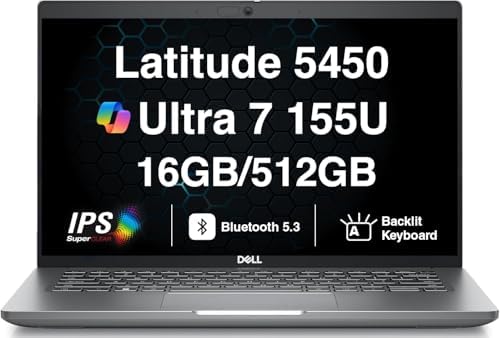
- AI-POWERED BUSINESS PERFORMANCE – The Dell Latitude 5450 business laptop is designed for professionals who need reliable…
- FAST MULTITASKING AND RELIABLE STORAGE – Features 16GB DDR5 SODIMM memory and a fast 512GB PCIe NVMe SSD, delivering qui…
- 14″ FULL HD IPS BUSINESS DISPLAY – 14.0″ IPS Full HD (1920×1080) anti-glare display with 60Hz refresh rate delivers clea…
Enterprise software developers often value reliability more than excitement, and that philosophy is reflected perfectly in the Dell Latitude 5450. While it lacks the marketing appeal of gaming or creator laptops, it excels in the areas that directly affect daily development work.
One of the Latitude’s biggest strengths is consistency. Java developers typically spend years working on the same machine. Stability, battery behavior, build quality, and dependable performance become far more important over time than benchmark scores. Dell’s Latitude series has long been trusted by corporations for exactly these reasons.
The laptop performs particularly well in professional Java workflows. IntelliJ IDEA, Eclipse, Maven builds, Docker containers, local development environments, and SQL tools all run smoothly. The system remains responsive even when multiple development services are active simultaneously.
Battery life contributes significantly to its appeal. Developers increasingly move between offices, meetings, coworking spaces, and remote work environments. The Latitude maintains productivity throughout much of the day without creating constant charger anxiety.
Build quality also deserves recognition. The chassis feels sturdy and professional, making it well suited to both university and corporate environments. Developers who travel frequently or commute daily will appreciate its durability.
The Latitude 5450 is especially attractive to enterprise Java developers, consultants, backend engineers, and IT professionals who prioritize reliability above all else.
Pros
✅ Excellent reliability
✅ Strong business-focused durability
✅ Comfortable development experience
✅ Good battery life
✅ Handles professional workloads effectively
Cons
❌ Conservative design
❌ Less upgrade flexibility than some competitors
3. Lenovo ThinkBook 16 Gen 7

- DISCLOSURE – Brand New Computer has been resealed to upgrade Memory/SSD. 1 Year warranty by Issaquash Highlands Tech
- THINKBOOK 16 G7 INTRO – Ideal for handling demanding tasks like data analysis, video editing, and multitasking with ease…
- THE POWER TO DO MORE – Equipped with AMD Ryzen 5 7533HS Processor, configurable with memory options from 8GB to 64GB DDR…
The ThinkBook series occupies an interesting space between mainstream consumer laptops and traditional ThinkPads. For Java developers, that balance can be extremely appealing because it combines strong productivity features with a more modern design language.
One of the first things developers notice is the spacious display. Java projects frequently involve multiple files, debugging windows, documentation pages, and terminal sessions. The 16-inch screen provides ample room for multitasking while reducing the need to constantly rearrange windows.
Performance remains strong across typical development workloads. Whether you’re compiling Spring Boot applications, working with REST APIs, managing databases, or running Docker containers, the ThinkBook feels comfortable handling modern Java environments. Build times remain competitive and the system rarely feels overwhelmed.
The keyboard experience is also surprisingly good. While the ThinkPad still holds the crown, the ThinkBook remains comfortable enough for long coding sessions. Developers spending entire days inside IntelliJ IDEA should find the typing experience more than satisfactory.
Thermal management contributes positively to overall usability. Larger laptops naturally provide more room for cooling, and the ThinkBook benefits from that additional space. Sustained workloads remain stable, helping preserve responsiveness throughout the workday.
Battery life is respectable considering the larger display. Developers who frequently move between meetings, classrooms, and remote work locations will find enough endurance for meaningful productivity away from a charger.
The ThinkBook 16 Gen 7 is an excellent option for students, junior developers, backend engineers, and professionals seeking a modern business laptop that remains highly capable for Java development.
Pros
✅ Large display improves productivity
✅ Strong Java development performance
✅ Comfortable keyboard
✅ Good thermal behavior
✅ Professional design
Cons
❌ Slightly larger than portability-focused options
❌ ThinkPad still offers a superior typing experience
4. ASUS ExpertBook B5

- Professional-grade performance with vPro Essentials Intel Core i7-1260P Processor and Iris Xe graphics with 1TB SSD, 16G…
- 14-inch FHD display that is TUV certified to lower blue light emission
- Security feature includes fingerprint sensor, webcam privacy shield and TPM 2.0 to ensure peace of mind
Corporate developers often gravitate toward ThinkPads and Latitudes, which means the ASUS ExpertBook B5 tends to fly under the radar. That’s unfortunate because it delivers many of the same strengths that Java developers value while adding a level of portability that makes daily commuting noticeably easier.
The first thing that stands out is how light the machine feels relative to its capabilities. Developers working in hybrid environments frequently move between offices, meeting rooms, home workspaces, and client sites. Carrying a lighter laptop every day may sound like a minor advantage, but it becomes increasingly valuable over years of ownership.
Performance is more than sufficient for serious Java development. IntelliJ IDEA, Eclipse, Spring Boot projects, Docker containers, PostgreSQL instances, and multiple browser tabs run comfortably together. The ExpertBook maintains responsiveness during project indexing and compilation, helping developers stay focused rather than waiting on hardware.
Battery life is another major strength. Java development can quickly drain weaker laptops, particularly when running local servers and development environments. The ExpertBook performs impressively away from a charger, making it particularly appealing to students and professionals who spend much of their day in transit.
The keyboard deserves recognition as well. While it may not quite match a ThinkPad, it remains comfortable during long coding sessions and provides a typing experience that most developers will appreciate.
For backend developers, consultants, students, and remote professionals, the ExpertBook B5 represents one of the most underrated Java development laptops currently available.
Pros
✅ Excellent portability
✅ Strong battery life
✅ Comfortable keyboard
✅ Handles Java development environments smoothly
✅ Professional business-oriented design
Cons
❌ Less brand recognition among developers
❌ Limited upgrade flexibility in some configurations
5. HP ProBook 460 G11

- Processor Manufacturer: Intel
- Processor Type: Core Ultra 7
- Processor Model: 155U
Many developers overlook the ProBook series because it lacks the prestige associated with EliteBooks or ThinkPads. In practice, however, the HP ProBook 460 G11 offers exactly the kind of balanced experience that many Java programmers need.
What makes the ProBook appealing is its practicality. Java development often involves long hours inside IDEs, reading documentation, managing dependencies, debugging applications, and maintaining databases. The ProBook approaches these workloads with a business-first mindset, focusing on reliability and usability rather than unnecessary extras.
The larger display contributes positively to productivity. Developers frequently work with multiple files, logs, terminals, and browser windows simultaneously. Additional screen space helps reduce clutter and allows more information to remain visible throughout the development process.
Performance remains strong across common Java workflows. Spring Boot applications, Maven builds, Docker containers, SQL tools, and local testing environments run comfortably. The laptop feels dependable during everyday development tasks and rarely struggles with the workloads most programmers encounter.
Battery life is another advantage. Developers who attend classes, client meetings, training sessions, or work remotely will appreciate the flexibility provided by a machine that remains productive throughout much of the day.
The ProBook 460 G11 is particularly attractive to students, business developers, consultants, and programmers who want a professional laptop without paying for premium enterprise branding.
Pros
✅ Strong value for business development work
✅ Large productivity-friendly display
✅ Reliable everyday performance
✅ Good battery life
✅ Professional design
Cons
❌ Not as premium as EliteBook models
❌ Keyboard, while good, trails ThinkPads
6. Framework Laptop 13
Most laptops are designed to be replaced. The Framework Laptop 13 was designed to be upgraded. For Java developers planning to keep a machine for many years, that distinction can completely change the ownership experience.
Framework’s modular approach is particularly appealing to software developers because developers tend to understand the value of repairability and long-term flexibility. Instead of replacing an entire laptop when requirements change, users can upgrade individual components over time. That makes the machine uniquely future-proof within this category.
Performance remains surprisingly strong for development workloads. IntelliJ IDEA, Maven, Gradle, Docker, Spring Boot applications, and local databases all run comfortably. The laptop feels responsive during compilation and multitasking, providing enough headroom for both students and professional developers.
Portability is another strength. The Framework remains easy to carry while still delivering enough performance for serious programming work. Developers who commute regularly or split their time between multiple workspaces will appreciate the balance.
The keyboard and display also contribute positively to the overall experience. Long coding sessions remain comfortable, and the screen provides enough clarity for reading code, logs, documentation, and database schemas throughout the day.
The Framework Laptop 13 is particularly attractive to developers who value repairability, sustainability, upgradeability, and long-term ownership flexibility. No other laptop on this list offers the same degree of control over future upgrades.
Pros
✅ Exceptional upgradeability
✅ Repair-friendly design
✅ Strong Java development performance
✅ Lightweight and portable
✅ Future-proof ownership model
Cons
❌ Upgrade ecosystem still evolving
❌ Initial setup philosophy may not appeal to all buyers
7. Dell Inspiron 16

- 💻 Powered Performance: Featuring the Intel 10-Core Core 7 150U processor (up to 5.4GHz), this Dell Inspiron 16 delivers …
- 🖥️ Expansive 16 inch Touchscreen: The FHD+ 1920×1200 WVA IPS panel with ComfortView Plus reduces eye strain while offeri…
- 🚀 Massive Memory & Storage: With up to 64GB DDR5 RAM and 4TB SSD, you’ll experience lightning-fast boot times, effortles…
Developers often assume that business laptops are the only serious option for programming, but the Dell Inspiron 16 proves that a well-configured mainstream laptop can be an excellent Java development machine. What makes it particularly attractive is the amount of workspace it provides without pushing buyers into premium enterprise pricing.
The larger display immediately improves productivity. Java development rarely happens in a single window. Most developers work with IntelliJ IDEA, browser documentation, Git clients, terminals, logs, and databases simultaneously. Having extra screen real estate reduces constant window switching and makes multitasking significantly more comfortable.
Performance remains strong across common Java workloads. Spring Boot applications, Maven builds, local servers, SQL databases, and Docker containers all run comfortably. The Inspiron feels especially well suited to developers working on medium to large projects where IDE responsiveness becomes increasingly important.
Another advantage is overall versatility. Outside of development, the laptop performs well for research, documentation, virtual meetings, coursework, and general productivity. Students and professionals who need one machine for multiple responsibilities will appreciate that flexibility.
Thermal performance remains stable under sustained workloads. Large builds, application testing, and local development environments can generate continuous load, but the Inspiron generally maintains responsiveness without becoming distracting.
For students, junior developers, backend engineers, and programmers who want a larger display without moving into workstation territory, the Inspiron 16 is an easy recommendation.
Pros
✅ Large display improves coding productivity
✅ Strong Java development performance
✅ Comfortable multitasking experience
✅ Good value proposition
✅ Handles larger projects confidently
Cons
❌ Less portable than compact alternatives
❌ Business-focused models offer stronger enterprise features
8. Samsung Galaxy Book5 Pro

- POWER FOR YOUR MOST PRODUCTIVE DAYS: Galaxy Book5 Pro 360 models come with a new Intel Core Ultra 7 processor 256V with …
- POWERFUL. DURABLE. LIGHT. AMAZINGLY SLIM: Galaxy Book5 Pro 360 is the epitome of portability and the lightest in our all…
- EVERYTHING UNDER MULTI-CONTROL: Navigate your phone, Galaxy Tab, Samsung TVs, and Smart Monitors using your laptop’s tou…
Battery life has become one of the most underrated productivity features for software developers. Few laptops demonstrate that better than the Samsung Galaxy Book5 Pro. While many machines focus entirely on performance, Samsung has created a laptop that balances development capability with exceptional mobility.
The first thing most developers notice is how easy the laptop is to carry. Whether commuting to work, attending lectures, traveling for business, or working remotely, portability plays a larger role in daily satisfaction than many buyers initially realize.
Performance remains more than capable for Java development. IntelliJ IDEA, Eclipse, Gradle builds, browser tabs, SQL tools, and local development environments run smoothly. The laptop feels responsive during everyday programming tasks and provides enough performance for most backend and enterprise workloads.
The display is another standout feature. Developers spend countless hours reading code, reviewing documentation, and debugging applications. A clear, sharp display improves comfort and reduces fatigue during long sessions. Samsung continues to excel in this area.
Battery endurance is where the Galaxy Book5 Pro truly separates itself. Developers who frequently work away from a desk will appreciate the ability to remain productive for extended periods without constantly searching for power outlets.
The Galaxy Book5 Pro is particularly attractive to students, consultants, remote developers, and professionals who prioritize mobility alongside development performance.
Pros
✅ Excellent battery life
✅ Lightweight and portable
✅ Beautiful display
✅ Strong everyday Java performance
✅ Comfortable for remote work
Cons
❌ Less upgrade flexibility than some competitors
❌ Heavy virtualization workloads may favor larger systems
9. Lenovo Yoga Pro 7
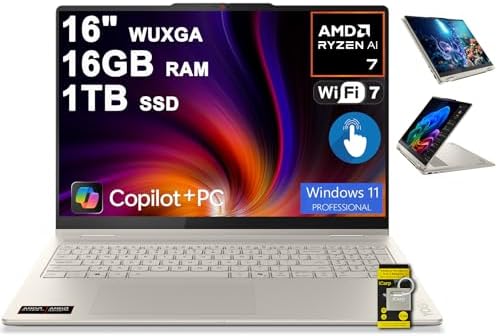
- 16GB RAM | 1TB SSD
- Equipped With The Powerful and Fast AMD 8-core Ryzen AI 7 350 Processor
- 16″ WUXGA (1920×1200) IPS Touchscreen (Glossy, Anti-fingerprint), Integrated AMD Radeon 860M Graphic
Many developers want a laptop that feels modern without sacrificing the practical requirements of software development. The Lenovo Yoga Pro 7 fills that role exceptionally well by combining strong performance, premium build quality, and portability into a package that works remarkably well for Java programmers.
The Yoga Pro 7 immediately feels more premium than many laptops in its category. Build quality, keyboard comfort, and overall usability contribute to an experience that remains enjoyable even during long development sessions. These details matter because programmers often spend thousands of hours on a single machine over its lifespan.
Performance is one of its strongest characteristics. Java projects continue growing in complexity, and modern frameworks such as Spring Boot often involve extensive dependencies, local services, and testing environments. The Yoga Pro handles these workloads comfortably while maintaining smooth multitasking performance.
The display contributes positively to productivity. Reading source code, reviewing pull requests, analyzing logs, and navigating documentation all benefit from a sharp, high-quality panel. Long coding sessions remain comfortable, which helps maintain focus throughout the workday.
Portability remains another major advantage. Despite its strong performance capabilities, the laptop remains easy to transport. Developers who move frequently between offices, classrooms, and remote workspaces will appreciate the balance.
The Yoga Pro 7 is particularly appealing to students, software engineers, backend developers, and professionals seeking a more premium Java development experience without moving into expensive workstation territory.
Pros
✅ Strong Java development performance
✅ Premium build quality
✅ Excellent display
✅ Comfortable keyboard
✅ Good balance of power and portability
Cons
❌ Premium features may increase cost compared to basic alternatives
❌ Repairability is limited compared to Framework Laptop 13
10. LG Gram 16

- AI Performance Anywhere – LG gram delivers powerhouse AI performance in an ultra-thin, ultra-light design. Weighing just…
- Reimagine Productivity with AI-Powered Copilot+ PC on Windows 11 – AI Copilot+ PC redefines what your laptop can do. Bui…
- Hybrid AI: On-Device and Cloud Synergy – LG gram now includes a hybrid AI solution that blends on-device intelligence wi…
Developers who spend their days moving between offices, campuses, client sites, and home workspaces often face a frustrating tradeoff. Larger displays improve productivity, but larger laptops usually add weight. The LG Gram 16 challenges that assumption by delivering a spacious screen without the bulk typically associated with 16-inch machines.
For Java developers, the larger display immediately becomes useful. IntelliJ IDEA, browser documentation, terminal windows, Git tools, and SQL clients can remain visible simultaneously without feeling cramped. Developers working with enterprise applications or large codebases will appreciate having more workspace available throughout the day.
Portability remains the Gram’s defining feature. Despite its screen size, carrying it daily feels surprisingly easy. This makes it particularly attractive to students, consultants, and remote developers who spend significant time away from a permanent desk.
Performance remains more than capable for Java development. Spring Boot applications, Docker containers, Maven builds, local servers, and testing environments all run smoothly. While the Gram is not positioned as a workstation, it provides enough power for the overwhelming majority of programming workflows.
Battery life further strengthens its appeal. Long coding sessions away from a charger become far more practical, allowing developers to remain productive throughout meetings, lectures, and travel days.
The LG Gram 16 is an excellent choice for developers who want maximum screen space without sacrificing mobility.
Pros
✅ Extremely lightweight for a 16-inch laptop
✅ Large display boosts productivity
✅ Excellent battery life
✅ Strong portability
✅ Comfortable for long coding sessions
Cons
❌ Less performance-focused than workstation alternatives
❌ Premium design may not appeal to every buyer
11. Microsoft Surface Laptop

- Qualcomm Snapdragon X Plus
- 16GB Memory 1 TB NVMe SSD
- 13.8″ Touchscreen (2304 x 1536)
Software developers often talk about specifications, but day-to-day usability can have just as much impact on productivity. The Microsoft Surface Laptop focuses heavily on user experience, creating a machine that feels polished and refined during everyday development work.
One of its biggest strengths is consistency. Everything from the keyboard to the touchpad and display feels carefully designed. Developers spending hours each day navigating code, reviewing pull requests, and reading documentation benefit from these refinements more than they might initially expect.
The display is particularly impressive for programming. Text remains sharp and easy to read, which becomes increasingly important during extended coding sessions. Whether working inside IntelliJ IDEA, Eclipse, or browser-based documentation, the screen contributes positively to overall comfort.
Performance remains strong enough for mainstream Java development. Local servers, Spring Boot projects, SQL databases, and modern IDEs run smoothly. The laptop feels responsive during compilation and multitasking, helping maintain workflow momentum.
Battery life is another advantage. Developers working remotely or attending classes will appreciate the ability to stay productive throughout much of the day without carrying a charger everywhere.
The Surface Laptop is particularly attractive to students, consultants, educators, and professionals who value refinement and usability as much as raw performance.
Pros
✅ Premium user experience
✅ Excellent display quality
✅ Comfortable keyboard and touchpad
✅ Good battery life
✅ Smooth everyday development performance
Cons
❌ Limited upgradeability
❌ Enterprise-focused developers may prefer traditional business laptops
12. ASUS Vivobook S 15

The line between mainstream laptops and professional development machines continues to blur, and the ASUS Vivobook S 15 is a perfect example of that trend. While it isn’t marketed specifically toward programmers, it offers a combination of performance, display quality, and usability that aligns surprisingly well with Java development.
One area where the Vivobook excels is multitasking. Modern Java workflows often involve several applications running simultaneously. IDEs, browsers, terminals, Docker environments, databases, and collaboration tools all compete for resources. The Vivobook handles these demands confidently and remains responsive under load.
The display contributes significantly to the overall experience. Reading source code, navigating documentation, and reviewing logs are tasks developers perform constantly. A high-quality panel improves readability and reduces fatigue during long work sessions.
Performance is strong enough for both students and professional developers. Spring Boot projects, Maven builds, backend services, and local development environments run comfortably. The laptop provides enough headroom to support increasingly demanding workloads as skills and projects grow.
Battery life remains respectable, helping support mobile productivity without compromising performance too heavily. Developers who divide their time between multiple locations will appreciate the flexibility this provides.
The Vivobook S 15 is particularly appealing to students, junior developers, and professionals looking for a modern laptop that performs well across both programming and everyday productivity tasks.
Pros
✅ Strong multitasking capability
✅ High-quality display
✅ Good overall performance
✅ Comfortable daily usability
✅ Suitable for students and professionals
Cons
❌ Business laptops offer stronger enterprise features
❌ Upgrade options vary by configuration
13. Acer TravelMate P4

- This Renewed product is tested and certified to look and work like new, with limited to no signs of wear. The refurbishi…
- 【Upgraded】 Seal is opened for Hardware/Software upgrade only to enhance performance. 14.0″ WUXGA (1920×1200) 60Hz Displa…
- 【Powerful Performance with Ryzen 5 PRO 6650U Hexa Core】 6th Gen Ryzen 5 PRO 6650U 2.90GHz Processor (upto 4.5 GHz, 16MB …
Business laptops rarely receive attention in programming discussions, yet they often provide exactly what developers need. The Acer TravelMate P4 follows that pattern. Instead of chasing premium aesthetics or gaming performance, it focuses on reliability, battery life, and productivity, which happen to be qualities Java developers value every day.
The laptop feels particularly comfortable in professional environments. Developers working in corporate settings often spend their days switching between IDEs, documentation, virtual meetings, issue trackers, and databases. The TravelMate handles these workflows smoothly while maintaining a practical and durable design.
Performance remains more than adequate for Java programming. IntelliJ IDEA, Eclipse, Maven, Gradle, Spring Boot applications, and local databases all run comfortably. While it may not lead benchmark charts, it delivers the consistency that matters during long development sessions.
Battery life is another highlight. Many developers underestimate how much flexibility a long-lasting battery provides until they start working remotely, attending lectures, or traveling frequently. The TravelMate performs well in these situations and remains productive throughout much of the workday.
For students, consultants, enterprise developers, and professionals seeking a dependable work machine, the TravelMate P4 represents excellent value.
Pros
✅ Reliable business-oriented design
✅ Good battery life
✅ Comfortable for development work
✅ Strong portability
✅ Consistent performance
Cons
❌ Less exciting design than premium competitors
❌ Display quality trails some higher-end models
14. Acer Aspire 14 AI
Artificial intelligence features have become a major selling point across the laptop industry, but many developers care more about practical benefits than marketing labels. The Acer Aspire 14 AI succeeds because it delivers a balanced development experience while incorporating newer hardware designed for modern workloads.
Students learning Java often need a laptop that can handle coursework today while remaining useful as projects become more demanding. The Aspire 14 AI fits that role particularly well. It provides enough performance for object-oriented programming, algorithms, data structures, Spring Boot projects, and backend development without feeling excessive.
Portability contributes positively to the overall experience. Carrying the laptop between classes, libraries, offices, and home workspaces remains comfortable. This flexibility is especially important for developers who do not work exclusively from a single location.
Battery efficiency is another strength. Coding sessions, research, documentation reviews, and project work can continue for extended periods without constant dependence on a charger. This helps support productivity throughout a typical academic or professional day.
The Aspire 14 AI is best suited to students, entry-level developers, and programmers seeking a modern machine that balances performance, portability, and future readiness.
Pros
✅ Modern platform with future-focused hardware
✅ Good battery efficiency
✅ Portable and lightweight
✅ Strong value for students
✅ Handles Java coursework comfortably
Cons
❌ Not designed for intensive enterprise workloads
❌ Limited upgrade flexibility
15. MSI Modern 15

- 【15.6″ FHD Touchscreen Display】Enjoy vivid colors and crisp detail with an intuitive touchscreen, delivering an immersiv…
- 【Intel Core 9 270H Processor】Delivers smooth, responsive performance for effortless multitasking—stream, chat, and work …
- 【32GB DDR4 RAM】Seamlessly tackle resource-intensive tasks, smoothly run multiple applications simultaneously, and enjoy …
Not every Java developer requires a business laptop. Some simply want a machine that performs well, remains affordable, and handles everyday development tasks without unnecessary complications. The MSI Modern 15 fits that description remarkably well.
What makes the Modern 15 appealing is its straightforward approach. The laptop provides enough screen space for coding, enough performance for modern development environments, and enough battery life for productive workdays. It avoids overcomplicating the formula while still delivering a capable programming experience.
Java development workloads feel comfortable on the system. IntelliJ IDEA, Eclipse, local databases, Maven builds, and browser-based documentation all run smoothly. Students and junior developers, in particular, will find enough performance headroom for coursework and personal projects.
The larger display also improves usability. Developers frequently work with multiple files and windows simultaneously, and the additional workspace helps reduce the need for constant window management. Long coding sessions remain comfortable, especially when combined with the laptop’s practical design.
The MSI Modern 15 is ideal for students, self-taught developers, coding bootcamp participants, and anyone entering the Java ecosystem who wants a capable machine without overspending.
Pros
✅ Good value for programming
✅ Comfortable display size
✅ Handles Java development smoothly
✅ Lightweight enough for daily transport
✅ Suitable for students and beginners
Cons
❌ Build quality trails premium business laptops
❌ Less future-proof than some competitors
FAQs
What specifications matter most for Java programming?
Java development benefits most from a strong processor, at least 16GB of RAM, a fast SSD, and a comfortable keyboard. While graphics performance is rarely a priority, memory and processor efficiency directly affect IDE responsiveness, build times, and multitasking performance.
Is 16GB RAM enough for Java development?
Yes. For most students, backend developers, and enterprise programmers, 16GB remains the ideal starting point. It provides enough memory for IntelliJ IDEA, browsers, databases, Docker containers, and local servers. Developers working heavily with virtualization may eventually benefit from 32GB.
Which IDE is best for Java programming?
IntelliJ IDEA remains the most popular choice among professional Java developers because of its powerful features, excellent code analysis, and framework support. Eclipse remains common in academic and enterprise environments, while NetBeans continues to serve some educational use cases.
Is a dedicated graphics card necessary for Java programming?
No. Most Java development workloads rely far more on processor performance and memory capacity than graphics hardware. Integrated graphics are sufficient for IntelliJ IDEA, Eclipse, Spring Boot, databases, and general backend development.
Which laptop on this list is best for computer science students?
The Lenovo ThinkBook 16 Gen 7, Acer Aspire 14 AI, and ASUS Vivobook S 15 are particularly strong choices for students because they balance performance, portability, battery life, and long-term usability.
Which laptop is best for Spring Boot development?
The Lenovo ThinkPad E16 Gen 2 and Dell Latitude 5450 stand out for Spring Boot development because they handle large projects, Docker containers, local databases, and enterprise workflows exceptionally well.
Should Java developers prioritize battery life or performance?
The answer depends on workflow. Students and remote developers often benefit more from strong battery life, while enterprise developers working with large projects may prioritize performance. Ideally, the best laptop balances both rather than maximizing only one.
Conclusion
As enterprise applications continue evolving, selecting the best budget laptop for Java programming requires focusing on the realities of modern development rather than marketing specifications. IDE performance, build times, multitasking capability, keyboard comfort, battery life, and thermal stability all contribute directly to daily productivity.
The strongest laptops in this guide succeed because they understand those priorities. Business-oriented machines such as the ThinkPad E16 Gen 2, Dell Latitude 5450, and HP ProBook 460 G11 emphasize reliability and long-term usability. Portable options like the Galaxy Book5 Pro and LG Gram 16 focus on mobility without sacrificing development capability. Meanwhile, innovative choices such as the Framework Laptop 13 offer unmatched upgradeability for developers planning years ahead.
For most Java developers, the Lenovo ThinkPad E16 Gen 2 remains the most complete package. Its keyboard, performance, reliability, and developer-friendly design make it an easy recommendation for students and professionals alike. Developers seeking maximum portability should consider the Samsung Galaxy Book5 Pro, while those who value upgradeability above all else will find the Framework Laptop 13 difficult to ignore.
Ultimately, the best laptop is the one that supports your workflow consistently, remains comfortable throughout long coding sessions, and continues meeting your needs as your projects grow in complexity.