Finding the best budget friendly laptops for programming is harder than it used to be. Modern development workflows demand more from a laptop than simply opening a code editor and running a few scripts. Developers now work with containers, virtual machines, AI-assisted coding tools, large browser sessions, cloud dashboards, and increasingly complex development environments. A laptop that feels fast during the first week can become frustrating after several months of real-world use.
When evaluating laptops for programming, I pay attention to factors that many buying guides overlook. Keyboard quality matters because developers spend thousands of hours typing. Thermal performance matters because a processor that overheats during long compile sessions cannot maintain its advertised performance. Battery longevity matters because most laptops lose capacity over time. Portability matters because students and professionals carry these machines every day.
The good news is that programmers no longer need flagship hardware to enjoy a productive experience. Several laptops now offer excellent displays, strong processors, comfortable keyboards, and reliable battery life without moving into premium workstation territory.
For this guide, I focused on machines that provide genuine value for software development, web development, computer science studies, cybersecurity training, Python programming, and general coding workloads. Each laptop earned its place for a different reason. Some prioritize keyboard quality. Others focus on portability, battery life, or upgradeability. Together, they represent the strongest options currently available for programmers who want dependable performance without unnecessary expense.
Table of Contents
1. Lenovo ThinkPad E16 Gen 8 – Overall Best Budget Friendly Laptop for Programming
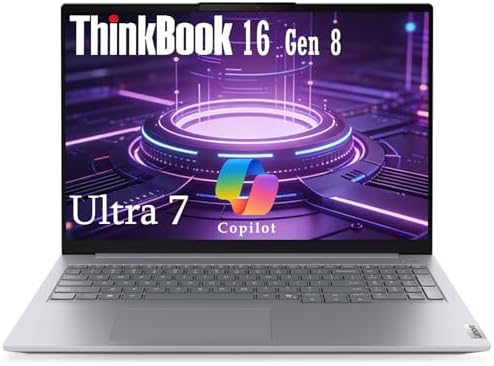
- AI-Enhanced Performance for Ultimate Productivity: Powered by Intel Core Ultra 7 255H processor and integrated Intel Arc…
- Stunning 16″ Display in a Sleek, Portable Design: Immerse yourself in a spacious 16-inch WUXGA IPS anti-glare screen wit…
- Robust Security and Rugged Reliability: Engineered for durability and security to meet the rigors of mobile work. In ter…
The Lenovo ThinkPad E16 Gen 8 sits at the top of this list because it delivers something programmers often value more than raw benchmark numbers: consistency. Many laptops feel fast when opening applications or browsing the web, but development workloads expose weaknesses quickly. Long compile sessions, multiple browser windows, local databases, containers, and development tools can push a system for hours at a time. The ThinkPad E16 handles these workloads remarkably well for its category.
What makes this model particularly interesting is that it demonstrates Lenovo’s business-first philosophy. Rather than chasing ultra-thin dimensions, Lenovo prioritizes usability. The result is a laptop that feels designed for actual work instead of showroom displays. The keyboard remains one of the strongest available in its segment. Key travel is comfortable, feedback is predictable, and typing fatigue stays low even during extended coding sessions.
For students, the larger 16-inch display provides a practical advantage. Side-by-side coding and documentation become easier, reducing the need for an external monitor. Developers working with Visual Studio Code, IntelliJ IDEA, PyCharm, or Eclipse will appreciate the additional screen space.
Battery performance remains respectable when unplugged. Unlike some performance-focused competitors, the E16 does not suffer dramatic slowdowns away from a charger. That characteristic becomes valuable during lectures, meetings, travel, and remote work.
Thermally, the machine behaves predictably. During sustained workloads, fan noise remains controlled while performance stays relatively stable. This is particularly important for developers who regularly compile large projects or run multiple development environments simultaneously.
The ThinkPad E16 is ideal for software engineering students, backend developers, cybersecurity learners, and professionals who prioritize reliability. It is less suitable for users seeking the lightest possible laptop or those focused heavily on GPU-intensive creative workloads.
Pros
✅ Excellent keyboard for long coding sessions
✅ Upgradeable memory and storage options
✅ Strong thermal stability under sustained workloads
✅ Large display improves multitasking
✅ Durable business-oriented construction
Cons
❌ Less premium-looking than some competitors
❌ Larger footprint reduces portability
2. ASUS Zenbook 14 OLED

- Spectacular Visual Delights–【14″ FHD+ OLED Display】Experience vivid color accuracy, deep blacks, and striking contrast …
- Reliable CPU Performance-【Snapdragon X Plus X1P-42-100 Processor】Deliver exceptional performance with advanced processin…
- Memory & Storage–【16GB LPDDR5X RAM】Seamless multitasking empowers you to work more efficiently and stay productive.【1.5…
The ASUS Zenbook 14 OLED proves that programmers do not have to sacrifice portability to obtain a capable development machine. While many lightweight laptops struggle with sustained workloads, the Zenbook manages to balance mobility and productivity surprisingly well.
The defining characteristic of this laptop is efficiency. ASUS has spent several generations refining the Zenbook line, and the result is a machine that feels purpose-built for professionals who move frequently between locations. Students walking across campus, consultants traveling between clients, and remote workers moving between home and office environments will immediately notice the advantage.
The OLED display deserves special attention. Programming guides often focus entirely on processors and memory, yet developers spend countless hours staring at screens. The panel delivers sharp text rendering, strong contrast, and a pleasant viewing experience during extended coding sessions. Documentation, code reviews, and terminal windows remain easy to read.
Unplugged performance is another strength. Many compact laptops aggressively reduce processor power when disconnected from a charger. The Zenbook avoids excessive throttling, making it practical for real-world mobile productivity. Developers can comfortably work through meetings, lectures, and travel without feeling constrained.
Thermal behavior remains respectable considering the chassis size. Long compile jobs naturally generate heat, but ASUS manages temperatures effectively enough that productivity remains consistent. Fan noise becomes noticeable under load, though not distractingly so.
This laptop particularly suits web developers, Python programmers, students, and professionals who prioritize mobility. Developers working primarily at a desk may find larger alternatives more comfortable, but those who value portability will appreciate the balance ASUS has achieved.
The Zenbook also demonstrates how modern efficiency-focused hardware can extend useful battery life while maintaining sufficient performance for demanding development environments.
Pros
✅ Outstanding OLED display quality
✅ Lightweight and highly portable
✅ Excellent battery life
✅ Strong productivity performance
✅ Premium build quality
Cons
❌ Limited upgradeability
❌ Smaller chassis can become warm under heavy workloads
3. Acer Aspire 5 15
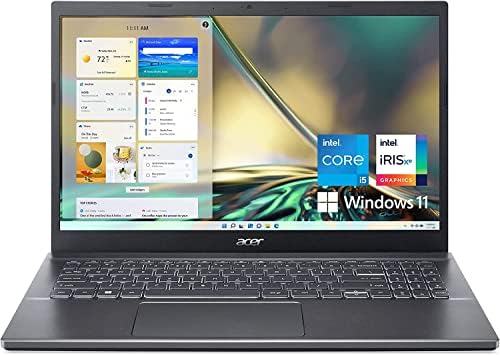
- Display: Stunning 15.6″ FHD (1920 x 1080) IPS 250 nits Anti-glare / 45% NTSC / 60Hz/ Thin Bezel LCD LED-backlit Display
- Memory / Storage / operation system: Upgraded to 16GB DDR4 SDRAM 3200 MHz / 512GB NVMe Solid State Drive for Storage / W…
- CPU / Graphics: Intel i5-12450H 8-Core Processor (Up to 4.4 GHz with Intel Turbo Boost Technology / 12 MB Intel Smart ca…
The Acer Aspire 5 has earned a reputation as one of the safest recommendations for aspiring programmers, and the current generation continues that tradition. What makes the Aspire 5 notable is not a single standout feature but rather its ability to avoid major weaknesses while remaining practical for a wide range of coding workloads.
For students entering computer science programs, the Aspire 5 represents a particularly sensible starting point. Development tools continue to grow more demanding, yet many entry-level machines struggle once multiple applications are opened simultaneously. The Aspire generally provides enough headroom to run modern IDEs, browser-based tools, development servers, and productivity applications without feeling overwhelmed.
Acer’s approach focuses on delivering core functionality effectively. The keyboard is comfortable enough for long assignments, the display offers adequate workspace, and the overall design remains functional rather than flashy. These qualities may not generate excitement, but they contribute significantly to long-term usability.
One of the Aspire’s biggest strengths is serviceability. Developers often keep laptops for several years, making future upgrades valuable. Expandability can extend a machine’s useful lifespan considerably, especially as programming tools become more resource intensive.
Battery performance is solid for everyday academic and professional workloads. While it may not reach the endurance levels of more premium efficiency-focused models, it remains capable of supporting productive work away from a charger.
Thermal performance is similarly practical. Under sustained compilation tasks, temperatures remain manageable and performance degradation stays limited. This helps maintain predictable responsiveness throughout longer development sessions.
The Aspire 5 works particularly well for beginner programmers, computer science students, web developers, and anyone seeking a straightforward coding laptop. Users demanding premium materials or cutting-edge displays may prefer alternatives higher in the market, but the Aspire continues to offer impressive overall utility.
Pros
✅ Reliable everyday programming performance
✅ Generally upgrade-friendly design
✅ Comfortable keyboard layout
✅ Good multitasking capabilities
✅ Practical long-term value
Cons
❌ Display quality trails premium competitors
❌ Build materials feel less refined
4. Lenovo IdeaPad Slim 5

- This Renewed product is tested and certified to look and work like new, with limited to no signs of wear. The refurbishi…
- [POWERFUL PERFORMANCE] – Lenovo IdeaPad Slim 3x Copilot+ PC features 45 TOPS NPU for AI multitasking and smooth video ca…
- [VIVID TOUCHSCREEN DISPLAY] – Features a 15.3″ IPS Touch WUXGA (1920×1200) anti-glare 16:10 display, 300 Nits peak brigh…
The Lenovo IdeaPad Slim 5 occupies an interesting position in the programming laptop market because it demonstrates how far mainstream productivity laptops have evolved. A few years ago, developers often had to choose between inexpensive machines with obvious compromises and premium devices that stretched beyond reasonable budgets. The IdeaPad Slim 5 narrows that gap by delivering a surprisingly refined experience for everyday development work.
What immediately stands out is efficiency. Lenovo has built this machine around the needs of users who spend much of their day multitasking. Modern programming rarely involves working inside a single application. Developers routinely move between code editors, browser-based documentation, cloud dashboards, terminal windows, communication platforms, and database tools. The Slim 5 handles these transitions smoothly, helping maintain workflow momentum throughout the day.
Battery behavior is one of its strongest characteristics. In real-world development scenarios, the laptop remains productive away from a charger for extended periods. That matters for students attending lectures, developers working from coworking spaces, and professionals moving between meetings. Some laptops advertise impressive endurance but significantly reduce performance while unplugged. The Slim 5 maintains a more balanced approach, allowing coding tasks to continue comfortably regardless of power source.
Thermal performance is equally practical. During longer compilation sessions, temperatures remain controlled and fan behavior stays predictable. This helps preserve responsiveness during sustained workloads instead of delivering short bursts of performance followed by aggressive throttling.
Portability is another advantage. The chassis remains light enough for daily transport without feeling fragile. Commuters, university students, and remote workers will appreciate the balance between mobility and durability. While it may not possess the rugged reputation of a ThinkPad, it still feels capable of handling everyday travel.
This laptop is ideal for computer science students, web developers, Python programmers, and professionals seeking a dependable everyday machine. It is less suited to users whose workloads revolve around advanced machine learning projects, extensive virtualization, or highly specialized engineering software.
Pros
✅ Excellent battery efficiency during everyday development
✅ Comfortable keyboard for extended coding sessions
✅ Lightweight and easy to carry daily
✅ Reliable multitasking performance
✅ Strong overall balance of portability and productivity
Cons
❌ Limited upgrade flexibility compared to some business laptops
❌ Not designed for demanding workstation-class workloads
5. Dell Inspiron 14 Plus
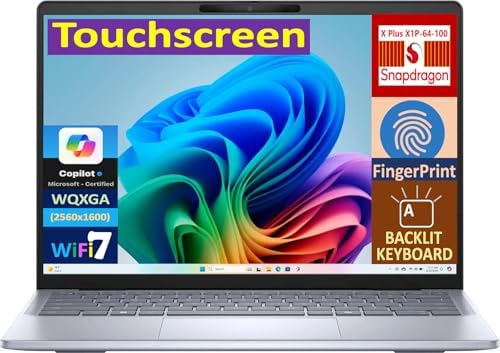
- [Superior Display] 14.0″ IPS WQXGA (2560×1600) 60Hz Touchscreen Display; Bluetooth 5.4, Webcam, Fingerprint, Backlit KB …
- [Powerful Performance] X Plus X1P-64 3.40GHz Processor (upto 3.4 GHz, 6MB Cache, 10-Cores, 10-Threads, ); Qualcomm Adren…
- [High Speed and Multitasking] 16GB OnBoard RAM; 65W PSU, Type-C Power-In, 3-Cell 54 WHr Battery; Ice Blue Color
The Dell Inspiron 14 Plus demonstrates that a programming laptop can deliver substantial performance without moving into workstation territory. Among mainstream laptops, it consistently stands out as one of the strongest options for developers who expect their systems to handle heavier workloads while remaining practical for daily use.
What differentiates the Inspiron 14 Plus from many competitors is processing headroom. Modern development environments continue growing more demanding. Running Docker containers, virtual machines, local databases, and integrated development environments simultaneously can quickly expose limitations in weaker systems. The Inspiron handles these scenarios confidently, making it particularly attractive to backend developers and cybersecurity students.
The display contributes significantly to the overall experience. Programming often involves spending entire days reading text, reviewing code, and navigating documentation. A higher-quality display reduces fatigue and makes long sessions more comfortable. Dell’s approach here prioritizes productivity rather than simply marketing specifications.
Unplugged performance remains respectable. While many higher-powered laptops experience noticeable slowdowns when disconnected from a charger, the Inspiron maintains enough capability to remain useful during travel and meetings. This flexibility becomes increasingly valuable as hybrid work environments continue to expand.
Thermally, the machine performs well under sustained load. Long compile jobs, containerized environments, and virtualization tasks inevitably generate heat, but Dell’s cooling solution helps maintain consistent behavior. Rather than chasing short benchmark bursts, the system focuses on sustained productivity.
Portability remains reasonable despite the additional performance capability. It is not the lightest laptop in this guide, but it avoids becoming cumbersome during daily transport. The tradeoff feels worthwhile for developers who regularly push their systems harder than average.
The Inspiron 14 Plus is particularly suitable for software engineers, backend developers, cybersecurity learners, and computer science students planning to work extensively with virtual machines. Those prioritizing extreme portability may find lighter alternatives more appealing.
Pros
✅ Strong performance for demanding development workloads
✅ Handles virtualization and containers effectively
✅ Good thermal stability during sustained use
✅ High-quality display for coding and documentation
✅ Balanced mix of power and portability
Cons
❌ Heavier than some ultra-portable alternatives
❌ Battery life may trail more efficiency-focused competitors
6. HP Pavilion Plus 14
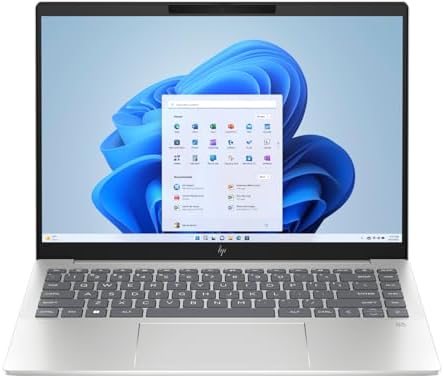
- (Memory Disk and System): 16GB DDR5 SDRAM, 1TB PCI-E NVMe M.2 SSD for Storage, Pre-install Windows 11 Pro
- (Processor): AMD Ryzen 7 8845HS 8-Core Processor (Up to 5.1 GHz, 16 MB Smart cache, 8 Cores, 16 Threads)
- (Screen and Graphics): Brilliant 14″ 2880×1800 (2880 x 1800) 400 nits UWVA, micro-edge, BrightView, Low Blue Light, SDR …
The HP Pavilion Plus 14 earns its place in this guide because it delivers a premium-feeling programming experience while remaining accessible to a wide range of users. HP has positioned the Pavilion Plus line as a bridge between mainstream consumer laptops and more expensive professional systems, and that strategy works particularly well for programmers.
One of the laptop’s strongest qualities is display quality. Developers spend significant amounts of time reading text, reviewing pull requests, studying documentation, and troubleshooting issues. A clear, sharp display contributes directly to comfort and productivity. The Pavilion Plus provides a viewing experience that feels notably more refined than many laptops in its broader category.
The keyboard also deserves recognition. While ThinkPads still set the benchmark for many developers, HP’s implementation remains comfortable for extended typing sessions. Long coding projects, technical reports, and coursework feel manageable without excessive finger fatigue.
Battery performance strikes a sensible balance between endurance and capability. Developers working away from a charger can remain productive throughout much of the day without feeling pressured to locate a power outlet. More importantly, performance remains sufficiently consistent while unplugged, allowing development workflows to continue uninterrupted.
Thermal behavior remains well controlled during sustained workloads. Software compilation, browser-heavy development environments, and multitasking scenarios generate predictable temperatures without excessive fan noise. That consistency helps create a more professional user experience.
Portability is another strength. The Pavilion Plus remains compact enough for frequent travel while retaining enough performance to satisfy most programming workloads. Students moving between classes and professionals commuting regularly will appreciate the balance.
This laptop is best suited to web developers, students, software engineers, and productivity-focused professionals. Developers requiring maximum upgradeability or specialized workstation capabilities may find other options more attractive, but for general programming it delivers a compelling overall package.
Pros
✅ Excellent display quality for long coding sessions
✅ Comfortable and responsive keyboard
✅ Good balance of performance and battery life
✅ Portable design for students and professionals
✅ Refined overall user experience
Cons
❌ Upgrade options may be limited depending on configuration
❌ Not intended for highly specialized workstation tasks
7. ASUS Vivobook S 14
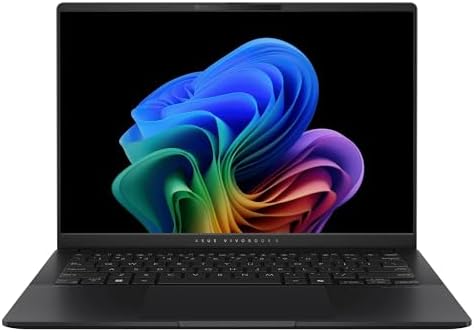
- PROCESSOR — Intel Core Ultra 7 Processor Series 2 258V 32GB
- DISPLAY — 14” WUXGA OLED (1920 x 1200) 16:10 60Hz Nano Edge display, 100% RGB color gamut, and 600 nits peak brightness
- MEMORY — 32GB LPDDR5X RAM on board
The ASUS Vivobook S 14 is one of the strongest examples of how mainstream laptops have matured in recent years. Earlier generations of consumer-focused machines often forced programmers to accept compromises in keyboard quality, thermal performance, or battery life. The current Vivobook S 14 feels far more refined, making it a legitimate option for students and professional developers alike.
What I appreciate most about this laptop is its balance. It does not attempt to dominate a single category. Instead, it performs consistently across the areas that matter most for programming. During typical development sessions involving Visual Studio Code, Git operations, browser-based documentation, terminals, and productivity applications, the system remains responsive and dependable. This consistency often proves more valuable than headline benchmark numbers.
The display contributes significantly to the overall experience. Clear text rendering helps reduce eye strain during long coding sessions, while the available workspace makes multitasking easier. Developers frequently switch between code, documentation, and debugging tools, and the Vivobook handles these workflows comfortably.
Battery life is another strong point. Many programmers spend substantial time away from their desks, whether attending classes, working remotely, or traveling between locations. The Vivobook maintains useful performance when unplugged, allowing development tasks to continue without constant dependence on a charger.
Thermally, ASUS has achieved a sensible balance. Sustained compile sessions generate heat, but the cooling system generally keeps temperatures under control without excessive fan noise. This creates a more pleasant experience during extended workloads and helps preserve performance consistency.
The laptop is particularly well suited to web developers, computer science students, Python programmers, and professionals seeking a portable daily machine. Developers working heavily with multiple virtual machines or large-scale data processing may benefit from systems with more aggressive performance capabilities.
What the Vivobook ultimately demonstrates is that a modern programming laptop does not need to feel utilitarian. It combines practicality, portability, and everyday usability in a way that appeals to a broad range of developers.
Pros
✅ Strong balance of performance and portability
✅ Comfortable display for long coding sessions
✅ Good battery life during mobile work
✅ Quiet and predictable thermal behavior
✅ Suitable for both students and professionals
Cons
❌ Upgrade options can be limited
❌ Heavy virtualization workloads may require more powerful hardware
8. Acer Swift Go 14

- Ready, Set Go!: Say hi to the all-new Swift Go 14 AMD—your AI PC featuring AMD Ryzen 7 8845HS processor equipped with Ry…
- Premium Performance on the Go: With the unparalleled performance of the AMD Ryzen 7 8845HS processor and built-in AMD Ra…
- Indulge Your Eyes: The Swift Go 14 with a 14-inch 16:10 WUXGA (1920 x 1200) touchscreen display offers vivid color accur…
The Acer Swift Go 14 deserves consideration because it approaches programming from a mobility-first perspective. While some laptops focus on maximizing raw performance, the Swift Go aims to provide enough capability for serious development work while remaining highly portable. For many programmers, particularly students and remote professionals, that combination is extremely attractive.
Portability is immediately noticeable. Carrying a laptop every day can become tiring when weight and size begin to accumulate. The Swift Go remains easy to transport between classes, offices, coworking spaces, and client meetings. Despite its compact nature, it still provides enough performance to support modern software development workflows.
The display quality helps distinguish the Swift Go from many competitors. Developers often spend hours reviewing code, reading documentation, and managing multiple browser windows. A clear, vibrant display improves readability and reduces fatigue during extended work sessions. This becomes increasingly important as screen time continues to grow.
Battery endurance is another major advantage. A programming laptop that requires frequent charging quickly becomes inconvenient in real-world environments. The Swift Go remains productive throughout much of a working day, making it particularly attractive to users who value flexibility and mobility.
Thermal performance remains respectable considering the laptop’s compact dimensions. While larger systems may sustain higher performance levels during extremely demanding tasks, the Swift Go handles typical development workloads effectively. Long coding sessions, moderate compilation tasks, and multitasking scenarios remain comfortable and responsive.
This laptop is particularly appealing to students, web developers, freelance programmers, and professionals who frequently work while traveling. Its strengths align closely with users who prioritize convenience and portability without sacrificing core development capabilities.
The Swift Go proves that lightweight laptops no longer need to compromise heavily on productivity. For many programming workloads, it offers more than enough capability while remaining one of the easiest systems in this guide to carry every day.
Pros
✅ Highly portable and travel friendly
✅ Strong battery endurance
✅ Attractive display quality
✅ Comfortable everyday programming experience
✅ Lightweight design supports daily mobility
Cons
❌ Sustained heavy workloads favor larger laptops
❌ Limited internal upgrade opportunities
9. MSI Prestige 13 AI Evo

- I-Powered Performance: Harness the capabilities of the latest Intel Core Ultra 7 processor to effortlessly manage demand…
- Power Your Passion: Intuitive navigation with faster performance, Windows 11 Pro is perfect for at home use or running a…
- 4K Display: The 13.3″ UHD OLED display produces stunning visuals with deep blacks and vivid whites, bringing videos and …
The MSI Prestige 13 AI Evo occupies a unique position in this guide because it combines portability with surprisingly strong professional productivity capabilities. MSI is often associated with gaming hardware, but the Prestige series demonstrates the company’s ability to build laptops aimed at professionals who value efficiency, battery life, and mobility.
One of the most impressive aspects of this machine is its weight. For developers who travel frequently, every gram matters. The Prestige feels exceptionally light during daily transport, making it easy to carry between meetings, classes, airports, and remote work locations. Despite this portability, it remains fully capable of handling serious programming workloads.
The keyboard experience supports extended productivity sessions. Developers spend substantial portions of their day typing, and a comfortable keyboard can significantly improve long-term usability. MSI’s implementation provides a satisfying balance of responsiveness and comfort, helping reduce fatigue during lengthy coding projects.
Battery life is another standout feature. Modern processors have become increasingly efficient, and the Prestige takes full advantage of those improvements. The laptop remains productive throughout long periods away from a charger, making it especially attractive for consultants, remote workers, and students with demanding schedules.
Thermal behavior is surprisingly mature given the compact chassis. Heavy workloads naturally generate heat, but MSI manages temperatures effectively enough to maintain a stable development experience. While workstation-class machines may deliver higher sustained performance, the Prestige remains more than capable for most programming tasks.
This laptop is best suited to mobile professionals, software engineers, consultants, and students who prioritize portability above all else. Developers working extensively with resource-intensive virtual environments may prefer larger alternatives with additional cooling capacity.
The Prestige 13 AI Evo demonstrates that programmers no longer need to choose between mobility and productivity. It delivers both in a package that remains remarkably easy to carry throughout the day.
Pros
✅ Extremely lightweight and portable
✅ Excellent battery efficiency
✅ Professional design and build quality
✅ Comfortable keyboard for coding
✅ Strong productivity-focused performance
Cons
❌ Limited upgradeability
❌ Heavy enterprise workloads may benefit from larger systems
10. Samsung Galaxy Book4

- Bundle with RECOLX AI Voice Recorder – Your Smart AI Partner for Work and Life: Package includes RECOLX AI Voice Recorde…
- Fully-Powered Intel Core 7 Processor: Powered by the latest Intel Core 7 processor(10-core, 12Threads, Up to 5.4GHz), th…
- Immersive 15.6″ FHD Display: Stay connected, productive and entertained with the long lasting battery youd expect from a…
The Samsung Galaxy Book4 completes this list because it offers one of the most balanced experiences available for programmers who value portability, battery life, and ecosystem integration. Samsung has steadily refined the Galaxy Book lineup, and the current generation demonstrates a level of maturity that makes it a legitimate choice for software development rather than simply a productivity laptop.
One of the strongest aspects of the Galaxy Book4 is its portability. Many programmers spend significant portions of their week moving between offices, classrooms, client sites, and home workspaces. A laptop that is easy to carry encourages productivity because it removes friction from daily routines. The Galaxy Book4 excels in this area while still providing enough performance for demanding development workflows.
The display contributes significantly to the user experience. Reading documentation, reviewing pull requests, debugging applications, and writing code require long periods of screen time. Samsung’s display technology provides excellent clarity and color reproduction, making extended work sessions more comfortable. While programmers may not need highly saturated colors, a quality display reduces visual fatigue over time.
Battery performance is another major strength. Developers increasingly work in flexible environments where access to power outlets is not always guaranteed. The Galaxy Book4 maintains dependable unplugged productivity, allowing coding tasks to continue throughout much of a working day. More importantly, it retains enough performance while unplugged to remain genuinely useful.
Thermally, the laptop behaves predictably. Long compile sessions and multitasking workloads naturally generate heat, but the cooling system generally maintains a comfortable balance between performance and noise levels. This helps preserve responsiveness during real-world development scenarios.
The Galaxy Book4 is particularly suitable for students, web developers, remote professionals, and programmers already invested in Samsung’s broader ecosystem. Developers whose workloads depend heavily on virtualization or sustained high-performance computing may prefer larger alternatives, but for general programming it provides an impressive overall package.
Samsung has successfully created a laptop that feels modern, portable, and practical while remaining capable of handling the needs of most developers.
Pros
✅ Excellent portability for daily commuting
✅ Strong battery life for mobile productivity
✅ High-quality display for coding and documentation
✅ Quiet and efficient operation
✅ Excellent fit for students and professionals
Cons
❌ Upgrade options may be limited
❌ Not optimized for workstation-class workloads
FAQs
What specifications should I prioritize when buying a programming laptop?
The most important specifications for programming are processor performance, memory capacity, keyboard quality, and battery life. Many buyers focus exclusively on processor specifications, but a comfortable keyboard and sufficient memory often have a greater impact on everyday productivity. For most developers in 2026, 16GB of memory should be considered the practical minimum, while 32GB provides additional flexibility for virtualization and advanced multitasking workloads.
Is 16GB of RAM enough for programming in 2026?
Yes, 16GB remains sufficient for the majority of programming tasks. Web development, software engineering, Python development, mobile application development, and cybersecurity coursework generally run comfortably with this amount of memory. Developers working extensively with multiple virtual machines, large databases, or machine learning projects may benefit from additional memory, but 16GB remains an excellent starting point for most users.
Should programming students choose a larger screen or a lighter laptop?
The answer depends largely on daily routines. Students who spend most of their time moving between lectures often benefit from lighter laptops because portability becomes a daily consideration. Those who frequently work with multiple windows, documentation, and development environments may appreciate the additional workspace offered by larger displays. Ideally, programmers should seek a balance between portability and screen usability rather than maximizing one factor exclusively.
Do programmers need dedicated graphics cards?
Most programmers do not require dedicated graphics hardware. Software development, web development, database administration, cloud engineering, and cybersecurity training typically run very well on modern integrated graphics solutions. Dedicated graphics become more important when working with machine learning, artificial intelligence development, game engines, video rendering, or GPU-accelerated computing applications.
Which laptop on this list is best for cybersecurity students?
The Lenovo ThinkPad E16 Gen 8 and Dell Inspiron 14 Plus stand out as particularly strong choices for cybersecurity students. Both provide enough processing capability to support virtual machines, penetration testing environments, networking tools, and Linux distributions. Their cooling systems also perform well during sustained workloads, which becomes important when running multiple security-focused applications simultaneously.
How important is battery life for software developers?
Battery life plays a larger role than many buyers initially expect. Developers increasingly work in hybrid environments that include classrooms, meeting rooms, coworking spaces, coffee shops, and travel scenarios. A laptop with strong battery endurance allows work to continue without constant concern about power outlets. Consistent unplugged performance is often just as important as raw battery duration.
Which laptop is the best overall option for most programmers?
The Lenovo ThinkPad E16 Gen 8 remains my overall recommendation for the widest range of developers. It combines excellent keyboard quality, reliable performance, strong thermal behavior, upgrade potential, and business-oriented durability. While other laptops may outperform it in specific categories such as portability or display quality, few provide the same level of balance across all the factors that matter most to programmers.
Conclusion
Choosing the best budget friendly laptops for programming is ultimately about finding the right balance between performance, usability, portability, and long-term reliability. The good news is that modern programmers have more excellent options available than ever before. Whether you are studying computer science, building web applications, learning cybersecurity, developing software professionally, or exploring Python programming, there is a laptop in this guide that aligns with your needs.
For most users, the Lenovo ThinkPad E16 Gen 8 remains the strongest overall recommendation because it excels in the areas programmers rely on every day. The ASUS Zenbook 14 OLED stands out for portability and display quality, while the Dell Inspiron 14 Plus offers additional performance headroom for demanding workloads. Students who prioritize mobility should strongly consider the Acer Swift Go 14 or Samsung Galaxy Book4, while professionals seeking a lightweight productivity machine will appreciate the MSI Prestige 13 AI Evo.
The most effective strategy is to focus on how you actually work. Consider where you code, how often you travel, whether you use virtual machines, and how long you expect to keep the laptop. By prioritizing real-world usability rather than marketing specifications, you will be far more likely to choose a machine that remains productive and enjoyable for years to come.