
As cameras capable of recording stunning footage become increasingly accessible, choosing the best 4K laptop for video editing has become one of the most important decisions creators make. Modern editing workflows involve far more than trimming clips together. Color grading, multi-camera timelines, motion graphics, noise reduction, proxy generation, and HDR delivery can quickly expose the limitations of underpowered hardware.
A common misconception is that any laptop with a high-resolution screen automatically qualifies as a serious editing machine. In reality, editors need a combination of display accuracy, GPU acceleration, processor performance, thermal stability, memory capacity, and storage speed. A beautiful display is useless if timeline playback stutters, while a powerful processor loses value if the screen cannot accurately represent colors.
This guide focuses specifically on laptops equipped with premium high-resolution displays and the hardware necessary to handle professional-grade editing workloads. Whether you’re producing YouTube content, commercial projects, documentaries, training courses, or client work, these machines offer the performance and visual fidelity required for demanding 4K production environments.
Table of Contents
1. Apple MacBook Pro 16 (M4 Pro) – Best Overall

- SUPERCHARGED BY M4 PRO OR M4 MAX — The 16-inch MacBook Pro with the M4 Pro or M4 Max chip gives you outrageous performan…
- CHAMPION CHIPS — The M4 Pro chip blazes through demanding tasks like compiling millions of lines of code. M4 Max can han…
- BUILT FOR APPLE INTELLIGENCE—Apple Intelligence is the personal intelligence system that helps you write, express yourse…
Among professional editors, few laptops have built a reputation as strong as the MacBook Pro. The latest 16-inch model continues that tradition by delivering an editing experience that feels exceptionally refined from the moment footage is imported until the final export completes.
The centerpiece is Apple’s 16.2-inch Liquid Retina XDR display with a 3456×2234 resolution and adaptive ProMotion refresh rates up to 120Hz. While not technically a native 3840×2160 panel, the display provides extraordinary sharpness, outstanding HDR performance, and exceptional color accuracy. The ability to sustain high brightness levels during HDR workflows makes it one of the most impressive laptop displays available to creators.
Performance is equally compelling. The M4 Pro chip combines powerful CPU cores with a highly capable integrated graphics architecture and dedicated media engines. Those media engines matter because they accelerate codecs commonly used in professional workflows, including ProRes, H.264, and HEVC. The result is smooth playback, efficient scrubbing, and impressive export speeds without requiring excessive power consumption.
Memory configurations also deserve attention. Large editing projects rarely exist in isolation. It’s common to have Premiere Pro or DaVinci Resolve running alongside Photoshop, Lightroom, browser tabs, cloud storage applications, and communication tools. Higher unified memory options help maintain responsiveness as workloads grow more demanding.
Perhaps the most remarkable aspect of the MacBook Pro is how much performance it delivers while unplugged. Many high-end editing laptops lose a significant portion of their capabilities when disconnected from power. Apple’s platform remains surprisingly consistent, making it especially attractive to traveling editors, documentary filmmakers, and creators who work on location.
Pros
✅ Outstanding Liquid Retina XDR display
✅ Exceptional HDR performance
✅ Excellent codec acceleration
✅ Industry-leading battery life
✅ Superb DaVinci Resolve and Final Cut Pro experience
Cons
❌ Hardware upgrades must be chosen at purchase
❌ Some advanced Premiere Pro workflows still favor powerful discrete GPUs
2. HP ZBook Studio G11 – Best Creator Workstation
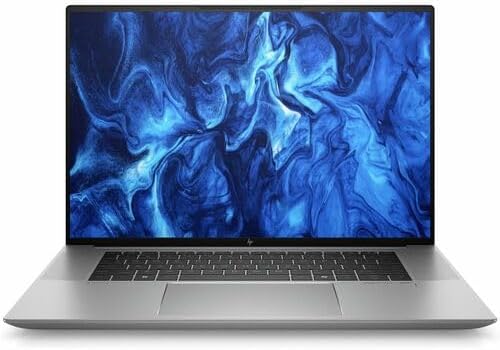
- AI-powered: Yes
- Processor Manufacturer: Intel
- Processor Type: Core Ultra 9
Where the MacBook Pro focuses on efficiency and elegance, the HP ZBook Studio G11 approaches video editing from a workstation perspective. This is a machine built for professionals whose projects generate revenue and whose deadlines leave little room for compromise.
Display quality immediately establishes the ZBook’s credentials. Depending on configuration, editors can access high-resolution creator-focused panels designed for color-critical work. For footage review, color correction, and delivery preparation, confidence in display accuracy becomes every bit as important as processing power.
Under the hood, Intel Core Ultra processors and NVIDIA professional graphics options provide substantial performance for Premiere Pro, After Effects, and DaVinci Resolve. GPU acceleration plays a major role in modern editing software, particularly when handling effects, transitions, color grading, and hardware-accelerated exports. The ZBook is designed to leverage those capabilities effectively.
Thermal management is another area where workstation engineering becomes valuable. Editing workloads often involve sustained pressure rather than short bursts of activity. Rendering a complex project, generating proxies, or processing effects can push a system for extended periods. The ZBook’s cooling solution helps maintain performance throughout these longer sessions.
Storage and memory flexibility further strengthen its appeal. Editors working with large media libraries know how quickly footage can consume storage space. The ability to configure substantial RAM and fast SSD storage helps ensure the system remains productive as project complexity increases.
Pros
✅ Professional workstation-class reliability
✅ Strong Premiere Pro performance
✅ Excellent creator-focused display options
✅ Powerful GPU configurations available
✅ Handles sustained workloads exceptionally well
Cons
❌ Heavier than many creator-focused laptops
3. Dell Precision 5690 – Best Mobile Workstation

- 16.3″ 4K OLED TOUCHSCREEN DISPLAY: Features a 16.3-inch OLED 4K touchscreen display (3840×2400) with a smooth 120Hz refr…
- 15TH GEN INTEL ULTRA 9 PROCESSOR WITH RTX 5060 GRAPHICS: Powered by a 15th Gen Intel Core Ultra 9-285H processor (2.50GH…
- 32GB LPDDR5X MEMORY AND POWER SUPPORT: Equipped with 32GB onboard LPDDR5X RAM, supported by a 130W power supply, Type-C …
Professional editing often involves balancing competing priorities. Editors want workstation-grade power, but they also need a laptop that can travel between studios, client meetings, production locations, and home offices. The Dell Precision 5690 addresses that challenge remarkably well.
Its high-resolution display options provide the level of detail expected in serious editing environments. Fine adjustments become easier to evaluate, sharpness issues are easier to identify, and color work feels more precise. When working with 4K footage, that additional clarity directly contributes to editing confidence.
The hardware platform is equally impressive. Intel’s latest workstation-oriented processors paired with NVIDIA professional graphics create a system capable of handling demanding timelines and advanced creative applications. Multi-layer edits, high-bitrate footage, effects-heavy sequences, and large media libraries all benefit from the available resources.
A significant advantage of the Precision family is consistency. Some laptops deliver excellent benchmark numbers but struggle to maintain them during longer workloads. The Precision series has earned its reputation by prioritizing reliability and sustained performance, qualities that matter greatly when deadlines are approaching.
Editors who split their time between production work and travel will also appreciate its relatively refined design. Despite its workstation roots, the Precision remains more portable than many competing systems in the same performance class.
Pros
✅ Excellent workstation performance
✅ High-resolution creator-friendly display
✅ Strong thermal management
✅ Premium build quality
✅ Reliable during long editing sessions
Cons
❌ Premium workstation hardware comes at a higher investment level
❌ Battery life trails efficiency-focused creator laptops
4. Lenovo ThinkPad P1 Gen 7 – Best for Professional Editors

- UNOPENED RETAIL PACKAGING, sold as configured by Lenovo. Includes one year of Courier or Carry-in Lenovo Warranty. Add u…
Video editing laptops often fall into two camps. Some prioritize creator aesthetics with flashy displays and aggressive performance profiles, while others focus on reliability and professional workloads. The ThinkPad P1 Gen 7 belongs firmly in the latter category, making it particularly attractive to editors who earn a living from their machines rather than simply create content as a hobby.
The display options immediately reveal Lenovo’s target audience. Configurations can be equipped with a 16-inch OLED panel running at 3840×2400 resolution, delivering the sharpness required for native 4K editing while providing additional vertical workspace compared to conventional UHD screens. The panel’s strong DCI-P3 coverage makes it suitable for color-sensitive work, whether you’re grading YouTube content, commercial projects, or client deliverables.
Performance scales impressively depending on configuration. Intel Core Ultra 9 processors paired with NVIDIA RTX Ada-generation workstation GPUs create a platform capable of handling demanding Premiere Pro timelines, After Effects compositions, and DaVinci Resolve projects. The dedicated graphics hardware becomes especially valuable when working with AI-powered features such as automatic reframing, object removal, and advanced noise reduction.
Storage flexibility is another strength. Professional editors rarely keep a single project on a machine. Multiple SSD configurations and generous memory ceilings allow the P1 to remain productive even when managing large footage libraries and multiple active projects simultaneously.
Unlike some creator-focused systems, the ThinkPad also prioritizes long-term usability. The keyboard remains among the best available on any laptop, a surprisingly important advantage for editors who spend hours scripting videos, managing clients, writing documentation, or organizing production schedules between editing sessions.
Pros
✅ Optional 3840×2400 OLED display
✅ Excellent DCI-P3 color coverage
✅ Powerful RTX Ada workstation graphics
✅ Outstanding keyboard
✅ Strong upgrade and configuration options
Cons
❌ Creator-focused competitors may offer more visually striking displays
❌ Premium configurations become expensive quickly
5. ASUS ProArt P16 – Best Creator Laptop

- [3K OLED Lumina Touch Display] Discover boundless creativity with the ProArt P16, featuring the ASUS Lumina OLED touchsc…
- [Powerful AMD Ryzen AI 9 HX Processor] Step into the future of content creation with the AMD Ryzen AI 9 HX 370 processor…
- [Ultrafast GeForce RTX 5070 GPU (8GB GDDR7)] Elevate your creative prowess with accelerated 4K encoding and GPU-accelera…
ASUS designed the ProArt family specifically for creative professionals, and nowhere is that focus more apparent than the ProArt P16. Rather than adapting a gaming laptop for creators, ASUS built this system around workflows involving editing, animation, photography, and design from the beginning.
The display is one of the laptop’s biggest strengths. The 16-inch OLED panel delivers a 3840×2400 resolution, providing exceptional detail for footage review and timeline work. With near-complete DCI-P3 coverage and factory calibration, editors can approach color correction and grading with far more confidence than they would on a standard consumer display. Deep contrast and OLED blacks further enhance the experience when evaluating cinematic footage.
Under the hood, AMD Ryzen AI processors work alongside NVIDIA GeForce RTX graphics, creating a balanced platform for creative workloads. Premiere Pro benefits from GPU acceleration during playback and exports, while DaVinci Resolve can leverage the available graphics resources for grading, effects, and rendering tasks. The hardware feels particularly well suited to creators juggling editing, thumbnail design, and motion graphics work within the same project.
Memory capacities extending to 64GB ensure large projects remain manageable. It’s increasingly common for editors to run Premiere Pro, Photoshop, Lightroom, browser tabs, cloud storage clients, and communication platforms simultaneously. The ProArt handles these multitasking scenarios with ease.
One area where ASUS deserves credit is thermals. Thin creator laptops often struggle to sustain peak performance, but the ProArt’s cooling system allows it to maintain higher performance levels during lengthy exports and demanding rendering sessions.
Pros
✅ 3840×2400 OLED creator display
✅ Factory-calibrated color accuracy
✅ Strong Premiere Pro and Resolve performance
✅ Up to 64GB RAM
✅ Excellent thermal management
Cons
❌ Battery life decreases noticeably during intensive editing workloads
6. MSI Creator Z17 HX Studio – Best for Adobe Creative Cloud
Adobe Creative Cloud users often have slightly different priorities than editors focused exclusively on video production. A typical workflow might involve Premiere Pro, After Effects, Photoshop, Illustrator, Audition, and Lightroom all interacting within the same project. The MSI Creator Z17 HX Studio was built with that reality in mind.
The large 17-inch touchscreen display provides a substantial workspace for editing. Depending on configuration, creators gain access to a high-resolution panel that offers excellent color reproduction and sufficient sharpness for professional editing. The larger screen size becomes particularly valuable when managing complex timelines, multiple panels, and large preview windows simultaneously.
Performance is where the laptop truly distinguishes itself. Intel Core i9 HX-series processors paired with NVIDIA RTX Studio graphics deliver the kind of horsepower required for demanding Adobe workflows. After Effects compositions, 4K multicam projects, motion graphics sequences, and effects-heavy edits all benefit from the available CPU and GPU resources.
Graphics acceleration plays a critical role here. Premiere Pro increasingly relies on the GPU for playback, effects processing, and exports, while After Effects can leverage graphics hardware for previews and rendering. The RTX Studio platform helps ensure these applications remain responsive even as project complexity grows.
The generous chassis also contributes to cooling performance. Larger systems often sustain performance better because they have more room to dissipate heat. Editors working on long-form content or commercial projects will appreciate the consistency this provides during marathon editing sessions.
Pros
✅ Large creator-focused display
✅ Powerful HX-series processor options
✅ RTX Studio graphics
✅ Excellent Adobe Creative Cloud performance
✅ Strong sustained performance
Cons
❌ Less portable than 16-inch competitors
❌ Large chassis may not suit frequent travelers
7. Acer ConceptD 7 Ezel – Best Convertible 4K Editing Laptop

- 9th Generation Intel Core i7-9750H 6-Core Processor (Up to 4. 5GHz) with Windows 10 Professional 64 Bit
- NVIDIA GeForce RTX 2060 with 6 GB of dedicated GDDR6 VRAM | RTX Studio Laptop
- 15. 6″ 4K Ultra HD (3840 x 2160) widescreen LED-backlit IPS Display | PANTONE Validated | Delta E <2 | 400nit Brightness...
Most convertible laptops are designed around flexibility first and performance second. The Acer ConceptD 7 Ezel takes the opposite approach. Acer built this machine specifically for creative professionals and then engineered one of the most versatile display mechanisms in the industry around that foundation.
The centerpiece is the 15.6-inch 3840×2160 UHD touchscreen display. Unlike many consumer 2-in-1 devices that prioritize convenience over image quality, the ConceptD panel was developed with professional creators in mind. Factory calibration, excellent color accuracy, and broad AdobeRGB coverage make it particularly attractive to editors who also work in photography, graphic design, and color-sensitive production environments.
Its unique Ezel hinge creates multiple working modes. Editors can pull the display forward for touch-based timeline navigation, sketch storyboard concepts using a stylus, review footage with clients, or fold the display into presentation mode. These options may sound like niche features until you spend hours planning shots, designing thumbnails, or reviewing rough cuts.
Performance is equally serious. Intel Core i7 H-series processors paired with NVIDIA RTX graphics provide enough horsepower for Premiere Pro, DaVinci Resolve, After Effects, and Lightroom workflows. GPU acceleration becomes particularly valuable when applying effects, stabilizing footage, and rendering 4K exports.
What makes the ConceptD stand out is that the convertible design genuinely enhances creative workflows instead of serving as a marketing feature.
Pros
✅ Native 3840×2160 UHD touchscreen
✅ Excellent AdobeRGB coverage
✅ Unique Ezel hinge design
✅ Strong creator-focused performance
✅ Great for editors who use stylus workflows
Cons
❌ Older platform compared to newer creator laptops
❌ Heavier than most convertibles
8. Razer Blade 16 – Best Premium Performance Option

- FAST 16” OLED QHD+ 240Hz DISPLAY — Truly designed for the competitive gamer with 0.2 ms response time, featuring a VESA …
- NVIDIA GEFORCE RTX 40 SERIES GRAPHICS — Packed for pure performance with 1.50 gPD (Graphics Power Density) and delivers …
- INTEL CORE I9-14900HX PROCESSOR — Featuring 24 cores and 5.8 GHz max clock speed, game and create flawlessly with the mo…
Many editors dismiss gaming laptops until they experience what modern high-end hardware can do inside Premiere Pro or DaVinci Resolve. The Razer Blade 16 demonstrates why that assumption can be costly.
Display quality immediately separates it from typical gaming systems. Depending on configuration, creators can access a 16-inch OLED panel with a 3840×2400 resolution and a refresh rate reaching 120Hz. While video editing doesn’t require high refresh rates in the same way gaming does, smoother timeline navigation and interface responsiveness are welcome advantages during long editing sessions.
Performance is where the Blade becomes particularly impressive. Intel Core i9 processors combined with NVIDIA RTX 4080 or RTX 4090 graphics create enormous editing headroom. High-resolution timelines, complex effects chains, advanced noise reduction, AI-assisted editing features, and multi-camera projects all benefit from the available graphics power.
DaVinci Resolve users especially appreciate powerful GPUs because many grading and effects tools scale directly with graphics performance. Premiere Pro also increasingly relies on GPU acceleration for playback, rendering, and export tasks.
Despite these capabilities, the Blade maintains a remarkably premium build quality. CNC-machined aluminum construction gives it a professional appearance that feels equally appropriate in a production studio or a client meeting.
Pros
✅ Optional 3840×2400 OLED display
✅ Up to RTX 4090 graphics
✅ Outstanding DaVinci Resolve performance
✅ Premium aluminum construction
✅ Excellent thermal performance
Cons
❌ High-performance hardware reduces battery life
❌ Premium specifications command a premium investment
9. Gigabyte AERO 16 OLED – Best Display for Color Accuracy

- NVIDIA GeForce RTX 3060 Laptop GPU GDDR6 6GB
- Boost Clock 1485 Mhz & Max Graphics Power of 75W
- NVIDIA DLSS for groundbreaking AI rendering
Few laptop series have built a stronger reputation among editors than Gigabyte’s AERO lineup. For years, the company has targeted photographers, filmmakers, and creative professionals who prioritize display quality above almost everything else.
The 16-inch OLED panel remains the star attraction. Running at 3840×2400 resolution and factory calibrated, the display is specifically designed for color-critical work. Near-complete DCI-P3 coverage helps ensure footage appears accurately during editing and grading sessions, while OLED contrast delivers impressive shadow detail and image depth.
Underneath that display sits hardware capable of taking full advantage of it. Intel Core i9 processors and NVIDIA RTX graphics provide the resources necessary for modern editing applications. Whether working in Premiere Pro, DaVinci Resolve, or Final Cut alternatives, editors gain enough performance to handle demanding projects comfortably.
The laptop’s creator-focused design philosophy extends beyond raw specifications. Editors spend countless hours staring at footage, making subtle grading decisions, and refining visual details. A display capable of accurately reproducing those details becomes one of the most valuable tools in the workflow.
For creators whose work depends heavily on color accuracy, the AERO 16 remains one of the strongest options available.
Pros
✅ Factory-calibrated OLED display
✅ 3840×2400 resolution
✅ Excellent DCI-P3 coverage
✅ Strong creator-focused hardware
✅ Great for color grading
Cons
❌ Battery life trails efficiency-focused alternatives
10. Microsoft Surface Laptop Studio 2 – Best Touchscreen Editing Experience
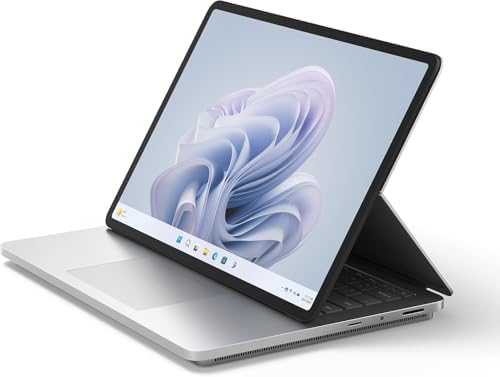
- Built to power your biggest ideas – Get incredible performance for the most demanding workloads with Intel Core processo…
- Up to 18 hours [1] of battery life – Surface Laptop Studio 2 can power your creativity and entertainment all day.
- Get into your workflow faster than ever – Multitask like a pro with up to 64GB RAM and a blazing fast SSD with up to 2TB…
Editing isn’t always about sitting behind a keyboard and mouse. Storyboarding, thumbnail design, rough planning, client presentations, annotation, and creative brainstorming often form a significant portion of the production process. Microsoft’s Surface Laptop Studio 2 embraces that broader view of content creation.
The 14.4-inch PixelSense Flow display offers a 2400×1600 resolution and a 120Hz refresh rate. While it isn’t a native 4K panel, its inclusion in this list is justified by how effectively it supports creator workflows. The screen can transition between traditional laptop mode, presentation mode, and studio mode, creating a level of interaction few competitors can match.
Performance remains strong thanks to Intel Core i7 processors and NVIDIA RTX graphics options. Premiere Pro, Photoshop, Lightroom, and other creative tools run smoothly, while GPU acceleration supports effects processing and rendering workloads.
Where the Surface truly differentiates itself is through direct interaction. Using the Surface Pen to sketch concepts, annotate screenshots, review timelines, or create thumbnail ideas feels natural in ways that traditional laptops simply cannot replicate.
For creators who regularly move between editing, design, planning, and presentation tasks, the Surface Laptop Studio 2 offers a uniquely flexible experience.
Pros
✅ Innovative creator-focused design
✅ 120Hz touchscreen display
✅ Excellent stylus support
✅ Strong editing performance
✅ Great for storyboarding and thumbnails
Cons
❌ Lower display resolution than other laptops in this roundup
FAQs
Is a 4K display necessary for video editing?
Not always, but it becomes increasingly valuable when working with 4K footage. A higher-resolution display allows editors to view more detail, evaluate focus more accurately, and work with larger timelines and preview windows. Color accuracy often matters just as much as resolution.
Which laptop is best for Premiere Pro?
The HP ZBook Studio G11, Dell Precision 5690, and MSI Creator Z17 HX Studio are particularly strong choices because of their powerful CPUs, RTX graphics options, and ability to sustain performance during long editing sessions.
Which laptop is best for DaVinci Resolve?
The Razer Blade 16 stands out because DaVinci Resolve scales exceptionally well with powerful GPUs. Configurations featuring RTX 4080 and RTX 4090 graphics provide substantial acceleration for grading, effects, and rendering workloads.
Is OLED better than Mini-LED for video editing?
Both technologies offer advantages. OLED delivers perfect blacks and exceptional contrast, while Mini-LED often provides higher sustained brightness and stronger HDR performance. Editors focused on color grading frequently gravitate toward OLED, while HDR specialists often appreciate Mini-LED displays.
How much RAM do I need for 4K editing?
Sixteen gigabytes is the practical minimum, but 32GB is the sweet spot for most serious editors. Professionals working with large After Effects projects, multiple applications, and complex timelines may benefit from 64GB or more.
Does refresh rate matter for video editing?
A higher refresh rate will not improve export speeds, but it can make timeline navigation, scrubbing, and interface responsiveness feel smoother. Displays running at 120Hz generally provide a more fluid editing experience than traditional 60Hz panels.
Conclusion
A laptop built for serious 4K editing must do far more than process footage quickly. Every component contributes to the workflow, from the display used for grading and review to the GPU responsible for accelerating effects and exports. The strongest systems are those that maintain balance across all of these areas rather than excelling in only one.
For most professional editors, the Apple MacBook Pro 16 (M4 Pro) remains the most complete package thanks to its exceptional display, impressive efficiency, media-engine acceleration, and outstanding battery life. Editors deeply invested in Adobe workflows may find the HP ZBook Studio G11, Dell Precision 5690, or MSI Creator Z17 HX Studio better aligned with their needs, while DaVinci Resolve users can take full advantage of the immense GPU performance available in the Razer Blade 16.
The right choice ultimately depends on the type of projects you edit, the software you rely on, and whether mobility, display quality, or raw performance matters most in your workflow. When those priorities align with the hardware, a great editing laptop becomes more than a tool—it becomes an accelerator for the entire creative process.