Choosing the best laptop brand for students in 2026 is about long-term behavior, not surface-level specifications. Students push laptops through inconsistent charging habits, long unplugged days, constant transport, and sustained multitasking. Over time, brand-level decisions around thermals, firmware, and battery management matter far more than processor labels.
This guide evaluates the most reliable student laptop brands using real, currently available laptops as proof points. Each product section reflects how the brand performs in day-to-day academic life, not in artificial benchmark scenarios.

Table of Contents
Lenovo IdeaPad Slim 5
Dell XPS 13
HP Pavilion 14
ASUS Zenbook 14 OLED
Acer Swift Go 14
FAQs
Conclusion
1. Apple MacBook Air (M3)

Best overall for many students
Apple remains the strongest overall laptop brand for students because of its focus on efficiency, consistency, and long-term stability. The MacBook Air M3 is designed to behave predictably regardless of battery level, workload, or age. In real student use, this means the laptop feels just as responsive in the evening as it does at the start of the day.
Most academic workloads do not require sustained high power. Writing papers, researching, coding, or preparing presentations rely on steady responsiveness rather than bursts of speed. Apple’s silicon architecture excels here, maintaining smooth performance without generating heat or fan noise. This makes a noticeable difference during lectures and library sessions where silence matters.
Battery behavior is where Apple truly separates itself as a brand. After months of daily charging, MacBooks tend to retain usable battery life better than most Windows alternatives. Standby drain remains low, and performance does not degrade when running unplugged, which is critical for students moving between classes.
This laptop is best suited for university students, programmers, writers, and general academic use. It is not ideal for students who require Windows-only software or dedicated graphics for engineering workloads.
Pros
✅ Excellent battery efficiency and longevity
✅ Silent, cool operation
✅ Stable performance unplugged
✅ Long software support lifespan
Cons
❌ Limited port selection
❌ Not compatible with some required Windows tools
2. Lenovo IdeaPad Slim 5
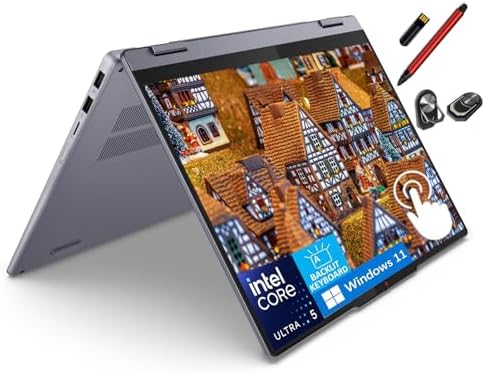
best laptop brands for students on a budget
Lenovo earns its reputation as one of the best laptop brands for students on a budget by prioritizing fundamentals that matter over time. The IdeaPad Slim 5 focuses on keyboard comfort, conservative thermal behavior, and reliable daily performance rather than premium materials or extreme thinness.
The keyboard is the defining strength. Students who write frequently or code for long stretches benefit from Lenovo’s key travel and layout, which reduce fatigue during extended sessions. This advantage becomes increasingly noticeable over weeks of academic use.
Lenovo’s performance tuning is intentionally conservative. Instead of chasing short performance spikes, the system maintains stable output with predictable fan behavior. This helps preserve internal components and avoids distracting noise in quiet environments.
Battery life is adequate for a full study day under moderate use, though it does not lead the category. What matters more is that battery behavior remains consistent over time rather than degrading quickly.
This laptop is ideal for students who need Windows compatibility, strong typing comfort, and dependable performance. It is not designed for GPU-intensive creative or engineering workloads.
Pros
✅ Excellent keyboard for long writing sessions
✅ Stable thermals and predictable performance
✅ Strong Windows compatibility
✅ Practical, durable design
Cons
❌ Display quality varies by configuration
3. Dell XPS 13

- Intel Core i5 5200U 2.2 GHz Processor
- 8 GB DDR3L SDRAM
- 256 GB SSD Storage; No Optical Drive
Dell positions itself as a long-term reliability brand, and the XPS 13 reflects that philosophy clearly. This laptop is designed to remain structurally sound and functionally relevant throughout an entire college career.
One of Dell’s strongest advantages is display quality. Clear text and accurate colors reduce eye strain during long research sessions, which is a meaningful benefit for students who read extensively. The compact form factor also makes it easy to carry between classes without feeling cramped during use.
Thermal tuning strikes a careful balance between responsiveness and noise. While the XPS 13 can feel warm under sustained load, it avoids erratic fan behavior that disrupts quiet study environments.
Dell’s firmware and driver support are consistently reliable. Updates arrive regularly, reducing the risk of compatibility issues during critical academic periods.
This laptop is well suited for students who want a premium Windows experience and plan to keep one device for several years. It is less ideal for those who need many ports or sustained high-wattage workloads.
Pros
✅ High-quality display for reading and research
✅ Strong long-term reliability
✅ Solid build quality
✅ Compact and portable
Cons
❌ Limited ports
❌ Can run warm under sustained loads
4. HP Pavilion 14

- HP Pavilion x360 14 Laptop with micro-edge Full HD IPS multitouch-enabled touchscreen display
- Windows 11 Home, 12th Generation Intel Core i5-1235U Processor, Intel Iris Xe Graphics
- 8GB RAM, 256GB PCIe NVMe M.2 solid-state drive
HP’s Pavilion 14 targets students who want a balanced, accessible laptop brand without unnecessary complexity. It handles everyday academic tasks reliably, including note-taking, online classes, and document work.
HP’s key advantage is availability and service support. For students who want peace of mind, HP’s broad repair network is a practical benefit. Performance is tuned for consistency rather than power, which suits general coursework well.
Battery life is serviceable but not standout. It comfortably handles moderate study days but may require charging during longer schedules.
This laptop suits undecided majors and general studies. It is not ideal for demanding workloads or extended unplugged use.
Pros
✅ Reliable everyday performance
✅ Comfortable size and weight
✅ Strong service availability
✅ Straightforward Windows experience
Cons
❌ Average battery efficiency
5. ASUS Zenbook 14 OLED

- (Memory Disk and System): 32GB 7467 MHz DDR5 SDRAM, 1TB PCI-E NVMe M.2 SSD for Storage, Pre-install Windows 11 Home
- (Processor): Intel Core Ultra 9 285H 16-Core Processor (Up to 5.4 GHz with Intel Turbo Boost Technology, 24 MB Intel Sma…
- (Screen and Graphics): Brilliant 14″ WUXGA (1920 x 1200) 500 nits 100% DCI-P3 color gamut Thin Bezel LCD Display powered…
ASUS appeals to students who need stronger performance or superior visual quality. The Zenbook 14 OLED stands out immediately due to its display, which offers excellent contrast and clarity for both creative tasks and long reading sessions.
Performance tuning is more aggressive than on mainstream student laptops. This helps with engineering tools and multitasking but increases power consumption under sustained use. Battery life remains reasonable, though not class-leading.
This laptop suits creative and technical students. It is less ideal for those prioritizing maximum battery longevity.
Pros
✅ Outstanding OLED display
✅ Strong multitasking capability
✅ Lightweight, premium design
✅ Modern port selection
Cons
❌ Battery life impacted by OLED usage
6. Acer Swift Go 14

- Ready, Set Go!: Say hi to the all-new Swift Go 14 AMD—your AI PC featuring AMD Ryzen 7 8845HS processor equipped with Ry…
- Premium Performance on the Go: With the unparalleled performance of the AMD Ryzen 7 8845HS processor and built-in AMD Ra…
- Indulge Your Eyes: The Swift Go 14 with a 14-inch 16:10 WUXGA (1920 x 1200) touchscreen display offers vivid color accur…
Acer positions the Swift Go 14 as an efficiency-focused student laptop, and this approach becomes clear in daily academic use. Rather than chasing peak performance numbers, Acer prioritizes stable thermals, predictable behavior, and low-friction usability. For students, this translates into a laptop that feels dependable throughout long study days without sudden slowdowns or distracting fan noise.
In typical coursework scenarios such as note-taking, online classes, research, and document editing, the Swift Go 14 remains responsive while staying relatively cool. Acer’s thermal tuning avoids aggressive boosting, which helps preserve battery health and internal components over time. This is especially important for students who rely on their laptops unplugged for extended periods.
The lightweight design makes the Swift Go easy to carry between classes, and the chassis feels balanced rather than flimsy despite its focus on portability. While it does not aim to deliver premium materials or cutting-edge displays, it avoids common budget pitfalls like excessive flex or poor keyboard feedback.
Battery life is sufficient for a full academic day under moderate use, and more importantly, it remains consistent as the laptop ages. Acer’s restrained approach to power management helps prevent the rapid battery degradation seen in more aggressively tuned systems.
This laptop is best suited for students who want a simple, reliable Windows laptop that stays out of the way. It is not designed for creative professionals, heavy multitasking, or GPU-accelerated workloads.
Pros
✅ Efficient thermal and power management
✅ Lightweight and easy to carry daily
✅ Stable performance for academic tasks
✅ Minimal software clutter
Cons
❌ Speakers lack depth and volume
FAQs
What is the best laptop brand for students overall?
Apple leads in efficiency and longevity, while Lenovo and Dell offer the most dependable Windows alternatives.
What is the best laptop brand for students on a budget?
Lenovo and Acer consistently offer the best balance of cost, durability, and performance for students.
How long should a student laptop last?
A well-chosen laptop from a reliable brand should last at least four years, covering a full degree program.
Conclusion
The best laptop brand for students is defined by long-term behavior, not headline specifications. Apple excels in efficiency, Lenovo and Dell in Windows reliability, and ASUS in performance-focused use cases. Acer fills an important role for students who want stability and simplicity without unnecessary complexity.